
Housemates with one Switch
You want to puzzle together on one screen and check whether the Joy-Cons you already have will do the job. Nintendo shows that in Snipperclips, two players can each use a Joy-Con. Check this for the game you want to play.


Start with the game and the system you’ll be playing on: check its local multiplayer mode, player count and supported controller layout before buying anything else. On a Switch, separate Joy-Cons may be enough for some games, while the right controller for a PC, PS5 or another Switch game depends on the game and connection. Also work out how many compatible controllers, cables or adapters you’ll actually need.
You want to puzzle together on one screen and check whether the Joy-Cons you already have will do the job. Nintendo shows that in Snipperclips, two players can each use a Joy-Con. Check this for the game you want to play.
You’re looking for controllers that work with your PC and chosen local co-op game, and want to know in advance what connection options are practical for multiple players. Xbox Support lists USB, Bluetooth and the Xbox Wireless Adapter as ways to connect an Xbox controller to Windows.
You want to give housemates extra controls without choosing features or accessories your game doesn’t need. Nintendo and PowerA describe different controller layouts for Switch games, so check the requirements of the specific game.
First check which controllers the game supports for each player. Then work out how many people will play at once, and finally consider which connection and features suit your gaming setup.
| What to consider | What should you check? | Who is this important for? |
|---|---|---|
| Game and system compatibility | Check the local multiplayer mode, player count, supported controller layout and compatibility with the system you’re using. | If I want to puzzle together, I need to know that both the game and the system support the controller layout. An estimated 36% of consumers put compatibility first. |
| Controllers for every player | Count compatible controllers, not just devices or Joy-Con halves; check what counts as one controller for each game. | I want to know in advance whether everyone needs their own controller or whether Joy-Cons can be shared. An estimated 29% of consumers need enough controls for every player. |
| Connection and playing space | Check the available USB ports, Bluetooth or any adapter you’ll need, as well as cable length and power supply. | If we’re playing on a shared PC or by the TV, I want to connect without the seating arrangement or available ports getting in the way. An estimated 21% of consumers are looking for a practical connection and enough room to move. |
| Features you need | Check whether the game requires motion controls, vibration or specific buttons, and whether the feature works with your system. | I don’t want to pay for extra features our puzzle game won’t use. An estimated 14% of consumers only want useful features. |
A controller may connect to your console or PC and still not suit the local multiplayer mode or controller layout of the game you’ve chosen.
Check the game’s player count and supported controls before choosing an extra controller.
Nintendo says Joy-Con 2 only works with Switch 2. Original Joy-Cons can be used wirelessly with Switch 2, but can’t be attached to it.
Check which Switch you have and whether you want to use the controllers wirelessly or attached to the console.
For the 8BitDo Ultimate 2C Wireless, 8BitDo lists 2.4 GHz or a cable for Windows. Xbox Support warns that Bluetooth performance with Xbox controllers can vary depending on the PC adapter.
Compare the stated connection method with the ports and wireless options available on your shared PC.
You may need a compatible adapter or cable for the connection method you choose.
A manufacturer’s additional warranty is separate from the seller’s obligation to supply a product that is of satisfactory quality.
Keep your proof of purchase and contact the seller if a fault develops. Consider any additional warranty separately.
Joy-Con is designed for supported Switch games, while Joy-Con 2 is made for Switch 2. The game and console generation determine which version is right for you.
The Xbox Wireless Controller is an option for a compatible Xbox or Windows setup.
DualSense is designed for PS5 and can be used with compatible games on supported PCs.
The Ultimate 2C Wireless is a specific option for a Windows PC, using the included 2.4 GHz adapter or a cable.
The Enhanced Wired Controller is a wired option for a docked Switch.
These Joybuy products suit a range of setups: Windows PC or Xbox, Nintendo Switch, Nintendo Switch 2 and PS5. Check which controller layout and connection each game supports.
 No image available
An option for an Xbox or Windows PC setup where the chosen game supports controllers.
Xbox lists USB, Bluetooth and the Xbox Wireless Adapter as connection options for Windows. Bluetooth reliability can vary depending on the PC adapter.
 No image available
An extra pair for a Switch game that supports separate Joy-Con controls.
Separate Joy-Con controls are only suitable for games that support this controller layout.
 No image available
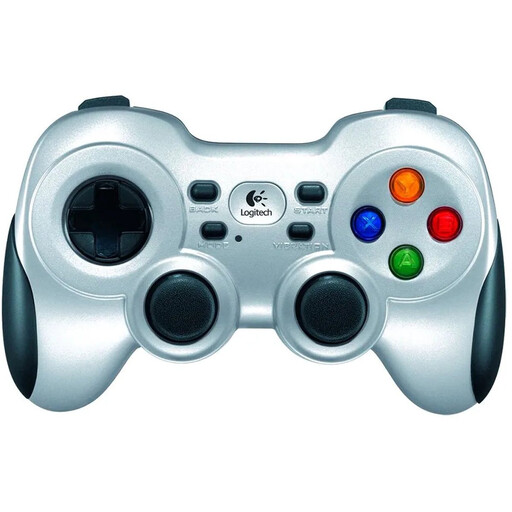
A PC game controller to consider if your chosen game supports controller input.
Check in advance that the connection method works with your shared PC and the game.
 No image available
An option for a PS5 setup or a compatible PC game, once you’ve checked that it supports the controller.
On PC, haptic feedback depends on game support and, according to PlayStation, requires a USB connection.
 No image available
An extra pair for a Switch 2 game that supports the chosen Joy-Con layout.
Joy-Con 2 only works with Nintendo Switch 2, not the original Switch.
No, it varies by game. Nintendo describes Snipperclips as a game where you can hand a Joy-Con to a second player. Check which controller each player needs for each game.
It depends on the controller, PC and game. Xbox Support lists USB, Bluetooth and the Xbox Wireless Adapter for connecting an Xbox controller to Windows; PlayStation Support lists USB-C and Bluetooth for DualSense on supported PCs. Don’t rely on the word ‘wireless’ alone: check the stated connection method for the model you choose.
No. Nintendo says Joy-Con 2 only works with Switch 2. According to Nintendo, original Joy-Cons can be used wirelessly with Switch 2, but can’t be attached to the console.
Contact the seller. According to the Government of the Netherlands, a seller must supply a product that is of satisfactory quality, and there is no fixed statutory warranty period in the Netherlands. What applies depends on the circumstances; accidental damage and normal wear and tear aren’t automatically covered by free repairs.