Who is this buying guide for?

Gamer with a dedicated console

You want to check first that the controller, connection and game features you need work with your PS5, Xbox or Switch. PlayStation, Xbox and Nintendo describe their controller features for specific devices and use cases.

Gamer sharing a bedroom

You want to listen to game audio through a compatible headset and consider cable space and vibrations, without assuming that a particular controller has quiet buttons.

PC gamer who plays for longer sessions

You’re weighing up a wired connection against the freedom of wireless play, battery use and customisable controls. The right choice also depends on support from your games and equipment.

What should you look for when buying?

What to consider What should you check? Who is this important for?
Platform and game Check the exact device, connection and game support for the features you want, such as haptic feedback or adaptive triggers. I want to be sure my device and adventure game are compatible before buying; around 36% of consumers give platform and game compatibility top priority.
Personal audio Check that the headset socket works with your device and chosen connection. PlayStation states that the DualSense headset socket requires a USB connection on PC and Mac. I want to hear my game through a compatible headset rather than the speakers; around 29% of consumers put personal audio first.
Gaming space and connection Check whether you can keep a cable safely out of the way, or which wireless connections your device supports. For the Enhanced Wired Controller version mentioned, PowerA lists a detachable 3 m cable. I want to sit comfortably without a cable running across our shared room; around 21% of consumers prioritise gaming space and connection type.
Controls and power Check which vibration settings the controller offers and whether batteries, a rechargeable battery or charging accessories are included with that version. Xbox Support states that rechargeable AA batteries bought separately do not charge inside the Xbox Wireless Controller. I want to choose how much feedback I feel and how my controller is powered; around 14% of consumers put controls and power use ahead of other buying considerations.

Common buying mistakes

  • Assuming a headset socket always works wirelessly

    PlayStation states that you need a USB connection to use the DualSense headset socket on PC and Mac. So, having a socket on the controller doesn’t guarantee audio over every type of connection.

    Before buying, check that your headset, device and controller connection will work together.

  • Choosing a controller without checking game features

    Haptic feedback and adaptive triggers depend on the game and device; sometimes you’ll also need a specific type of connection.

    First, check that the basic controls work on your platform. Then see whether your game supports the extra feedback features.

  • Assuming wireless means USB-C charging

    Xbox Support states that rechargeable AA batteries bought separately do not charge inside the Xbox Wireless Controller. The power source you need depends on the model and package.

    Check which type of battery it uses and what’s included with that version.

    Depending on the version, you may need to buy AA batteries or a compatible rechargeable battery pack separately.

  • Choosing a wired controller without checking the cable route

    A cable can be practical if you have a fixed gaming spot, but the distance and walking route in your shared bedroom will determine whether it fits safely.

    Measure the distance to your gaming spot and keep the cable out of your housemate’s way.

Brands to consider

Sony PlayStation

The DualSense is designed for PS5 and also works with certain PCs and other devices. Available features depend on the game and connection.

  • PlayStation describes haptic feedback and adaptive triggers for games that support these features.
  • According to PlayStation, haptic feedback in supported PC games and the headset socket on PC and Mac require a USB connection.

Xbox

The Xbox Wireless Controller is designed for compatible Xbox consoles, Windows PCs and mobile devices.

  • Xbox lists a 3.5mm headset socket and wireless connections for several types of device.
  • Xbox Support states that the controller uses AA batteries or a compatible rechargeable battery pack; rechargeable AA batteries bought separately won’t charge inside the controller.

Nintendo

The original Switch Pro Controller is designed for Nintendo Switch. Don’t confuse it with the Switch 2 Pro Controller.

  • Nintendo lists motion controls, HD Rumble and amiibo support.
  • Nintendo quotes a battery life of around 40 hours, which varies depending on how it’s used. This specification doesn’t indicate whether the buttons are quiet or whether headset audio works through the controller.

8BitDo

The Ultimate 2 Bluetooth is designed for compatible Switch and Windows set-ups. The Ultimate 3-mode for Xbox is a different version with different connections.

  • 8BitDo lists adjustable vibration intensity for the Ultimate 2 Bluetooth.
  • For Switch 2, 8BitDo lists firmware-dependent support. Features of the Ultimate 2 Bluetooth and Ultimate 3-mode for Xbox are not necessarily interchangeable.

PowerA

The Enhanced Wired Controller is designed for compatible Xbox Series X|S, Xbox One and Windows set-ups with a fixed gaming spot.

  • For the version mentioned, PowerA lists a detachable 3 m cable, a 3.5mm socket and rumble motors.
  • These product specifications don’t indicate how loud the buttons are. If you play wired, remember to consider the cable route too.

Joybuy game controllers for different gaming set-ups

The selection below includes controllers for Switch, PC and PS4, among others. Before buying, check that the exact version works with your device and game, and that it supports the headset feature you want.
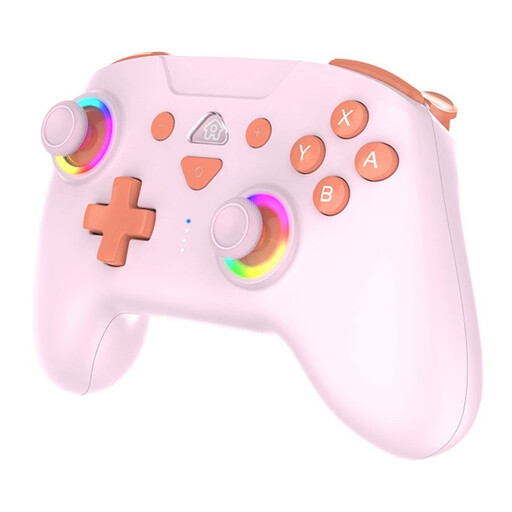
SUBSONIC Wireless Controller SW2 & SW with LED, Pink

SUBSONIC Wireless Controller SW2 & SW with LED, Pink

An option for a Switch set-up if you want to play wirelessly and are looking for motion controls or adjustable vibration.

Listed compatibility: Nintendo Switch and Switch 2. The product information lists Bluetooth, a rechargeable battery, three vibration levels, motion sensors and programmable rear buttons.

View at Joybuy

NAXSIR wireless Bluetooth gamepad with phone holder

NAXSIR wireless Bluetooth gamepad with phone holder

An option if you’re looking for a wireless gamepad with a phone holder and your device is listed as compatible.

The product name mentions Bluetooth 5.2, 2.4G, dual vibration and a phone holder. Listed compatibility includes Android, iOS, PC, Smart TV, PS3 and Switch.

View at Joybuy
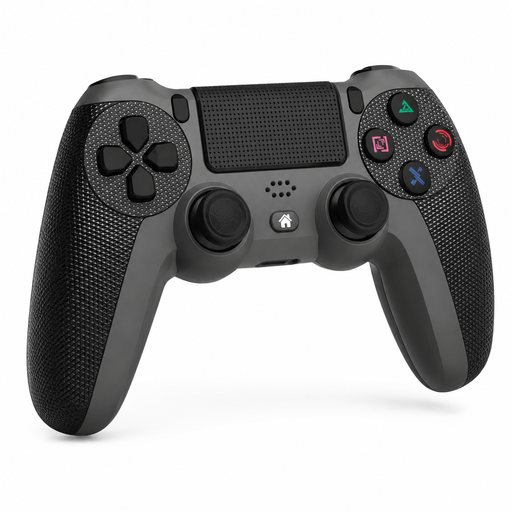
Wireless PS4 controller for Slim and Pro with touchpad

Wireless PS4 controller for Slim and Pro with touchpad

An option for a PS4 set-up if you want to play wirelessly and are looking for a controller with a touchpad.

The product name lists PS4, PS4 Slim and PS4 Pro. Listed features include a touchpad, dual vibration motors, a turbo function and a 3.5mm socket.

View at Joybuy
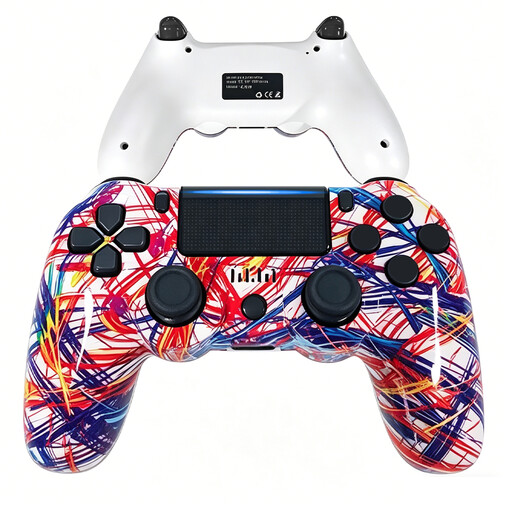
VIELLAN wireless Bluetooth controller for PS4, 600 mAh

VIELLAN wireless Bluetooth controller for PS4, 600 mAh

An option for a PS4 set-up if you’re looking for a wireless controller with a rechargeable battery.

Listed specifications include Bluetooth, a 600 mAh battery, two vibration motors and analogue joysticks.

View at Joybuy

VIELLAN wireless PC controller with Hall Effect joysticks and PS5 button layout

VIELLAN wireless PC controller with Hall Effect joysticks

An option for PC if you’re looking for programmable rear buttons; the listed PS5 button layout does not confirm PS5 compatibility.

The product name mentions Hall Effect joysticks, 255-level Hall Effect triggers, programmable rear buttons, RGB lighting and a 1000 mAh battery. USB-C is listed for charging.

View at Joybuy

Frequently asked questions

Can I use a wireless DualSense to listen through a headset connected to the controller on my PC?

Not using only the wireless controller connection, according to PlayStation Support: the headset socket requires a USB connection on a Windows PC or Mac. Also check your device’s audio settings.

How do I turn off vibrations if I don’t want them in a shared bedroom?

On Nintendo Switch, you can turn off controller vibrations in System Settings, then Controllers and Sensors. Nintendo describes this setting for Switch; 8BitDo lists adjustable vibration intensity for the Ultimate 2 Bluetooth. This doesn’t mean the physical buttons are silent.

Do I need to buy batteries or a charging cable separately?

That depends on the exact version and what’s included in the package. Xbox Support states that the Xbox Wireless Controller uses AA batteries or a compatible rechargeable battery pack, and that rechargeable AA batteries bought separately won’t charge inside the controller. Check which power source and charging accessories are included with the version you choose.

What are my rights if a controller bought online disappoints me or breaks too soon?

For a standard online consumer purchase, ACM ConsuWijzer states that you generally have a statutory cooling-off period of up to 14 days after delivery, subject to exceptions depending on the specific purchase. You’re also covered by the statutory guarantee if the product doesn’t perform as you could reasonably expect under normal use; the seller is responsible for this.
