
Player with wired headphones
Wants to know where to plug in and whether audio works through that socket with the chosen controller connection. PlayStation, Xbox and Nintendo describe connection options for each model.


First, choose a controller that works with your console or PC and the game. Then decide whether you want to use your headphones through the controller, the system or a separate wireless connection. Sony requires a wired controller connection to use audio through the DualSense socket on PC or Mac, while Nintendo specifies the Switch 2 Pro Controller for Switch 2 only. Haptics and extra buttons matter most when the game supports them and they suit the way you play.
Wants to know where to plug in and whether audio works through that socket with the chosen controller connection. PlayStation, Xbox and Nintendo describe connection options for each model.
Wants a controller to suit their console and to avoid confusing the original Switch, Switch 2, PS5 and Xbox. Check the controller’s model and generation.
Values haptics or customisable buttons, but wants to check whether the game supports these features. PlayStation, Nintendo and GameSir describe these features for each controller.
Choose first based on your system and preferred audio connection, then compare features such as haptics and customisable buttons.
| What to consider | What should you check? | Who is this most important for? |
|---|---|---|
| Compatibility | Check that the controller works with your console or PC and the game. Look at the exact generation and supported connection method. | I don’t want to find out after buying that my system or game doesn’t support the controller; around 29% of consumers prioritise system and game compatibility. |
| Headphone audio | Decide whether your headphones are wired or wireless, and check audio support for your controller, system and connection combination. | When I play with headphones, I want to know in advance where the sound comes from and whether my connection works; around 29% of consumers prioritise a working audio route. |
| Haptics and buttons | Check whether the game supports haptics or adaptive triggers, and which buttons you can customise on the exact model. | I look for tactile feedback or a custom button layout, but only want to consider these features if they suit the games I play; around 24% of consumers prioritise controls and customisation. |
| Comfort and use | Consider the grip and check whether the cable, charging method or battery suits the way you play. | For longer gaming sessions, I want a controller that feels comfortable to hold and is practical to use; around 18% of consumers prioritise comfort and maintenance. |
To use audio through the DualSense headset socket on PC or Mac, Sony requires a wired connection to the controller.
Check the controller connection and audio output together for the system you play on.
Nintendo lists a headphone socket on the Switch 2 Pro Controller, which, according to Nintendo, is for Switch 2 only.
Check the full product name and whether you use the original Switch or Switch 2.
GameSir claims that the Hall Effect sticks on the G7 SE prevent stick drift. This is a manufacturer claim, not an independently verified guarantee that the controller will never develop a fault.
Also consider whether the wired connection, headset socket and compatibility suit your setup.
ACM ConsuWijzer distinguishes between an offered warranty and your legal right to a product that is fit for purpose.
Check who the seller is and keep your proof of purchase in case you have questions about a warranty or a fault.
The DualSense is an option for PS5 players who want to use haptics and adaptive triggers when supported by the game.
The Xbox Wireless Controller is designed for Xbox and Windows; Microsoft lists a 3.5mm socket for a compatible headset.
If you want to connect headphones to your controller, make sure you distinguish between the original Switch Pro Controller and the Switch 2 Pro Controller.
The wired G7 SE is an option for Xbox and Windows, with a headset socket and customisable rear buttons.
According to 8BitDo, the Ultimate 2C Wireless is an option for Windows and Android, with different connection methods for each system.
This selection includes controllers for PS5, Xbox and Windows systems, and Switch 2, with options for wired headphones or customisable controls.
 Image unavailable
An option for PS5 players who want to use the listed headset socket and game-dependent haptics or adaptive triggers.
The product description lists PS5 compatibility and a stereo headset socket. Sony states that audio through this socket on PC or Mac requires a wired controller connection; haptics and adaptive triggers depend on the game.
 Image unavailable
Suited to anyone looking for a wired Xbox or Windows controller with a headset socket and programmable rear buttons.
The product description lists Xbox Series X|S, Xbox One and Windows 10/11, a 3.5mm headset socket, Hall Effect joysticks and two programmable rear buttons. The controller uses a wired connection.
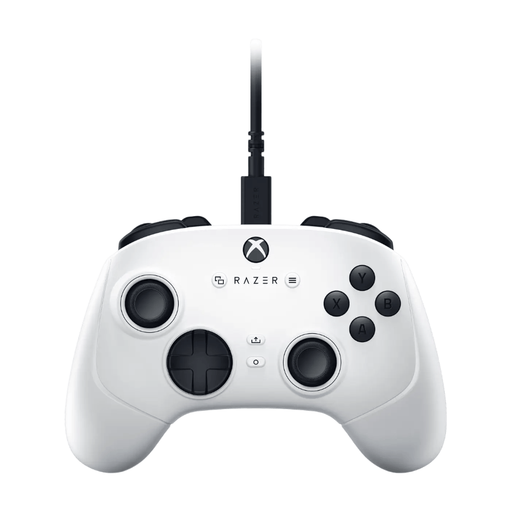 Image unavailable
A wired option for Xbox and Windows players looking for extra assignable buttons.
The product description lists four paddles, six assignable buttons and a detachable 3 m USB-C cable. The controller uses a wired USB connection.
 Image unavailable
A wired option for Xbox and Windows, with a socket for wired headphones.
The product description lists Xbox Series X|S, Xbox One, Windows 10/11 and Steam, a 3.5mm headphone socket and four vibration motors. The detachable USB-C cable is 3 m long.
 Image unavailable
Suited to Switch 2 players who want to connect wired headphones to the controller and customise buttons.
Nintendo specifies a 3.5mm socket that follows the CTIA standard and customisable GL/GR buttons. According to Nintendo, this model is for Switch 2 only; Nintendo doesn’t guarantee that every audio device will work.
According to Sony, the DualSense must be connected to the PC or Mac by cable to use the controller’s headset socket.
Nintendo lists the headphone socket as one difference between the Switch 2 Pro Controller and the original Switch Pro Controller. So, if you want to connect headphones to the controller, check which generation you’re buying.
Nintendo specifies a 4-pole 3.5mm socket that follows the CTIA standard. Check that your headphones work with it, as Nintendo doesn’t guarantee support for every audio device.
ACM ConsuWijzer says that online product purchases generally come with a 14-day cooling-off period after delivery, subject to exceptions that you should check in advance. This is separate from your statutory warranty rights: if a product isn’t fit for purpose, separate rights apply.
The Dutch government notes that safety requirements and consumer rights can be harder to assess when buying from an online shop outside the EU. According to the Dutch government, electronic products placed on the EU market must carry a CE mark. Also check who the seller is and what terms apply to returns and warranties.