
Playing together on one screen
You want to play with a flatmate. Check that the exact version of the game supports local co-op and the controller layout you’ve chosen. Steam lists shared-screen play for LEGO Marvel Super Heroes 2 on PC.


Start with your gaming device and the play styles supported by your specific game: an extra controller won’t make a game suitable for two players if it doesn’t support local co-op. Then choose a controller to suit how you want to play, such as separate controllers for playing together, a model with a headset socket for private listening, or a wired controller if you don’t mind having a cable in the room.
You want to play with a flatmate. Check that the exact version of the game supports local co-op and the controller layout you’ve chosen. Steam lists shared-screen play for LEGO Marvel Super Heroes 2 on PC.
You want to listen to game audio through a headset. Check the controller connection and the audio features of your gaming device. Nintendo lists an audio socket on the Switch 2 Pro Controller; Xbox lists a socket for a compatible headset on its wireless controller.
You play on a specific Switch, PS5, Xbox or PC and want the controller and game to work with that system. So check the exact model, connection and supported play style.
First, check your gaming device and whether the game supports the features you need. Then choose based on playing together, audio and how the controller is powered.
| Buying concern | What should you check? | Who is this most important to? |
|---|---|---|
| Compatibility | Check the exact console model or PC operating system, the connection and whether the game supports the controller. | If I want to avoid buying a controller that isn’t right for my device or game, I check that combination first. Around 33% of consumers say compatibility is their main buying concern. |
| Playing together | Check for local co-op, the player count and which controller layouts are supported by the exact version of the game. | If I want to play with my flatmate on one system, I need to know whether the game supports it and whether we can both use a suitable controller. Around 27% of consumers put playing together first. |
| Audio in the bedroom | Check whether the controller has a headset socket and whether it works with your gaming device and game. | If I’d rather listen to game audio through a headset in a shared room, I look for a suitable socket. Around 20% of consumers say audio is their main buying concern. |
| Power and cables | Check whether the controller uses batteries, needs charging or is wired, and whether you can position the cable safely and conveniently. | If I don’t want to keep charging or replacing batteries, I weigh that up against having a cable running through the room. Around 20% of consumers prioritise power and cable space. |
Nintendo says that Joy-Con 2 only works with Nintendo Switch 2. Original Joy-Con can be used wirelessly with Switch 2.
Make a note of your Switch model, then check compatibility and the play style supported by the game.
Local co-op and the controller layouts you can use vary between games and versions.
Before buying, check the player modes and which controllers the exact version of the game supports.
PowerA says the Advantage Wired can only be used with a docked Nintendo Switch 2.
Check whether your setup uses a dock and whether the cable can run safely through the shared room.
In the Netherlands, a commercial or manufacturer’s warranty is in addition to your statutory guarantee. The Netherlands Authority for Consumers and Markets says that the retailer is responsible for the statutory guarantee if a product is faulty.
Keep your proof of purchase and contact the retailer if your product is faulty.
A relevant choice for Joy-Con and Pro Controllers if your Nintendo system and the play style of your game are the deciding factors.
The DualSense is designed for PS5; PlayStation also describes USB and Bluetooth connections with devices including PCs.
The Xbox Wireless Controller is an option for Xbox consoles and Windows PCs.
According to its product specifications, the Ultimate 2C Wireless is designed for Windows and Android.
The Advantage Wired is designed for a docked Nintendo Switch 2 setup where a cable and headset socket are suitable.
Below are Joybuy product picks for Nintendo Switch setups, PS5, Xbox, PC and mobile gaming. Check that each model’s connection and game support suit your needs.
 Image unavailable
A wireless pair of controllers for a Switch setup. Check that the game supports local co-op and this controller layout.
The product information lists compatibility with Nintendo Switch, Switch OLED and Switch 2, as well as Bluetooth, NFC, vibration and up to 8 hours of battery life.
 Image unavailable
A set of left and right Joy-Con 2 controllers for Nintendo Switch 2. Whether two players can use them separately depends on the game.
The product information lists wireless use and wrist straps included. Nintendo says Joy-Con 2 doesn’t work with the original Switch.
 Image unavailable
A single wireless controller for a PS5 setup. To play together, the game must support local co-op and you’ll need a second compatible controller.
The product information lists haptic feedback, adaptive triggers and a 3.5mm headset socket. Whether these features work also depends on the game.
 Image unavailable
A single wireless controller for Xbox or a Windows PC. Check that the game supports the controller and play style you want.
The product information lists Bluetooth and a 3.5mm socket for a compatible headset. For the standard Xbox controller, Xbox lists AA batteries or a separate charging solution.
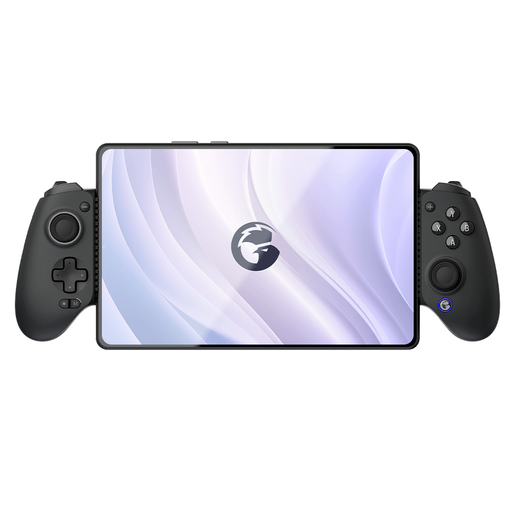 Image unavailable
A mobile game controller for playing on a phone or another listed device. Check that it works with your device and game.
The product information lists Bluetooth, iOS, Android, Switch, tablet and PC, as well as an extendable phone holder.
No. The game must support local co-op and the controller layout you’ve chosen. Check the exact version of the game. For example, Steam lists shared-screen play for LEGO Marvel Super Heroes 2 on PC, but that doesn’t automatically apply to other games or platforms.
No. Nintendo says Joy-Con 2 can only be used with Switch 2. According to Nintendo, original Joy-Con can be used wirelessly with Switch 2.
Check how to pair it with your platform, and position any cable so no one can trip over it. If you’re using Joy-Con 2 wirelessly, Nintendo recommends attaching the included wrist straps to the controllers.
In the Netherlands, the retailer is responsible for the statutory guarantee if a product is faulty. According to the Netherlands Authority for Consumers and Markets, the solution could be a free repair or replacement; a separate manufacturer’s warranty doesn’t replace your statutory rights.
For a standard online purchase, ACM ConsuWijzer says you’ll generally have a statutory cooling-off period of up to 14 days after delivery. Check the terms and any statutory exceptions before you buy.