First, check whether your device and story game support gamepad input. A controller can navigate choice menus, but it won’t automatically replace a keyboard for free text. Then choose based on platform, connection and controls. If text is hard to read in a bright room, the screen, reflections and text contrast matter more than extra controller features.
Who is this relevant to?
Players who want to make story choices using buttons
You want to select options easily, but first check whether your game supports gamepad input. Valve explains how Steam Input can translate controller inputs; that doesn’t mean every story game supports the controls you need.
Readers who play in a bright room
You want to be able to read the story text clearly. So assess the screen, any reflections and the text contrast where you play. The W3C Web Accessibility Initiative explains the importance of sufficient contrast between text and its background.
Players who want to sit back and relax
Think about how the controller feels in your hands, how far you sit from your device and whether you’d prefer a wired or wireless connection. Check these practical details once you’ve confirmed that your game and platform support the controller.
What should you look for when choosing?
Start with the input your story game requires and the device you play on. Then consider readability where you play, along with the controls, connection and power supply.
| What to consider |
What should you check? |
Who is this important to? |
| Input and compatibility |
Check the specific game and device, and whether they support gamepad, keyboard or mouse input. |
If I want to make story choices with a controller, I need to know that the game and device accept that input. Around 36% of consumers list input compatibility as their main concern. |
| Readability in bright conditions |
Assess the screen and any reflections where you play; check whether the game has text or contrast settings. |
When I play in a bright room, I want to be able to read the story text comfortably. Around 29% of consumers prioritise readability in daylight. |
| Controls and comfort |
Compare the D-pad and how the controller sits in your hands; also check whether the cable is long enough for where you sit. |
If I make lots of choices from my usual seat, I look for easy-to-reach buttons and a suitable connection. Around 21% of consumers put comfort and ease of use first. |
| Power and accessories |
Check the connection for your device and which cables, adapters or batteries are included with the exact version. |
If you’re considering charging, batteries or wireless accessories, first check the exact version and connection. Around 14% of consumers name power supply as their main concern. |
Common buying mistakes
-
Trying to solve a bright-room problem with controller features
The controller won’t change the screen’s contrast or reflections. As a result, the text may still be uncomfortable to read, even if the controls work with the game.
First, check the screen, where you play and the game’s text settings.
-
Confusing platform compatibility with game support
A controller that works with your device can only provide input that the game supports. Entering free text is different from selecting options.
Before buying, check the controls for the specific story game and whether the actions you need can be assigned to controller buttons.
-
Assuming ‘wireless’ means the same thing on every device
The connection listed can vary by device. 8BitDo specifies 2.4GHz or wired use on Windows, and Bluetooth on Android, for the Ultimate 2C Wireless.
Compare the connection for the exact version with your device, and check which accessories you’ll need.
Brands to consider
Xbox
An option for supported Xbox consoles, Windows PCs and certain mobile devices.
- Microsoft lists features including a hybrid D-pad, Bluetooth and button mapping.
- Check the exact version and game support. Microsoft says the Xbox bundle with a USB-C cable includes a 2.7 m cable; this doesn’t necessarily apply to other packages.
PlayStation
DualSense is mainly relevant if you have a PS5 or another device supported by Sony.
- Sony lists USB and Bluetooth for supported PC, Mac and mobile systems; only compatible games and apps can use the controller.
- Sony says haptic feedback on PC requires support from the game as well as a USB connection. Don’t assume it will work with every story game.
Nintendo
The Switch Pro Controller is a console-specific option for Switch players.
- Nintendo says the controller can be paired wirelessly with Switch 2.
- Nintendo estimates battery life at around 40 hours, depending on use. On Switch 2, the HOME button on this older controller can’t wake the system from sleep.
Logitech G
The wired F310 is a PC option if you don’t need a wireless connection.
- Logitech lists XInput and DirectInput as input modes.
- Logitech says the DirectInput mode requires software installation. These input modes don’t prove that every story game accepts a gamepad.
8BitDo
The Ultimate 2C Wireless is a possible option for Windows or Android if the connection is suitable.
- 8BitDo lists 2.4GHz wireless or wired use on Windows, and Bluetooth on Android.
- Check the connection for your device and the exact contents of the package.
Joybuy products
These controllers are intended for story games that support gamepad input. For each model, check whether the device listed and the specific game are right for your setup.
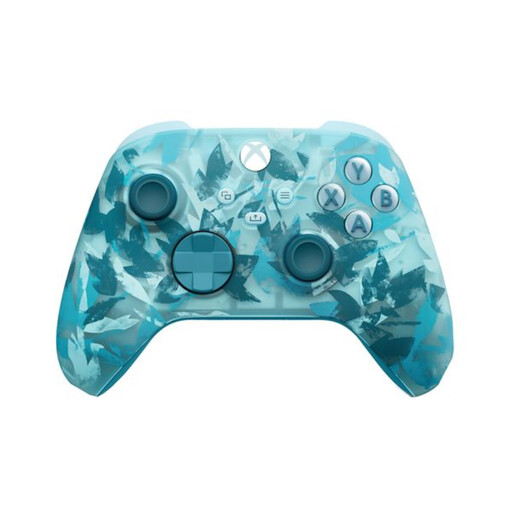 Image unavailable
Xbox Wireless Controller – Ice Breaker Special Edition
Worth considering for a story game with gamepad input on Xbox Series or PC.
The product name lists Xbox Series and PC; check that your game supports the controller.
View at Joybuy
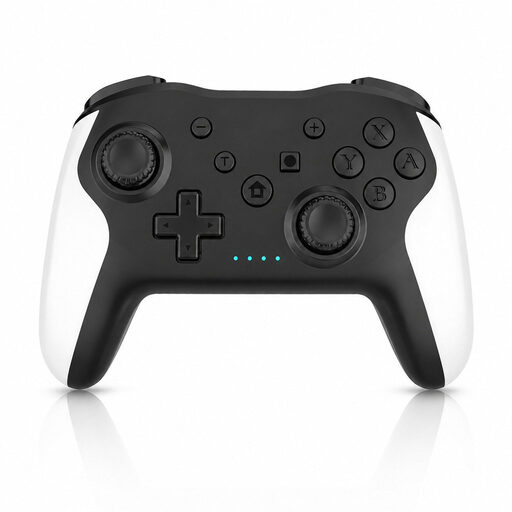 Image unavailable
Game controller for Switch and PC
An option to compare if your story game supports gamepad input on Switch or PC.
The product name lists Switch and PC; check whether the game works with a controller on your device.
View at Joybuy
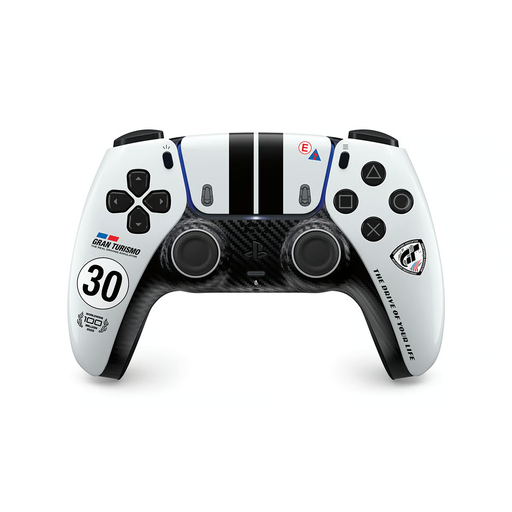 Image unavailable
PS5 DualSense Wireless Controller – Gran Turismo Limited Edition
Worth considering for a story game on PS5 that supports gamepad input.
The product name lists a wireless PS5 DualSense controller; check the game’s compatibility.
View at Joybuy
 Image unavailable
GameSir Cyclone 2 Multiplatform Controller – Black-Bundle Edition
An option to compare if your story game supports gamepad input on one of the listed devices.
The product name lists PC, Switch, iOS and Android. Check which device and input method your game uses.
View at Joybuy
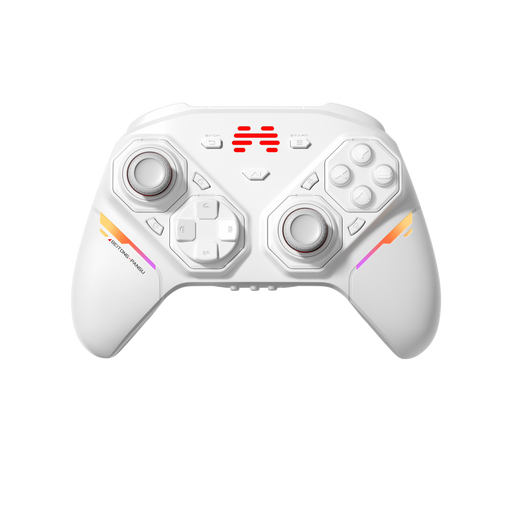 Image unavailable
BEITONG PanGu Modular Wireless Gaming Controller
Worth considering if your story game supports gamepad input on one of the listed platforms.
The product name lists PC, Nintendo Switch, Switch 2, Steam and Android. Check compatibility with your game and device.
View at Joybuy
Frequently asked questions
Can any game controller be used with a text-based story game?
No, platform compatibility alone isn’t enough. Check whether the specific game supports gamepad input. On PC, mapping keys may sometimes help, but entering free text requires a different type of input.
Should I mainly buy a different controller for a bright room?
Not if the problem is that the text is hard to read. First, assess the screen, any reflections and the text contrast where you play; a controller won’t change the picture.
How do I connect a DualSense to a Windows PC?
Sony lists USB and Bluetooth for supported versions of Windows. The controller works with compatible games and apps; extra features depend on support from the game and the connection.
What if I’m unhappy with a controller I bought online, or it breaks too soon?
For an online consumer purchase in the Netherlands, you generally have a 14-day cooling-off period after delivery, according to ACM ConsuWijzer. This is separate from your rights if the product is faulty: if a product breaks sooner than you could reasonably expect under normal use, the seller must put things right free of charge, for example by repairing or replacing it, or issuing a refund, according to ACM ConsuWijzer.


