What should you look for at a small desk?
First check that your device and game are supported. Then decide which connection and controls will work best at your desk.
| What to consider |
What should you check? |
Who is this important for? |
| Device and game |
Check support for your console or operating system and for the game. Check compatibility for special features separately. |
If I play on a specific console or PC, I don’t want to find out after buying that the controller and game don’t work well together. Around 31% of consumers prioritise compatibility. |
| Cables on your desk |
Check whether your PC supports Bluetooth or the required receiver, which USB port is available and where a cable can be routed safely. |
I want to move my hands freely without a cable getting tangled among my desk items. Around 25% of consumers prioritise a clear space to play. |
| Controls and grip |
Compare the dimensions and button layout, and check whether extra buttons would be useful to you. Product specifications won’t tell you how a controller will feel in your hands. |
During longer gaming sessions, I want to be able to reach the buttons easily and hold the controller comfortably. Around 19% of consumers prioritise how a controller handles during play. |
| Power and connection |
Check the power source and which cable or receiver you need. For Xbox Wireless on PC, you may need a separate adapter if the feature isn’t built in. |
I don’t want to be caught out by unexpected connection or power requirements while playing. Around 13% of consumers mainly consider what they need and what might interrupt play. |
| Extra gaming features |
Check whether haptics, triggers or motion controls are supported by each game and platform, and whether a particular connection is required. |
If an exploration game offers extra feedback, I want to know whether the feature will actually work on my device. Around 12% of consumers mainly look for these kinds of supported extra features. |
Controllers at Joybuy
This selection includes controllers for Nintendo Switch systems, Xbox and PC, PS5 and compatible devices, as well as a mobile controller. Check that the connection and features listed for each model suit your device and game.
 No image available
Turtle Beach Afterglow Wave Wireless Controller, Transparent
Suited to anyone who plays wirelessly on a Nintendo Switch system and wants to customise extra buttons.
The product information lists Bluetooth, support for Switch 2, Switch, Switch Lite and Switch OLED, TMR sticks and two programmable buttons. The stated battery life is up to 40 hours.
View at Joybuy
 No image available
Xbox Wireless Controller for Xbox Series/PC, Ice Breaker Special Edition
Suited to anyone who plays on Xbox Series or PC and values wireless play at a small desk.
The product information lists Xbox Wireless and Bluetooth, support for Windows 10/11 and AA batteries. The stated battery life is up to 40 hours.
View at Joybuy
 No image available
Turtle Beach Rematch Super Mario Jump Wireless Controller
Suited to anyone who wants to play wirelessly on a Nintendo Switch system and use programmable buttons.
The product information lists support for Switch 2 and Switch OLED, two programmable buttons and a C button for GameChat. The stated battery life is up to 40 hours.
View at Joybuy
 No image available
PlayStation DualSense Wireless Controller, Grand Theft Auto VI White Limited Edition
Suited to anyone who plays on PS5 or uses a compatible game on PC, Mac or mobile.
The product information lists haptic feedback, adaptive triggers and Bluetooth. The availability of extra features depends on the game and device; Sony lists USB as a requirement for haptic feedback on PC.
View at Joybuy
 No image available
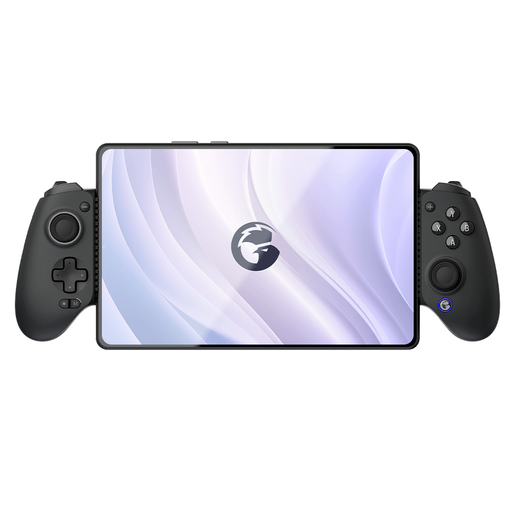
GameSir G8 Galileo Plus
Suited to anyone who plays on a mobile device at a small desk and wants to use an adjustable holder.
The product information lists Bluetooth, support for Switch, iOS, Android, tablets and PC, plus programmable rear buttons. According to the product information, the holder fits devices up to 179 mm wide.
View at Joybuy
Frequently asked questions
Can I connect a wireless controller to my PC without an extra receiver?
It depends on the controller and your PC. Xbox Support lists USB, Bluetooth and Xbox Wireless as different connection options; Xbox Wireless may require an adapter. According to 8BitDo, the 8BitDo Ultimate 2C Wireless uses 2.4 GHz via the receiver or a cable on Windows, and Bluetooth on Android.
Will DualSense haptics work on PC if I use Bluetooth?
Bluetooth alone isn’t enough for haptic feedback on PC. Sony says the game must support the feature and the controller must be connected via USB.
Does a Nintendo Switch Pro Controller work with Switch 2?
Yes. According to Nintendo, you can pair the original Switch Pro Controller with Switch 2 wirelessly. The HOME button on that controller can’t wake Switch 2 from sleep mode. The Switch 2 Pro Controller is a different model and, according to Nintendo, doesn’t work with the original Switch.
What should I check when connecting a controller to a PC?
Check which connection types your controller and PC support, and route a USB cable so it won’t get caught among your desk items. Xbox Support warns that not every cable for an Xbox controller can transfer data. Follow the instructions for your exact model when charging and installing updates.


