
PC adventure gamer
You want to know whether the controller works with your Windows game, and which connection or button layout is right for you.


Start with your gaming platform and check that your fantasy game supports the controller; a working connection doesn’t guarantee that every feature will be available. Then choose between a cable you can route around your desk and wireless play with no cable on your work surface. Also consider grip, button layout and power.
You want to know whether the controller works with your Windows game, and which connection or button layout is right for you.
You’re weighing up whether you can route a cable neatly around your desk or whether wireless play would give you more room to work. Grip and how easy the buttons are to reach can also matter during longer sessions.
You’re choosing for a PS5, Xbox or Switch game you already own, and don’t want to assume that a controller for another platform will work too.
First, check that your platform and game support the controller. Then decide which connection suits your desk, and compare the controls and power options.
| What to consider | What should you check? | Who should consider this? |
|---|---|---|
| Platform and game | Check your gaming platform or Windows version, the supported connection, and whether the specific game supports the controller. | If I want to be sure my game and device will work together before choosing, compatibility comes first. Around 33% of consumers focus on this. |
| Desk space and grip | Think about where a cable or receiver will sit, and whether the controller feels comfortable in your hands. Manufacturer descriptions can’t tell you how it will feel to you. | If space is limited, I want to know whether a cable will get in the way and whether the controls are comfortable to reach. Desk space and grip are top priorities for around 27% of consumers. |
| Buttons and features | Look at the button layout and any assignable buttons. For special feedback or input features, check that your game supports them. | If I need particular buttons or extra input options for my adventure, the controls matter more than other features. Around 20% of consumers put this first. |
| Power and use | Check whether the model uses batteries, needs charging or requires a cable, and whether the necessary cable or receiver is included. | If I’d rather not have to replace batteries unexpectedly or charge a controller, I check its power source and what’s included. This is the main consideration for around 20% of consumers. |
A controller may connect, but certain features might not be available in every game or over every connection. For example, Sony says haptic feedback on PC depends on support from the game and a USB connection.
Before counting on any special features, check whether your game supports them and which connection is required.
Connection options can vary by device. 8BitDo lists 2.4 GHz or USB for Windows and Bluetooth for Android for the Ultimate 2C Wireless.
Check the full model details and find out which receiver, cable or connection your device needs.
A manufacturer’s claim about stick technology doesn’t prove that a complete controller will never develop a fault.
Consider the stick technology alongside compatibility, controls and the warranty that applies to your purchase.
A paid package is different from your rights if a product breaks too soon under normal use.
Before choosing a package, compare its extra cover with the rights you already have.
An Xbox controller could suit you if you play on Xbox or Windows and want to take the platform into account.
The DualSense is worth considering for PS5 games and supported Windows PCs where you want to use PlayStation controls.
The Switch Pro Controller is designed for players looking for a separate controller for Switch games.
The G7 SE is a wired option for Xbox and Windows if you can use a cable at your desk.
The Ultimate 2C Wireless is worth considering for Windows with the included 2.4 GHz receiver or USB, and for Android via Bluetooth.
The X05 could suit you if you use different devices and want to check the right connection for each one.
This selection includes controllers for PS5 and PC, Xbox and Windows, Switch, and use with mobile devices. Check which controller and features your game supports before you buy.
 No image available
An option if you play on PS5 or want a controller for a supported PC; check which features your game supports.
The product listing names PS5, PC, Mac and mobile devices. According to Sony, haptic feedback on PC requires a supported game and a USB connection.
 No image available
Suited to Xbox or Windows if you want to play wirelessly; check that your game supports it and look at the connection options for the version you choose.
The product name specifies the Robot White version.
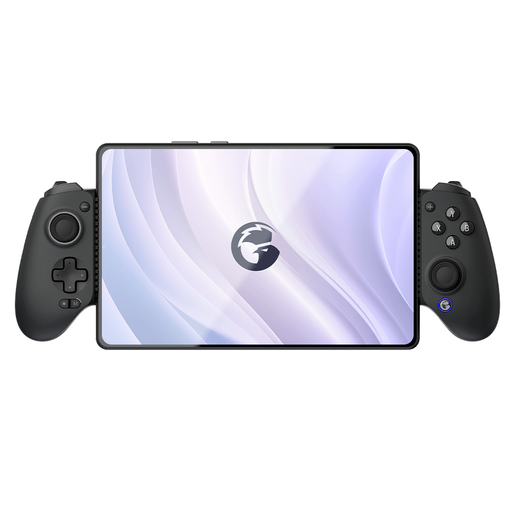 No image available
An option if you’re looking for a controller for a mobile device; check that it works with your device and game.
The product name lists Switch, iOS, Android, tablet and PC. The product information mentions an adjustable phone holder for devices up to 179 mm wide.
 No image available
An option if you play your fantasy game on Nintendo Switch and want to play wirelessly.
The product listing mentions a built-in battery and an included USB-C cable. Nintendo lists motion controls, HD rumble and amiibo functionality.
 No image available
An option if you use one of the listed devices and want to compare which connection suits your desk.
The product name lists PC, Nintendo Switch, iOS and Android, programmable buttons and adjustable joystick resistance.
No. Check whether the specific game supports it. Some controllers connect but don’t offer every feature in every game; Steam displays information about controller support for games.
Choose a connection mode supported by your platform, and think about where a cable or receiver will sit. According to GameSir, the GameSir G7 SE connects to Xbox or PC via USB-C. On Windows, the 8BitDo Ultimate 2C Wireless uses a 2.4 GHz receiver or cable; on Android, it uses Bluetooth.
According to Sony, haptic feedback on PC is only available if the game supports it and the controller is connected via USB. Connecting via Bluetooth alone isn’t enough.
You don’t need an extra package to have a statutory warranty. According to ACM ConsuWijzer, if a product breaks too soon under normal use, the seller must provide an appropriate free solution. Compare any paid package separately to see what extra cover it offers.
According to Ondernemersplein, electrical and electronic devices sold in the Netherlands must comply with the applicable EU rules. For devices with Bluetooth or a radio frequency module, the government business information service lists the Radio Equipment Directive and manufacturers’ obligations concerning CE marking and an EU declaration of conformity. A product listing alone doesn’t prove that a specific item meets these requirements.