What should you look for when choosing?
First check that the controller suits your platform and game. Then consider audio, controls and power for your room setup.
The percentages below show how consumers choosing a controller for this situation divide according to their main buying priority.
| What to consider |
What should you check? |
Who is this most relevant to? |
| Compatibility |
Check the exact platform, connection and features your game requires. |
I want to know first whether the controller and the game features I need will work with my console or PC. Around 29% of consumers put compatibility at the top of their buying priorities. |
| Minimising disturbance |
Check the available settings for the controller speaker and vibration, and find out where headset audio works. |
If I share a room, I want to be able to adjust game sounds and controller feedback when someone else is resting. Around 29% of consumers give minimising disturbance their highest priority. |
| Controls for long gaming sessions |
Compare the grip and button layout for your hands, and check whether any extra buttons have functions you’ll use. |
When exploring for longer, I want a layout that feels comfortable and keeps important buttons within easy reach. Around 24% of consumers put controls and comfort first. |
| Power and what you need |
Check which cables, connections and other items are listed as required, and allow for cable space or charging. |
I want to know in advance whether my gaming space can accommodate a cable and what I’ll need to use or charge the controller. For around 18% of consumers, power and required accessories come first. |
Joybuy products
This selection includes controllers for Xbox and Windows PC, PS4 and PC, and Nintendo Switch. Check each model to make sure its features and audio setup meet your needs.
 No image available
Xbox Wireless Controller – Heart Breaker Special Edition
An option if you’re looking for a controller for Xbox Series or PC and want to use personal audio. Check that your headset and connection will work with your setup.
The product name describes a wireless Xbox controller for Xbox Series and PC in the Heart Breaker Special Edition design.
View at Joybuy
 No image available
Dualshock wireless game controller for PS4 and PC, black
Worth considering if you play on PS4 or PC and want a wireless controller. Also check that it works with your chosen game and audio setup.
The product name describes a black wireless controller compatible with PS4 and PC.
View at Joybuy
 No image available
Game controller with dual vibration and gyroscope for Switch and PC
An option to consider if your game uses a gyroscope and you play on Switch or PC. Check which features your game requires.
The product name lists dual vibration, a gyroscope, and Switch and PC as supported platforms.
View at Joybuy
 No image available
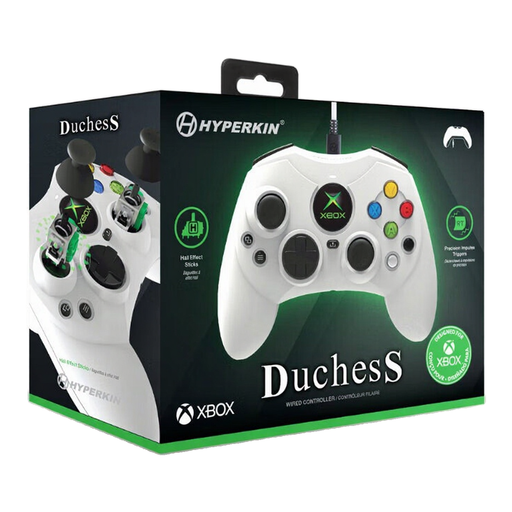
Hyperkin Duchess wired controller for Xbox and Windows, white
Worth considering if a wired connection suits your gaming space and you play on one of the listed Xbox platforms or Windows.
The product name lists Xbox Series X|S, Xbox One and Windows 10/11. Its wired connection means you’ll need space for the cable.
View at Joybuy
 No image available
Nintendo Switch Pro Controller, black
An option if you play on Nintendo Switch and the Pro Controller’s features suit your game. You can turn controller vibration off in the Switch settings.
Nintendo lists motion controls, HD Rumble and amiibo. Estimated battery life is around 40 hours, and may vary depending on usage conditions.
View at Joybuy
Frequently asked questions
Can I make the DualSense quieter on a PS5?
On PS5, you can adjust the controller speaker volume and the intensity of vibration and trigger effects. This doesn’t mean the buttons themselves are silent.
Will a headset connected to the DualSense work if I use Bluetooth on PC?
For headset use through the controller socket on PC, PlayStation specifies a wired connection. Also check that your game and device support the audio you want.
How do I turn off controller vibration on a Nintendo Switch?
Open System Settings and select Controllers and Sensors to change Controller Vibration. Nintendo says the setting applies to all synced controllers.
What cooling-off period and warranty apply to an online purchase in the Netherlands?
When you buy remotely from a business, you’ll often have 14 days to change your mind, subject to exceptions explained by the Dutch government. You’re also covered by statutory rights if a product doesn’t perform as you could reasonably expect during normal use. These are separate from any manufacturer’s or seller’s warranty.
Is CE marking relevant for a wireless controller?
Radio equipment covered by EU rules must meet requirements including those for safety and electromagnetic compatibility. These general rules don’t confirm that a specific item for sale complies, so check the product and seller information.


