
PC puzzle gamer who wants a simple setup
You play at a desk and want to know whether the controller works with your game, without unnecessary setup or charging steps. Logitech notes that some games don’t support either of the two gamepad standards.


First, check whether your puzzle games support controller input: Logitech notes that some games don’t support XInput or DirectInput gamepads. A wired controller suits a fixed desk setup; choose wireless if freedom to move matters more, and if you plan to use it with several devices, always check support for the specific game and model.
You play at a desk and want to know whether the controller works with your game, without unnecessary setup or charging steps. Logitech notes that some games don’t support either of the two gamepad standards.
You want to sit further from the screen or play without a cable, so check which connection the model uses with each device and how it is powered. Microsoft and 8BitDo describe different connection options for their controllers.
You want to use one controller with several devices, but you’ll need to check which controls and features are available for each game and device. Sony notes that DualSense features can vary by device.
| What to consider | What should you check? | Who is this important for? |
|---|---|---|
| Game compatibility | Check whether your puzzle game supports controller input and whether you need to set an input mode. | If my main concern is whether a particular puzzle game works with the controller, I check support for each game first. Around 40% of consumers say compatibility is their main concern when buying. |
| Ease of use at your desk | Check that the cable is long enough and that you have a spare USB port. | If I play in one place and don’t want to manage a wireless connection or charging, a simple wired setup matters more to me. Around 25% of consumers focus mainly on ease of use at their desk. |
| Wireless play and power | Check whether the model uses Bluetooth or a receiver, whether the receiver is included and how the controller is powered. | If I want to sit anywhere around my workspace without a cable, I check which wireless connection my device supports. Around 18% of consumers prioritise the freedom to move wirelessly. |
| Use with multiple devices | Check compatibility with each computer, console and game; special features can depend on the game and connection. | If I want to use the same controller with my PC and console, I check which features are available for each combination. Around 17% of consumers say use with multiple devices is their main concern when buying. |
A computer may recognise a controller even if a game doesn’t support the controls you want to use. Logitech notes that some games don’t support XInput or DirectInput gamepads.
Before weighing up extra features, check controller support and settings in the puzzle games you play.
For the 8BitDo Ultimate 2C Wireless, the manufacturer lists Bluetooth for Android and a 2.4GHz receiver or cable for Windows.
Check the connection option for your operating system and whether your device has the necessary port.
An additional warranty product doesn’t replace your rights if a product is faulty. The Government of the Netherlands notes that there is no fixed statutory warranty period in the Netherlands.
Compare what an additional warranty actually offers, and contact the seller if there’s a fault.
The F310 is a wired PC option for a fixed desk setup.
The Xbox Wireless Controller is an option for use with a Windows PC and a supported Xbox console.
The Ultimate 2C Wireless offers a wireless receiver or wired connection for Windows.
DualSense is worth considering if you also use a PS5 and play compatible PC games.
These products are aimed at PC setups and include both wireless and wired controllers. The Dutch Authority for Digital Infrastructure notes that equipment covered by the applicable European rules must carry a CE mark. Check the exact variant, as a product listing doesn’t confirm the marking on the item supplied.
 No image available
A wireless option for a PC setup, provided your game supports the controller.
The product description lists compatibility with Windows 10/11, Bluetooth and Xbox Wireless.
 No image available
An option to consider if you’re looking for a PC-compatible gamepad with wireless connectivity.
The product name lists Bluetooth 5.2, 2.4G Wireless, dual vibration and a phone holder. The description mentions use with Windows PCs.
 No image available
A PC-focused option to compare if you’re looking for a wireless controller with extra control features.
The product description lists Bluetooth, dual vibration, a 6-axis gyroscope and a USB-C charging cable.
 No image available
An option to consider for PC if programmable controls are useful for your games.
The product description lists 255-level Hall Triggers, RGB lighting, a 1000 mAh battery and USB-C charging.
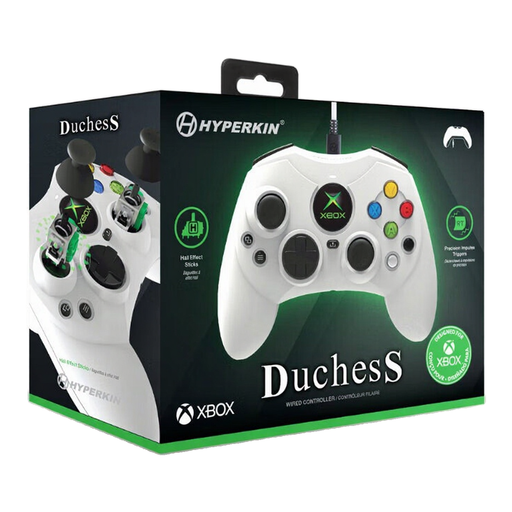 No image available
A wired option for a fixed PC setup, provided your game supports the controller.
The product description lists compatibility with Windows 10/11 and Xbox, plus a detachable 3-metre USB-C cable.
No. Check support for the specific game and, where needed, the selected input mode. Logitech notes that some games don’t support XInput or DirectInput gamepads.
According to 8BitDo, you can connect it by cable or wirelessly using the 2.4GHz receiver. The manufacturer lists Bluetooth for Android, so check whether your PC can use the included USB-A receiver.
No. Sony says the game must support the feature, and haptic feedback on PC requires a USB connection.
The Dutch Authority for Digital Infrastructure notes that equipment covered by the applicable European equipment directives must carry a CE mark to be sold in Europe. Check the exact variant; a product listing alone doesn’t confirm which marking the item supplied carries.
Not in every case. According to the Government of the Netherlands, a 14-day cooling-off period applies in many cases to distance contracts with a business; this isn’t necessarily the same as buying online from a private seller.