First, choose a controller that works with your console or PC and the specific puzzle game. Then decide how you’ll power it. Replaceable AA batteries mean you won’t need to charge while playing; a rechargeable battery requires a suitable USB charging option, while a wired controller takes up a USB port and limits how far you can move. Compatibility with a device doesn’t guarantee support for every game or extra feature.
Who is this choice relevant to?
Gamers with few spare power sockets
If you don’t want to use an extra power adapter, you can compare AA batteries, charging via an available USB port and wired play. Microsoft describes using AA batteries with the Xbox Wireless Controller, while Nintendo lists a USB charging cable with the Pro controllers discussed here.
Console and PC gamers who want to check compatibility
If you want to make sure a controller works with both your device and your chosen game, it’s worth checking platform support and game features separately. PlayStation and Nintendo outline platform-specific requirements; Steam also notes that gamepad input depends on whether the game supports it.
What should you look for when choosing?
Wireless with AA batteries
Choose this if: you use a supported device and don’t want to rely on charging during a gaming session.
Bear in mind: you’ll need to replace the batteries or charge rechargeable AA batteries separately. Microsoft says rechargeable AA batteries don’t charge inside the controller.
Wireless with a built-in rechargeable battery
Choose this if: you have a suitable USB port available to charge the controller between gaming sessions.
Bear in mind: a flat battery means you’ll need to wait for it to charge or use a suitable cable. Features and platform support vary by model.
Wired via USB
Choose this if: you have a suitable USB port and the cable can reach your gaming area.
Bear in mind: the cable takes up a USB port and limits how far you can move. Also check that your game and platform are supported.
| What to consider |
What to check before buying |
Who is this important to? |
| Power without an extra socket |
Check the battery type, whether a cable is included and whether you can charge via an available USB port. |
If I don’t want to free up an extra socket, I look for batteries or USB charging. Around 31% of consumers prioritise power options. |
| Compatibility with a console or PC |
Compare the exact model variant with your device, operating system and preferred connection. |
What matters most to me is that the controller connects to my console or PC. Around 31% of consumers give platform compatibility top priority. |
| Controls in the puzzle game |
Check whether the specific game supports gamepad input and the controller features you want. |
If I want to play with a gamepad, I need to know whether my puzzle game supports it. Around 19% of consumers prioritise in-game controls. |
| Batteries, cables and ease of use |
Check what’s included, whether you have a spare USB port and whether the cable reaches your gaming area. |
I want to know in advance whether I’ll need separate batteries or another way to charge the controller. Around 19% of consumers prioritise ease of use and the items they’ll need. |
Common buying mistakes
-
Assuming wireless means you’ll never need to charge it
A wireless controller may use AA batteries or a built-in rechargeable battery. Microsoft says rechargeable AA batteries don’t charge inside the Xbox controller.
Check the battery type and what’s included in the box before you buy.
-
Assuming every game supports all controller features
Device compatibility alone doesn’t tell you whether a game supports gamepad input or extra features. PlayStation says haptic feedback on PC requires both game support and a USB connection.
Check that the specific game supports the features you want and your preferred connection method.
-
Choosing a Pro controller for the wrong Nintendo console
Nintendo says the Switch 2 Pro Controller is only for Nintendo Switch 2.
Check the full console name and model variant, not just the Pro label.
-
Choosing a wired controller without checking your gaming area
Wired play requires a suitable USB port and a cable long enough to reach where you sit.
Check the connection, cable length and route between your device and gaming area.
Relevant brands
Xbox
A relevant choice if you have a supported Xbox console, Windows PC or certain mobile devices and want to play wirelessly.
- Microsoft lists AA batteries for the wireless controller and a USB-C cable variant.
- Rechargeable AA batteries don’t charge inside the controller. Check game support and what’s included with the version you choose.
PlayStation
The DualSense is an option for PS5 players and for compatible games on supported PCs and other devices.
- PlayStation describes USB-C and Bluetooth connections on supported devices.
- On PC, some features depend on the game. PlayStation says a USB connection is required for haptic feedback.
Nintendo
The rechargeable Pro controllers discussed here are designed for use with their corresponding Nintendo consoles.
- Nintendo lists a USB charging cable with the models discussed here.
- Nintendo says the Switch 2 Pro Controller is only for Switch 2, so check the exact console variant.
PowerA
PowerA says the Enhanced Wired Controller is designed for supported Xbox consoles and Windows, if a wired connection suits your setup.
- PowerA lists a detachable 3 m cable.
- The stated platform support doesn’t include PS5 or Nintendo Switch. Also check that you have a USB port available.
8BitDo
According to the manufacturer, the Ultimate 2C Wireless is designed for Windows and Android, with different connection options for each platform.
- 8BitDo lists a built-in rechargeable battery, plus a USB cable and adapter in the box.
- The manufacturer lists 2.4 GHz and wired connections for Windows, and Bluetooth for Android. Don’t assume Windows Bluetooth support based on the product name.
Joybuy products
These products include wireless controllers and wired options for the consoles and PC platforms listed. Before you buy, check that the exact model, game and connection you want are right for your setup.
 No image available
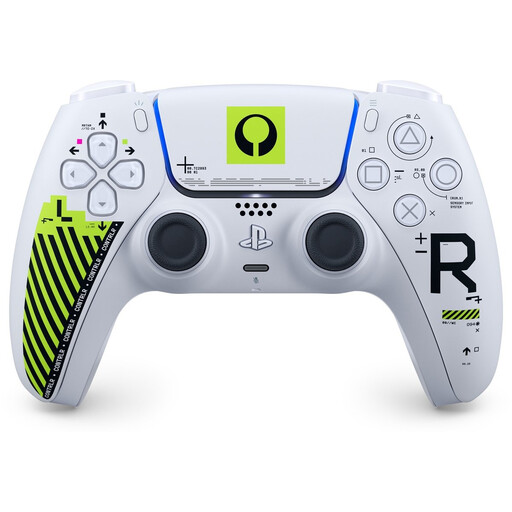
Sony PS5 DualSense Wireless Controller - Marathon Limited Edition
A wireless option for PS5 players looking for a built-in rechargeable battery and USB-C charging.
The product description lists Bluetooth, USB-C, haptic feedback and adaptive triggers. Feature support also depends on the game.
View at Joybuy
 No image available
Gaming Controller with Dual Vibration & Gyro for Switch & PC
A wireless option if you’re looking for a controller for one of the Switch or PC platforms listed.
The product information lists support for Switch and PC, a wireless connection, dual vibration and a gyroscope. Also check that your specific game supports it.
View at Joybuy
 No image available
VIELLAN Wireless Gaming Controller with Hall Effect Joysticks, 1000 mAh
A wireless option for PC users looking for a built-in rechargeable battery and USB-C charging.
The product information lists Hall effect joysticks, a 1000 mAh battery and USB-C charging. The title also mentions a PS5 layout, but that alone doesn’t confirm PS5 compatibility.
View at Joybuy
 No image available
GameSir Cyclone 2 Multiplatform Controller, Black Bundle Edition
An option for anyone who wants to choose between wired, 2.4 GHz and Bluetooth connections on the listed platforms.
The product information lists PC, Switch, iOS and Android, and says this bundle includes a charging dock. Check which connections are supported on each platform.
View at Joybuy
 No image available
GameSir G7 SE Wired Xbox Game Controller, Dynamic Blue
A wired option for players with a supported Xbox console or Windows PC who don’t want to use controller batteries.
The product information lists Xbox Series X/S, Xbox One, Windows and Steam, and a detachable 3 m USB cable. Wired play requires a suitable connection and enough room for the cable.
View at Joybuy
Frequently asked questions
Do you always need a spare power socket for a wireless controller?
No, not always. The Xbox Wireless Controller can use AA batteries, while a controller with a built-in rechargeable battery can charge via a suitable USB port. Check that the cable or charging option you need is available for your model.
Can you charge rechargeable AA batteries by connecting the Xbox controller to USB?
No. Microsoft says rechargeable AA batteries don’t charge inside the controller. The rechargeable Xbox battery, sold separately, is a different product.
Does every PC puzzle game work with a game controller?
No, gamepad support varies by game. Steam says gamepad-focused input only works in games that support gamepads. Also check that your game supports the extra features and connection you want to use.
What are your rights if a controller is faulty in the Netherlands?
The Dutch government says you’re entitled to a product that meets the standard you can reasonably expect, and that you should contact the seller if there’s a fault. There’s no fixed statutory guarantee period; what you can reasonably expect depends, among other things, on the product and normal use. A manufacturer’s warranty doesn’t replace your statutory rights.
Where can you take used batteries or a controller you’re throwing away?
According to the Dutch government, used batteries shouldn’t go in the bin and can be returned to shops that sell batteries, among other places. Discarded electrical appliances can be taken to designated collection points. For household appliances, the take-back scheme described also applies when you buy a similar new appliance.


