What should you look for when choosing one?
Start by checking your controller’s battery type and connection. Then compare capacity, portability and extra outputs.
One controller with a USB-rechargeable battery
Choose this if: your controller can be charged using a compatible USB cable and you mainly want to keep a socket free.
Bear in mind: check that the power bank’s chosen port supplies power, and don’t assume it will provide a particular number of charges.
Several devices at once
Choose this if: you want to connect another device as well as your controller and have the right cables for both.
Bear in mind: the available power may be shared when charging several devices at once.
Xbox controller with removable AA batteries
Don’t choose this for: charging removable AA batteries in the controller; Xbox Support says they are not charged there.
Alternative: look into a suitable AA battery charger or a compatible rechargeable battery pack and the right cable.
| What to consider |
What should you check? |
Who should consider this? |
| Controller and battery |
Identify your controller model and battery type. Check whether the battery pack can be charged via USB and which cable is compatible. |
I want to avoid buying a power bank that can’t charge my controller’s battery. Around 31% of consumers say compatibility is their main consideration. |
| Capacity and socket |
Compare the stated capacity and, where available, information about the actual energy delivered. Also check how you charge the power bank itself. |
I want to charge my controller without using an extra mains socket, while making sure the capacity suits how I use it. Around 31% of consumers pay most attention to this. |
| Multiple outputs |
Check the number of usable outputs, the cables you need and the available power when using ports at the same time. |
I want to connect another device as well as my controller, so I’m looking at both the ports and the shared power. Around 19% of consumers prioritise charging several devices at once. |
| Size and safety |
Compare the weight with how often you’ll carry the power bank. If a safety warning may apply, check the exact model and item or batch number. |
I want a simple model that’s easy to carry and safe to use. Around 19% of consumers say portability and simplicity are their main considerations. |
Brands to consider
The examples below relate to specific models or product ranges. They are not a general assessment of a brand or an indication of availability.
Trust
The Primo 25029 is worth comparing if you use both USB-A and USB-C cables.
- Trust lists two USB-A outputs and one USB-C output for this model.
- Trust states a maximum of 15 W via USB-C or 12 W via USB-A, and says that charging speed varies by device. This doesn’t confirm the charging speed for a game controller.
Belkin
The BoostCharge BPB027hqWH is worth a look if you want two USB-C ports and can use a USB-C cable.
- Belkin states that the model delivers up to 20 W when using one port.
- According to Belkin, the total output is 15 W when both ports are used at the same time. You’ll need a compatible cable if your controller has a different connection.
Fresh 'n Rebel
The Powerbank 12000 mAh in Storm Grey is worth comparing if you want to use USB-C and USB.
- The manufacturer lists 20 W Power Delivery and the ability to charge two devices at once via USB-C and USB.
- According to the product description, the faster-charging claim applies to devices in certain conditions. It doesn’t prove specific performance with game controllers.
HEMA
The HEMA Powerbank 20000mAh is a useful point of comparison if you’re looking for a model with a stated capacity of 20,000 mAh.
- Consumentenbond lists two USB-A connections, one USB-C connection and a weight of 410 grams for this model.
- The stated capacity and connections alone don’t tell you how many times it will charge a controller.
Xtorm
The Xtorm FS5200 is a useful point of comparison if you’re looking at a model with two USB-C ports and USB-A as well.
- For this specific 20,000 mAh model, Consumentenbond lists two USB-C ports, one USB-A port and a weight of 381 grams.
- The connections and weight listed are for the FS5200. Don’t use them to draw conclusions about the performance of other Xtorm models.
Power banks at Joybuy
This selection includes power banks with USB-C, built-in cables or multiple outputs. Always check that your controller’s battery can be charged via USB and that the cable and output are compatible. Product specifications alone don’t prove a particular charging speed or number of charges.
 No image available
MOMAX 1-Power F.Pass+ 10,000 mAh
The built-in USB-C cable may suit a controller with a compatible USB-C connection. Check that the connection can supply power.
The product information lists two built-in cables, USB-C and USB-A outputs, and the ability to charge up to three devices at once.
View at Joybuy
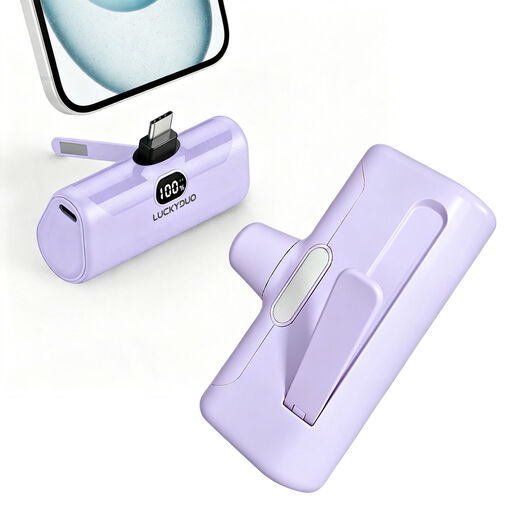 No image available
5,000 mAh USB-C power bank, 15 W PD, purple
Worth considering for a controller that charges via USB-C. Check that the cable and output are compatible with your controller model.
The product title lists 5,000 mAh, USB-C and 15 W Power Delivery.
View at Joybuy
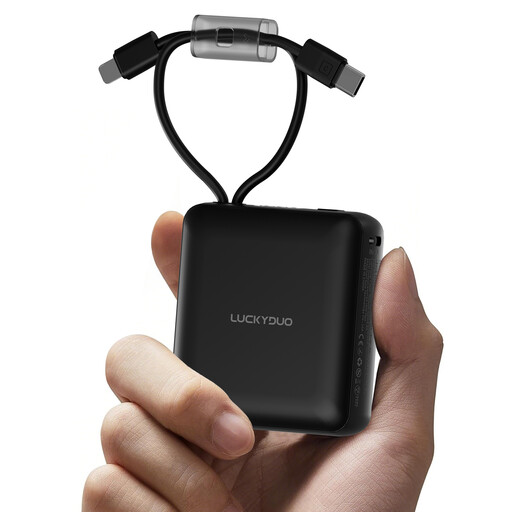 No image available
10,000 mAh power bank with 2 built-in cables, black
The built-in USB-C cable may be useful with a controller that has a compatible USB-C connection. Check that your controller supports charging this way.
The product information lists built-in USB-C and Lightning cables, along with a display showing the remaining battery level.
View at Joybuy
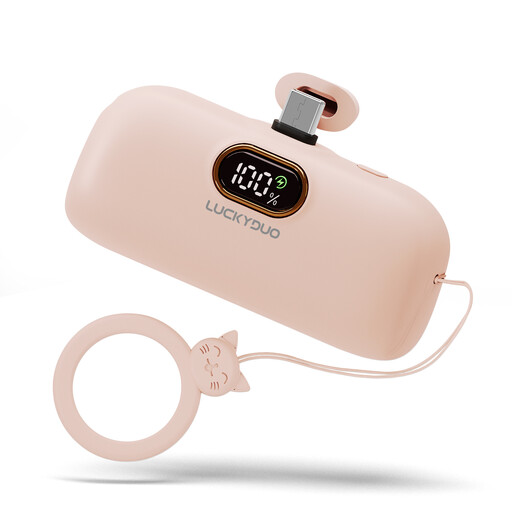 No image available
5,000 mAh USB-C power bank, pink
Worth considering for a controller with a USB-rechargeable battery and a compatible USB-C connection. Check that the connection works as an output.
The product title lists a capacity of 5,000 mAh and a USB-C connection.
View at Joybuy
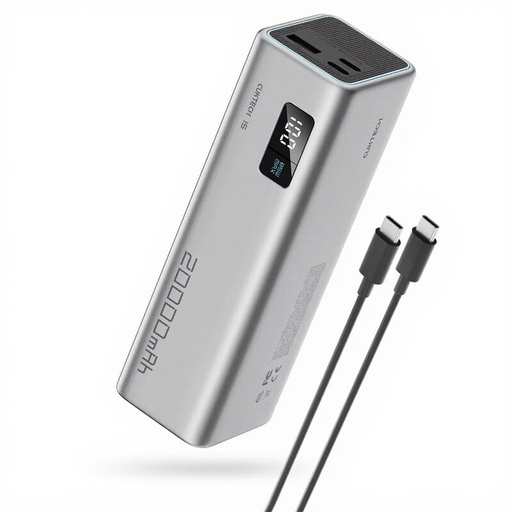 No image available
CUKTECH 15 SE 20,000 mAh, grey
The three listed outputs let you connect several devices. Check which cable is right for your controller and how much power is available when using multiple outputs at once.
The product information lists two USB-C outputs, one USB-A output and up to 65 W on a single port.
View at Joybuy
Frequently asked questions
Will a power bank charge the rechargeable AA batteries in your Xbox controller via USB?
No. Xbox Support states that rechargeable AA batteries are not charged inside the standard Xbox Wireless Controller. Check whether you’re using a compatible rechargeable battery pack instead.
Can you tell how many full charges your controller will get from 10,000 mAh?
Not reliably from the stated capacity alone. It also depends on your controller’s battery and the actual energy delivered. Consumentenbond tests the energy delivered separately from the manufacturer’s stated capacity.
How can you charge safely, and what should you do with a damaged power bank?
Place charging equipment in an open area so heat can escape. Don’t charge it under a pillow or duvet, and don’t use damaged cables. The Fire Service advises keeping chargers in an open area and avoiding damaged cables. Also check whether a safety warning applies to the exact power bank model.
What are your rights if a power bank bought online doesn’t work properly?
For online purchases from a business, you usually have 14 days to change your mind, subject to exceptions, according to the Dutch Government. If the product doesn’t last or work as it should, contact the seller to find a solution. In the Netherlands, there is no fixed statutory guarantee period that applies to all products.
Can you put an empty power bank in your general rubbish?
No. The Dutch Government says that empty batteries shouldn’t go in the bin and that collection points are available. Ask your local collection point how to dispose of a power bank with a built-in battery.


