
Platformer player sharing a room
You play while someone else is resting in the same room. You want to keep game audio and vibration under control, without assuming that a headset will silence the buttons.


Start with your console or PC, then check that the controller and your platform game are compatible. For example, Nintendo says that a Switch 2 Pro Controller won’t work with the original Switch. If you’re playing in the same room as someone else, assess the headset connection, vibration and button noise separately: a headset can keep game audio to yourself, but it won’t make the buttons quieter.
You play while someone else is resting in the same room. You want to keep game audio and vibration under control, without assuming that a headset will silence the buttons.
You’re choosing between controllers for Switch, Switch 2, Xbox, PS5 or PC, and want to avoid buying a model that looks suitable but doesn’t work with your device or game.
You want to weigh up directional controls, grip and button layout against extra features your platform game may not use.
First, check that the controller works with your system and game. Then consider noise in the room, controls and the practicalities of wired or wireless play separately.
| What to consider | What should you check? | Who is this important for? |
|---|---|---|
| Compatibility | Check the exact system and model, any firmware requirements, connection type and game support. | I want to avoid buying a controller that doesn’t work with my console or game. For around 33% of consumers, compatibility is the top priority. |
| Keeping things quiet for your room-mate | Check where a headset will work, whether vibration can be adjusted and whether the button noise is acceptable in your room. | I want to play while someone else is resting in the same room, so I consider game audio, vibration and button noise separately. For around 27% of consumers, keeping things quiet for their room-mate comes first. |
| Directional controls and comfort | Compare the D-pad and grip with what feels comfortable to you. Also check whether button mapping is useful for your game. | I often make jumps and change direction, so I want the buttons to be comfortable to reach. Around 20% of consumers prioritise directional controls and comfort. |
| Connection and power | Check how far you’ll be from your screen, the cable and the power source for the exact model. | I want to know whether a cable will be convenient or whether I’ll need to allow for charging or batteries. For around 20% of consumers, connection and power are the top priorities. |
Nintendo says that the Switch 2 Pro Controller works only with Switch 2. It’s a different model from the Pro Controller for the original Switch.
Before buying, check the full model name and the system you play on.
A headset can keep game audio from disturbing others, but it won’t affect vibration or the noise made by physical buttons. Nintendo describes a setting to turn off controller vibration on the original Switch; this won’t silence the buttons.
Check the audio connection and vibration settings for your setup, and bear in mind the noise made by the buttons themselves.
Additional cover is different from your statutory rights if a product doesn’t do what you could reasonably expect. ACM ConsuWijzer explains the difference in its information about guarantees.
Compare what extra cover offers before you pay for it.
Nintendo makes Pro Controllers for the original Switch and for Switch 2.
Xbox offers wireless controllers for supported Xbox consoles, Windows PCs and certain mobile devices.
DualSense is designed for PS5 and works with compatible games on supported PCs and other devices.
The Ultimate 2 Bluetooth is an adjustable option for the Switch and Windows setups listed by 8BitDo.
The G7 SE is a wired option for the Xbox and PC setups listed by GameSir.
These products are suited to selected Switch, Android and Xbox or Windows setups. Check whether each controller and game is right for your gaming setup.
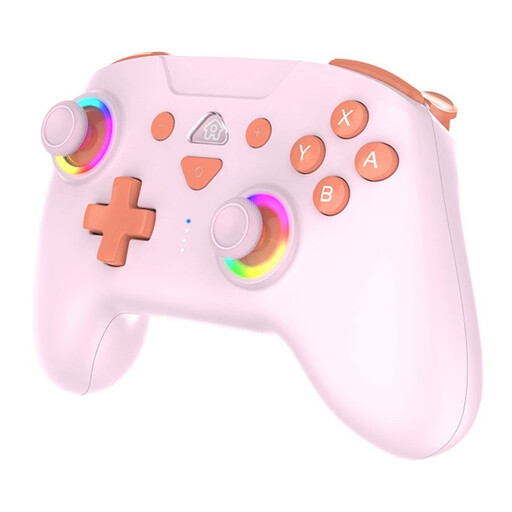 No image available
The product information lists Switch and Switch 2 setups; check that your game and system support the controller.
Wireless Bluetooth connection; two programmable buttons and three adjustable vibration levels, according to the product information.
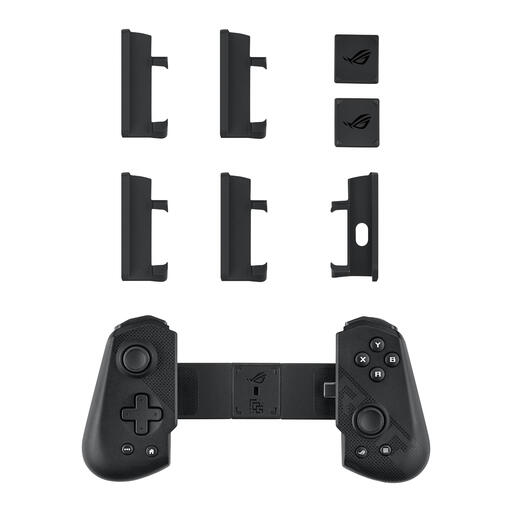 No image available
The product information lists Android gaming; check that your device and game are compatible.
Wired USB-C connection and D-pad, according to the product information.
 No image available
For a supported Xbox or Windows setup; check that it works with your game and audio settings.
Wired, with a detachable 3-metre USB-C cable and 3.5mm headset socket, according to the product information. Hall-effect sticks and impulse triggers are also listed.
The cable needs to run between the controller and the device.
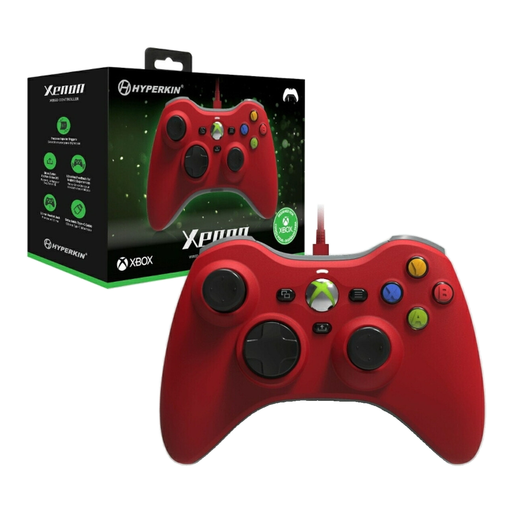 No image available
For a supported Xbox or Windows setup; check game and audio support for your device.
Wired, with a detachable Type-C cable and 3.5mm headset socket, according to the product information. Impulse triggers and vibration feedback are also listed.
The controller needs to be connected to the device by cable.
 No image available
For the original Nintendo Switch. Nintendo says you can turn off controller vibration in the system settings. This setting applies to all synchronised controllers.
Wireless connection, HD Rumble and motion controls, according to the product information.
No. Nintendo says the Switch 2 Pro Controller doesn’t work with the original Nintendo Switch; the Switch Pro Controller is a different model.
According to Nintendo, go to System Settings from the HOME Menu, then select Controllers and Sensors to turn off Controller Vibration. Nintendo says this setting applies to all synchronised controllers.
Sony says a wired connection to the PC is needed to use the headset socket. Also check that the game supports the audio features you want.
According to ACM ConsuWijzer, online purchases generally come with a statutory 14-day cooling-off period after delivery, with some exceptions. Separately, if a product doesn’t perform as you could reasonably expect under normal use, you have statutory rights against the seller. These aren’t automatically limited to the length of the manufacturer’s guarantee.
No. The Dutch government says used batteries must be taken to a collection point and shouldn’t go in the bin.