First, choose a controller that suits your console or PC and the game you play. Then decide how to connect a headset, so the game audio doesn’t have to come through the room speakers. For longer quests, a comfortable grip and a suitable power source matter too, while extra features are only worth considering if you’ll use them and the game supports them.
Who is this relevant to?
Players with a sleeping flatmate
If you want to hear game audio through a headset rather than the room speakers, it’s worth checking the connection and platform support. PlayStation and Nintendo specify different requirements for using a headset with their controllers.
Console players looking for compatibility
Check that the full model name is right for your PS5, Xbox or Switch 2 before weighing up extra features. Nintendo, for example, states that the Switch 2 Pro Controller is only for Switch 2.
Players who take on long quests
For longer gaming sessions, grip, button layout and power supply can all matter. The right shape varies from player to player, so check how the controller is charged or powered too.
What should you look for when buying?
| What to consider |
What should you check? |
Who is this important for? |
| Keeping the sound private |
Check the headset connection, platform and connection type. PlayStation says that using a DualSense headset on PC requires a wired connection to the PC. |
If I want to hear the audio privately, I look for a headset connection that works with my device. Around 36% of consumers put keeping the sound private at the top of their list. |
| Compatibility |
Check the full model name, the stated platform and, if necessary, whether the game supports it. Extra features may depend on the game and connection. |
If I want to make sure a controller works with my console or PC first, I check the exact platform listing. Around 29% of consumers put compatibility first. |
| Comfort and controls |
Compare the grip, stick and button layout, and how easy the controls are to reach. Assignable rear buttons are mainly useful if you want to remap actions. |
For long quests, I want to be able to hold and use a controller in a way that feels comfortable to me. Around 21% of consumers put comfort and controls at the top of their list. |
| Power supply |
Check what’s included, how it charges and whether there’s a practical place for a cable. Xbox Support says rechargeable AA batteries don’t charge inside the Xbox controller. |
If I want to avoid interruptions or unexpected extra purchases, I check how the controller is powered in advance. Around 14% of consumers say power supply is their main concern. |
Common pitfalls
-
Assuming ‘works on PC’ means ‘all features work wirelessly’
For DualSense, PlayStation says the headset connection on PC requires a wired connection between the controller and computer. Haptic feedback on PC and features such as adaptive triggers also depend on the connection and game support.
Before buying, check separately that your game supports the features you want, which connection you’ll use and how you’ll connect your headset.
You may need a compatible USB cable or another audio connection to get the audio setup you want.
-
Confusing a Switch Pro Controller with a Switch 2 Pro Controller
Nintendo says the Switch 2 Pro Controller is only for Switch 2. Similar model names don’t automatically mean that a controller is designed for both systems.
Check the full model name and the connections on the exact version you’re considering.
-
Leaving power supply until after you’ve bought it
A wireless controller may need batteries or a separate charging solution. Xbox Support says rechargeable AA batteries don’t charge inside the controller; Nintendo’s stated battery life is an estimate that depends on how you use it.
Check what’s in the box and how it charges, and consider whether a cable or separate charger would be practical where you play.
Batteries, a compatible charger or a separate charging solution may be additional items you need.
Brands to consider
Sony PlayStation
DualSense is designed for PS5 and is also supported by some PC games. It’s worth considering if you’re looking for PlayStation features and a headset connection.
- PlayStation specifies haptic feedback and adaptive triggers.
- On PC, features depend on the game; haptics and the headset connection have USB requirements. Bluetooth alone doesn’t guarantee these features.
Microsoft Xbox
The Xbox Wireless Controller is designed for Xbox and Windows PC, and has a connection for a compatible wired headset.
- Microsoft describes a textured grip and the option to assign buttons.
- You’ll need to choose a separate option for a rechargeable battery; rechargeable AA batteries don’t charge inside the controller.
Nintendo
The Switch 2 Pro Controller is specifically designed for Nintendo Switch 2 and, according to Nintendo, has a headset connection.
- Nintendo specifies assignable GL/GR buttons, a 3.5mm CTIA connection and estimated battery life of around 40 hours, depending on use.
- According to Nintendo, the controller is only for Switch 2. Battery replacement through customer services may be chargeable.
GameSir
According to GameSir, the G7 SE is designed for Xbox and Windows PC and uses a wired USB-C connection.
- The manufacturer’s documentation lists two assignable rear buttons.
- It’s a wired controller, so it doesn’t offer the freedom of movement you get with a wireless model. ‘Anti-drift’ is a manufacturer claim, not a guarantee against faults.
8BitDo
According to 8BitDo, the Ultimate 2C Wireless is designed for Windows via 2.4GHz and Android via Bluetooth.
- 8BitDo specifies extra buttons and an included receiver.
- This Wireless version isn’t listed as a PS5, Xbox or Switch model. The battery life is a manufacturer estimate based on ideal laboratory conditions.
Joybuy product picks
These product picks are aimed at gaming on Switch or Switch 2, PS4, PS5 and PC. Check that each model supports your console and game, and that its headset connection suits your setup.
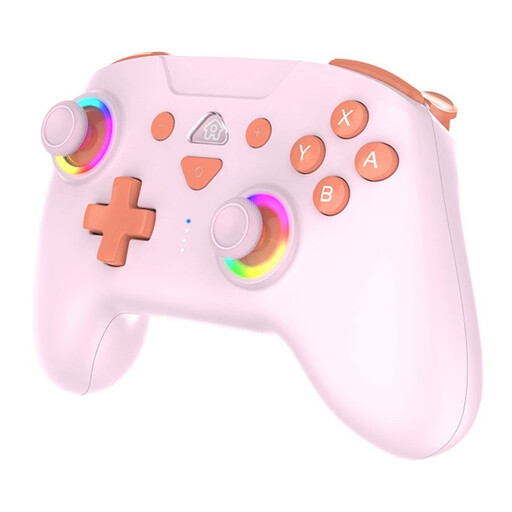 Image unavailable
SUBSONIC Wireless Controller SW2 & SW with LED, pink
Worth considering if you’re looking for a wireless model for Switch or Switch 2 gaming; check the exact compatibility with your console and game.
The product name specifies SW2 and SW, LED lighting and the colour pink.
View at Joybuy
 Image unavailable
Wireless Dualshock controller for PS4 and PC
Worth considering if you’re looking for a wireless model for PS4 or PC. Check that your game supports it and which audio connection you need for a headset.
The product name specifies wireless controls and compatibility with PS4 and PC.
View at Joybuy
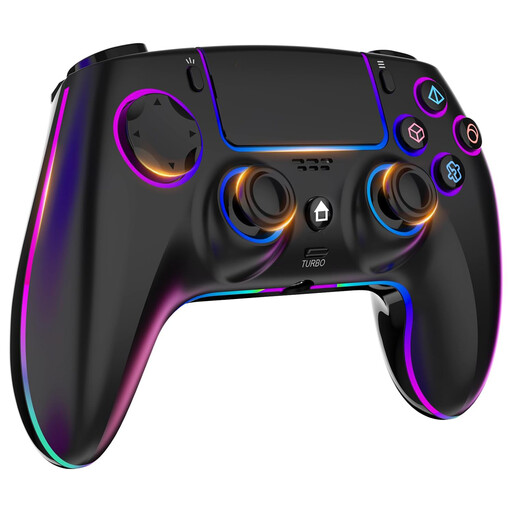 Image unavailable
Wireless controller for PS4 and PC with headset connection
Worth considering if you’re looking for a wireless controller for PS4 or PC and want to connect a headset; check that the connection works with your headset and device.
The product name specifies a 1000 mAh battery.
View at Joybuy
 Image unavailable
PlayStation 5 DualSense controller, Starlight Blue
An option for PS5 players who want to use a headset instead of the room speakers. PlayStation lists a 3.5mm headset connection for the DualSense.
On PC, PlayStation says the headset connection requires a wired connection to the computer; support for extra features varies by game.
View at Joybuy
 Image unavailable
Game controller with dual vibration and gyroscope for Switch and PC
Worth considering if you’re looking for a controller for Switch or PC; check the exact compatibility with your device and game.
The product name specifies dual vibration and a gyroscope.
View at Joybuy
Frequently asked questions
Does the DualSense headset connection work when I play wirelessly on PC?
Not through the connection on the controller: PlayStation requires a wired connection between the DualSense and the PC. With a wireless connection, you can check which audio outputs your computer offers.
Do I need to charge rechargeable AA batteries for an Xbox controller separately?
Yes. Xbox Support says rechargeable AA batteries don’t charge inside the controller, so you’ll need to use a suitable separate charging method.
What can I do in the Netherlands if a controller I bought online is faulty?
If there’s a fault, contact the seller. According to the Dutch government, you’re entitled to a product that works as it should; the Netherlands doesn’t have a fixed statutory warranty period. Normal wear and tear or damage caused by your own use doesn’t automatically entitle you to a free repair. For online purchases from a business, you’ll also have 14 days to change your mind in many cases, subject to applicable exceptions.


