What should you look for?
First, check that the controller works with your console and the game’s multiplayer mode. Then make sure the controls and cable route suit the layout of your living room.
| What to consider |
What to check |
Who should pay extra attention? |
| Console and game compatibility |
Check the exact Switch generation, the number of local players and whether the game supports one horizontal Joy-Con per player. |
If I want to play with someone else, both my console and the game’s multiplayer mode need to support the controller I choose. Around 36% of consumers put compatibility first. |
| Space and cable routing |
Check the positions of the console, sofa and walkway. Choose a wired controller only if you can route its cable safely away from walkways. |
In a narrow room, I don’t want a cable running between the sofa and console where someone could trip over it. Around 29% of consumers prioritise room to move and a clear cable route. |
| Controls for each player |
Check which controller configuration and buttons the game requires. A single Joy-Con and a full-sized gamepad offer different ways to play. |
If the game requires two-handed controls, I don’t want to assume that a single Joy-Con will be enough. Around 21% of consumers see controls for both players as the most important consideration. |
| What you need besides the controller |
Check the connection, what’s included in the box and how the specific version connects to your device. |
I want to know in advance whether my setup needs a suitable port or receiver. Around 14% of consumers focus mainly on what they need besides the controller. |
Controllers on Joybuy
These controllers are suited to setups using individual Joy-Con controllers or full-sized wireless gamepads for Switch, Xbox, Windows PCs and PS5.
 No image available
Xbox Wireless Controller - Robot White
A full-sized wireless gamepad for an Xbox or supported Windows PC setup.
Product information lists a wireless connection and a USB-C port.
View on Joybuy
 No image available
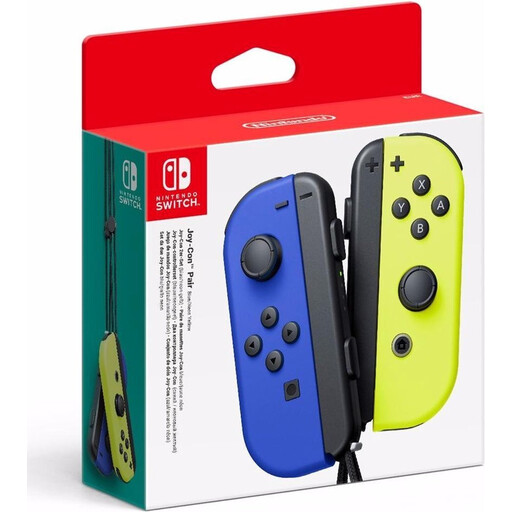
Nintendo Switch Joy-Con Pair - Neon Blue/Neon Yellow
A set for a Switch setup where two players can use the controllers separately, if the game supports this mode.
Product information lists a wireless connection, motion sensors and HD Rumble.
View on Joybuy
 No image available
Nintendo Switch Pro Controller - Black
A full-sized wireless gamepad for Switch games that support this controller.
Product information lists analogue sticks, motion controls, HD Rumble and amiibo functionality.
View on Joybuy
 No image available
Sony PlayStation 5 DualSense Wireless Controller - White
A full-sized wireless gamepad for PS5 games that support the DualSense.
Product information lists motion sensors, a built-in microphone, haptic feedback and adaptive triggers.
View on Joybuy
 No image available
Nintendo Switch 2 Official Joy-Con 2 Pair - Light Blue/Light Red
A left and right controller for separate use in supported Switch 2 games. Nintendo says Joy-Con 2 doesn’t work with the original Switch.
Product information lists wireless controls, motion controls and HD Rumble. Nintendo says the pair comes with two wrist straps.
View on Joybuy
Frequently asked questions
Are two Joy-Con 2 controllers enough for every two-player game?
No, it depends on the game. Nintendo says local multiplayer is available in supported games and that controller configurations vary by game. Check the information for your platform game.
Can I use Joy-Con 2 with the original Nintendo Switch?
No. Nintendo says Joy-Con 2 only works with Nintendo Switch 2. Nintendo also says that original Joy-Con controllers can be used wirelessly with Switch 2.
How do I set up Joy-Con 2 for individual players?
Set the controller configuration in the Switch 2 controller menu and check which mode the game supports. Nintendo recommends attaching the Joy-Con 2 wrist straps when using the controllers wirelessly.
Will the PowerA wired controller reviewed here work without the dock?
No. PowerA says this model only works when the Switch is in its dock. The manufacturer lists a detachable 3 m cable; also check whether you can route it safely to your seat.
What can I do if a controller develops a fault during normal use?
According to the Dutch Government, you’re entitled to a product that works properly in the Netherlands, and you should contact the retailer if there’s a fault. There’s no fixed statutory warranty period; whether a repair or replacement is appropriate depends on the circumstances.


