What should you look for?
Start by checking platform and game support. Then find out how audio will reach your headphones, and only after that compare your preferred controls and ease of use.
| What to consider |
What should you check? |
Who is this important for? |
| Platform and game |
Check the exact console generation or operating system, as well as whether your game supports the controller. |
If I want to be sure my controller works with both my device and mystery game, compatibility is the first thing I check; around 33% of consumers put this at the top of their list of buying concerns. |
| Headphone audio |
Check where the headset will be connected and whether the chosen controller connection supports audio through that port. |
If I want to keep my headphone cable connected to the controller, I want to know in advance which audio route will work with my setup; around 27% of consumers put headphone audio first. |
| Controls and feedback |
Check whether the game supports features such as haptics and whether you want to customise the buttons. |
If I want to customise buttons or use game-supported feedback while solving puzzles, I check which features each game supports; around 20% of consumers prioritise controls and feedback. |
| Grip and power |
Compare the shape and grip, the power source and the charging accessories included. |
If I’m holding the controller for a long time, grip and charging matter more to me than extra features; around 20% of consumers put comfort and power supply at the top of their list of buying concerns. |
Joybuy product picks
These Joybuy picks include DualSense for PS5 and supported PC games, wired Xbox controllers, and a controller for the original Switch with a separate audio setup.
 No image available
PlayStation 5 DualSense Controller, Starlight Blue
Suitable for PS5 controls and PC games that support DualSense; on PC, audio through the headset port requires a wired controller connection.
The description lists a 3.5mm headset jack and a rechargeable battery.
USB-C connection; haptic feedback and adaptive triggers depend on game support.
View at Joybuy
 No image available
GameSir G7 SE Wired Xbox Controller, Dynamic Blue
A wired option for Xbox and Windows if you want to connect your headset to the controller.
The description lists a 3.5mm jack and a wired USB connection.
Two programmable rear buttons; the cable limits your freedom of movement.
View at Joybuy
 No image available
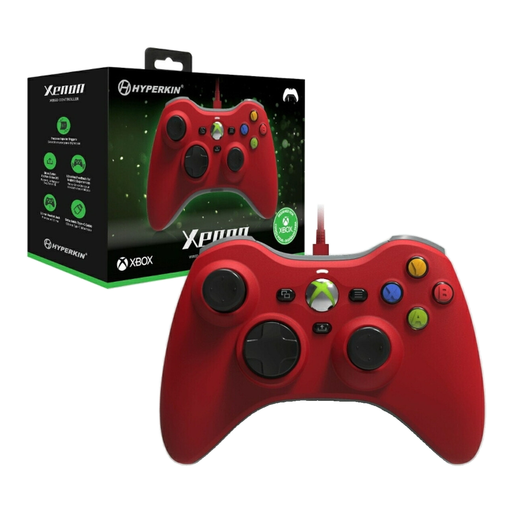
Hyperkin Xenon Wired Controller for Xbox, Red
A wired Xbox controller for anyone who wants to connect their headphones through the controller and is happy to use a cable.
The description lists a 3.5mm headset jack and a Type-C cable.
Listed for Xbox Series X|S, Xbox One and Windows 10/11.
View at Joybuy
 No image available
Nintendo Switch Pro Controller, Black
For use with the original Nintendo Switch if you connect your headphones through a separate audio route.
The product specifications checked don’t confirm a headset jack on this controller.
Bluetooth audio on the original Switch is a separate option; Nintendo notes limits on the number of connected wireless controllers, possible audio delay and Bluetooth microphones.
View at Joybuy
 No image available
GameSir T7 Wired Xbox Controller, Blue
Suitable for Xbox and Windows setups when you want a wired connection and a port for a wired headset.
The description lists a 3.5mm headset jack and a detachable 3 m USB-C cable.
Listed for Xbox Series X|S, Xbox One, Windows and Steam; the cable determines how far you can sit from the device.
View at Joybuy
Frequently asked questions
Will a headset work with my Xbox controller if it’s connected to a PC via Bluetooth?
No. Microsoft says Bluetooth doesn’t support a headset connected to the Xbox controller. To get audio through the controller, use USB or a suitable Xbox Wireless connection, or connect the headset directly to your PC.
Can I use the DualSense headset port wirelessly with a PC?
According to Sony, using the DualSense headset port on PC and Mac requires a wired controller connection. Also check whether your game supports the DualSense features you want to use.
Does the Switch 2 Pro Controller also work with the original Switch?
No. Nintendo says the Switch 2 Pro Controller is only for Switch 2 and doesn’t work with the original Switch.
What should I know about Bluetooth audio on the original Switch?
Nintendo warns that Bluetooth audio allows a maximum of two wireless controllers to be connected, may cause audio delay and doesn’t support Bluetooth microphones.
What warranty and cooling-off period apply to online purchases in the Netherlands?
According to the Dutch government, there is no fixed statutory warranty period in the Netherlands; if a product is faulty, the retailer is your point of contact. For distance purchases from a business, a 14-day cooling-off period applies in many cases, subject to statutory exceptions.


