Start with the device and game you play: a controller for PS5, Xbox, Nintendo Switch or PC isn’t automatically compatible with the others. Then choose a connection that suits the distance from your seat, and compare grip, power and features that your game actually supports.
Who is this buying guide for?
Console player on the sofa
You want a controller that suits your console and its generation, and feels comfortable to use from the sofa. Check compatibility for the exact model; Nintendo, for example, distinguishes between Pro Controllers for the original Switch and Switch 2.
PC player using a TV
You connect a PC to a big screen, so you’ll need to match the supported connection, your game and the distance between your PC and seat. Microsoft lists Windows PCs as compatible with the Xbox Wireless Controller, while Sony states that DualSense supports PC.
Player looking for extra controls
You want to know whether haptic feedback, motion controls or extra buttons will work with your game before taking those features into account. Sony and Nintendo describe these features for certain controllers, but whether they’re available depends on the device and game.
What should you look for when buying?
First check the platform and console generation, then the connection from your seat, and finally the extra features and power supply.
| What to consider |
What should you check? |
Who is this important for? |
| Compatibility |
Check support for your exact console or PC, then see whether your game supports the features you want. Nintendo confirms that the Switch 2 Pro Controller doesn’t work with the original Switch. |
If you use one specific console or game, you’ll want to make sure the controller works with your setup. Around 36% of consumers prioritise compatibility. |
| Range from the sofa |
Measure the distance to your console or PC and check that the wireless connection or cable you choose is suitable. GameSir says the GameSir G7 SE has a wired USB-C connection. |
If you play from the sofa, you won’t want a cable that restricts where you sit, and you’ll want to know when the controller needs charging. Around 29% of consumers mainly choose based on range and comfort. |
| Extra features |
Check whether each game supports haptic feedback, motion controls or extra buttons. Sony states that DualSense features may require a USB connection. |
If you want extra feedback or controls in a fantasy adventure, it’s important that your game supports them. Around 21% of consumers mainly choose based on enhanced immersion and controls. |
| Power and running costs |
Check the power source and what’s included with the exact version. Also check any additional protection and its terms. |
If you want to know what else you’ll need besides the controller and what protection comes with your purchase, compare the version and its terms. Around 14% of consumers prioritise power and running costs. |
Common buying pitfalls
-
Assuming every Switch Pro Controller works with every Switch
The Nintendo Switch 2 Pro Controller isn’t compatible with the original Nintendo Switch. The name alone doesn’t tell you which generation the model is for.
Before buying, check which console generation the controller supports and make sure it matches your device.
-
Assuming extra feedback is always an advantage
Sony says haptic feedback and adaptive triggers are available only when a game supports them; a USB connection may be required.
Check that your game supports these features and that the connection suits your needs before taking them into account.
-
Choosing a wired controller without checking the cable route
GameSir says the GameSir G7 SE uses a wired USB-C connection. The distance between the connection point and your seat may therefore determine whether the setup is practical.
Check the cable route and allow enough clear space to move around safely before choosing a wired model.
-
Assuming a paid extended warranty is the same as your statutory rights
The Government of the Netherlands distinguishes between your statutory rights for a product and an extended warranty. There is no fixed number of years of statutory warranty; if a relevant problem arises, the seller must provide a solution.
Read exactly what an additional plan covers and compare it with your statutory rights and the terms of your purchase.
Relevant game controller brands
Microsoft Xbox
The Xbox Wireless Controller is suited to Xbox consoles and Windows PCs, including if you want to play wirelessly from the sofa.
- Microsoft lists Bluetooth, button mapping, a hybrid D-pad and textured grips.
- Compatibility with Xbox or Windows doesn’t mean the controller will also work with PlayStation or Nintendo consoles. Check the power source for the version you choose.
Sony PlayStation
DualSense is designed for PS5 and certain PC uses, especially when your game supports the feedback features you want.
- Sony specifies haptic feedback and adaptive triggers for DualSense.
- These features depend on the game and may require a USB connection. Descriptions of the experience aren’t an independent performance test.
Nintendo
The Pro Controller ranges for Nintendo Switch and Switch 2 are separate options, so choose the one that matches your console generation.
- Nintendo lists motion controls, HD rumble and amiibo support for the original Switch Pro Controller. It can also be used wirelessly with Switch 2.
- The Switch 2 Pro Controller doesn’t work with the original Switch. This version adds features including GL/GR buttons and a headset jack.
GameSir
The G7 SE is a wired option for supported Xbox consoles and Windows PCs.
- GameSir specifies USB-C, two lockable rear buttons and Hall Effect sticks for this model.
- It’s wired, so the cable route needs to suit your seating position. The anti-drift claim comes from the manufacturer and isn’t an independent longevity test.
8BitDo
The Ultimate 2.4G is a receiver-based option for platforms including Windows, if you want to match the connection to your PC setup.
- 8BitDo describes this model as having a 2.4GHz receiver, charging dock and customisable buttons.
- Check the exact version if the type of sticks is an important factor in your purchase.
Game controllers at Joybuy
These models suit a range of setups: Xbox or Windows PC, PlayStation, Nintendo Switch and Switch 2, plus a controller with extra programmable buttons for selected platforms.
 No image available
Xbox Wireless Controller Robot White
Worth considering if you’re looking for a wireless controller for Xbox or a Windows PC. Check that your device and game support the connection you want.
View at Joybuy
 No image available
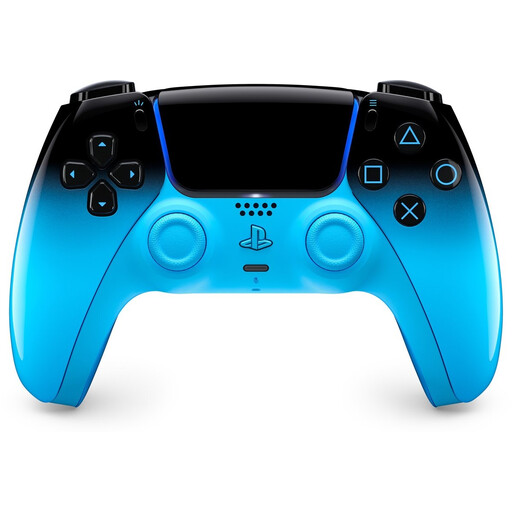
PlayStation DualSense Wireless Controller V3, Hyperpop Rhythmic Blue Edition
An option for PS5 or a supported PC game if you’re looking for a DualSense controller. Sony says haptic feedback and adaptive triggers depend on the game, and USB may be required.
View at Joybuy
 No image available
Nintendo Switch Pro Controller Black
An option for Nintendo Switch if you’re looking for a wireless Pro Controller. Nintendo also confirms that it can be used wirelessly with Switch 2; check which features your game supports.
View at Joybuy
 No image available
BEITONG KP70 Elite Wireless Gaming Controller, 6 Programmable Buttons
Worth considering if you’re looking for a controller with extra programmable buttons. Check the listed platform support for your setup and decide which type of connection you want to use.
View at Joybuy
 No image available
Nintendo Switch 2 Official Pro Controller Black
An option for Nintendo Switch 2. According to Nintendo, this controller isn’t compatible with the original Nintendo Switch.
View at Joybuy
Frequently asked questions
Will a Switch 2 Pro Controller also work with my original Nintendo Switch?
No. Nintendo says the Switch 2 Pro Controller doesn’t work with the original Switch. However, Nintendo says the original Switch Pro Controller can be used wirelessly with Switch 2.
Will I always get haptic feedback and adaptive triggers when using DualSense on PC?
No. Sony says these features are available when a game supports them, and a USB connection may be required. Check that your game supports them and that you’re using a suitable connection.
How long does it take to charge a Nintendo Switch Pro Controller?
Nintendo says it takes about six hours to charge fully. The stated battery life is around 40 hours, but it may be shorter depending on the software and features in use.
What are my rights when buying a controller online in the Netherlands?
For distance purchases from a business, the Government of the Netherlands says you’ll often have a 14-day cooling-off period. You’re also entitled to a product that conforms to the agreement. The Netherlands has no fixed statutory warranty period, and the seller must resolve any relevant fault. Check your purchase terms as well.


