
Adventure gamer with a dedicated console
First, you want to know whether the controller works with your console and game. PlayStation, Microsoft and Nintendo each describe the support and features available on their own platforms.


First, choose a controller that works with your console or PC and the game you want to play. Then decide whether you want visible lighting or dimmable indicators. For long sessions, power and connectivity matter too, while haptics, triggers and extra buttons only make a difference if your game and platform support them.
First, you want to know whether the controller works with your console and game. PlayStation, Microsoft and Nintendo each describe the support and features available on their own platforms.
You might want visible controller lighting, or prefer less distraction from bright indicators. Options vary by model and platform: PlayStation describes indicator settings for PS5, while PowerA offers adjustable lighting zones on Lumectra models.
You’ll want to consider grip, power and freedom of movement. A cable, AA batteries and a rechargeable battery each involve different trade-offs, as information from Microsoft, Nintendo and 8BitDo shows.
First check that your system and game support the controller. Then compare lighting, comfort, feedback and power based on how you play.
| What to consider | What should you check? | Who is this most important for? |
|---|---|---|
| Compatibility | Check that your console or operating system and the game support the controller and the features you want. | I want to be sure my usual console and game work with the controller before anything else; around 29% of consumers put compatibility first. |
| Lighting in a dark room | Check whether you can adjust the brightness on the exact model and whether the buttons themselves are illuminated. | In a dark room, I want to choose between visible lighting and as little distraction as possible; around 23% of consumers consider controller lighting first. |
| Comfort during long sessions | Compare the grip and layout. If you’re considering a wired model, check that the cable is long enough for where you sit. | During long sessions, I want a comfortable grip and enough room to move where I’m sitting; around 18% of consumers prioritise grip and seating distance. |
| Feedback and extra controls | Check which types of feedback your game supports and whether you can assign extra buttons as you wish. | I want haptics, triggers or extra buttons to be genuinely useful in my game; around 18% of consumers prioritise feedback supported by the game. |
| Power and play time | Check the power source, what’s included with the model and the conditions under which the stated battery life applies. | For a long gaming session, I want to know whether I’ll need to change batteries, recharge or play with a cable; around 12% of consumers prioritise power for uninterrupted play. |
PowerA describes lighting zones, while PlayStation describes a setting for indicator brightness. Neither confirms that the button labels light up.
For the exact model, check separately which parts are illuminated and how you can adjust the brightness.
PlayStation says adaptive triggers and haptics require game support. Haptics on PC may also require a USB connection.
Check support for your game and platform before making these features a deciding factor.
The Xbox quick-start guide explains how to insert batteries. Nintendo and 8BitDo list rechargeable batteries and usage-dependent play times for specific models.
Check the power source and what’s included with the exact model. Treat stated battery life as dependent on usage, not as guaranteed play time.
The DualSense is designed for PS5 players who want to use haptics and adaptive triggers in games that support these features.
The Xbox Wireless Controller is designed for Xbox and supported PCs. Microsoft lists Bluetooth and button mapping among its features.
The Switch Pro Controller is designed for compatible Switch games and, according to Nintendo, features motion controls, HD rumble and amiibo functionality.
The Advantage Wired with Lumectra is designed for supported Xbox systems and Windows PCs when adjustable RGB lighting is what you’re after.
The Ultimate 2C Wireless is designed for supported Windows and Android devices and features assignable extra bumpers and Hall Effect sticks.
This selection includes controllers for Nintendo Switch, PS5 and Xbox or Windows PC, with controller lighting listed for some models. Check whether the lighting illuminates the buttons themselves on the exact model.
 No image available
For playing on Nintendo Switch. The specifications list Bluetooth, seven-colour LED lighting, vibration feedback and a stated range of 10 m.
 No image available
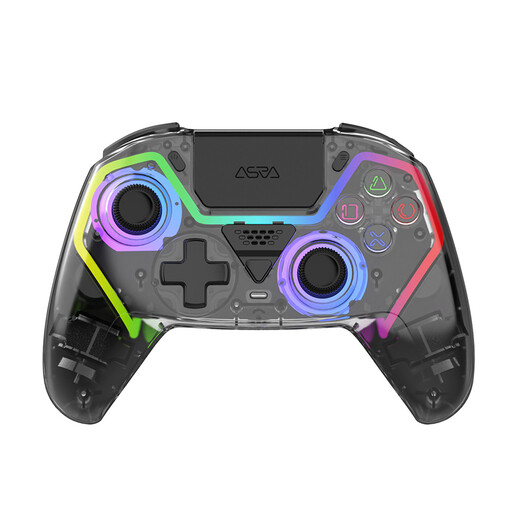
For anyone looking for a controller for PS5. This model lists RGB lighting, programmable buttons, Hall Effect sticks and a 1000 mAh battery.
 No image available
For use with PC or Nintendo Switch; the listed platforms also include iOS and Android. This bundle lists Mag-Res TMR sticks, Hall and Micro 2-in-1 triggers, RGB lighting, a 1000 Hz polling rate and a charging dock.
 No image available
For Nintendo Switch players looking for a black Pro Controller.
 No image available
For use with Xbox or a Windows PC. The product details list Hall Effect sticks and triggers, support for Xbox Series X|S, Xbox One, Windows 10/11 and Steam, and a detachable 3 m USB-C cable; the cable limits how far you can sit from the console or PC.
Yes. PlayStation describes the ‘Brightness of Controller Indicators’ setting under Settings > Accessories > Controller (General). This does not confirm that all lighting can be turned off completely.
No. PC compatibility alone does not guarantee this. According to PlayStation, the game must support adaptive triggers and haptic feedback; haptics on PC may also require USB.
The Xbox quick-start guide explains how to insert batteries. For the exact model, check whether AA batteries are included and which charging option you’d like to use; don’t assume a battery is included as standard.
According to ACM ConsuWijzer, online purchases generally come with a statutory cooling-off period of up to 14 days after delivery, although there are exceptions. If a product doesn’t perform as you could reasonably expect under normal use, you may also be entitled to a statutory guarantee from the seller.
The Dutch government lists collection points for used batteries at shops and supermarkets that sell batteries. There are also places to hand in small discarded electrical appliances; check the collection point’s terms and conditions.