
Console players with wired headphones
If you want to connect your headphones to the controller, check that your specific controller, console and audio connection all work together.


Start by choosing a controller that works with your console or PC and lets you connect your headphones the way you want. Then compare support for haptic feedback and triggers in your games, and consider whether a rechargeable battery, replaceable batteries or a cable best suits your gaming sessions. Features vary by system and connection mode.
If you want to connect your headphones to the controller, check that your specific controller, console and audio connection all work together.
Haptic effects are most relevant when they’re supported by both the game and the connection mode you’re using.
If you use several devices, check whether the controller connects via USB, Bluetooth or another method, and where you’ll plug in your headphones.
Start with compatibility and the audio connection you need. Then compare the effects available in your games and the power source or cable supplied with the specific model.
| What to consider | What should you check? | Who is this important for? |
|---|---|---|
| Compatibility | Check the console, PC and exact controller model. Nintendo Support states that the Switch 2 Pro Controller only works with Switch 2. | If I play on a particular system, I want to be sure the controller is designed for it. Around 33% of consumers put compatibility first. |
| Audio connection | Decide whether your headphones need to connect to the controller or directly to the device. Sony Support requires a wired controller connection to use the DualSense headset socket on PC or Mac. | If I want to hear audio through the controller, the connection needs to work with my setup. Around 27% of consumers prioritise audio connectivity. |
| Haptics and triggers | Check that your specific game supports them and, if you’re playing on PC, confirm which connection is required. Sony says DualSense haptics and adaptive triggers depend on the game. | If tactile effects matter to me in adventure games, I want to know whether my games support them. Around 20% of consumers say gameplay feel is their main consideration. |
| Power and cable | Check whether the model uses a rechargeable battery, AA batteries or a cable, and what’s included. Nintendo UK estimates that the Switch 2 Pro Controller’s battery lasts for around 40 hours. | For long sessions, I want to avoid having to stop frequently to recharge or replace batteries. Around 20% of consumers prioritise uninterrupted play. |
For DualSense on PC, Sony requires a wired connection to use the headset socket. Pairing via Bluetooth doesn’t automatically mean audio will play through the controller.
Check the entire connection path, from your gaming device to the controller to your headphones, including the connection mode you’ve chosen.
Nintendo states that the Switch 2 Pro Controller only works with Switch 2. That’s why it’s important to check the exact model name and compatibility.
Check the full product name and your console version before ordering.
Sony says that haptic feedback and adaptive triggers depend on game support. On PC, haptic feedback also requires a USB connection.
Check which features are supported in the games you actually play and which connection they require.
Controllers can vary in their power source and cabling. A fixed cable affects how freely you can move, while rechargeable or replaceable batteries may need attention during use.
Check what’s in the box and whether your gaming setup suits the charging equipment, batteries or cable length required.
Depending on the model, you may need a charging solution, AA batteries or enough cable length to reach comfortably.
A good choice for PS5 players who want to use DualSense features in games that support them.
An option for Xbox players who want to connect a wired headset to a controller with a 3.5mm socket.
The Switch 2 Pro Controller is designed for Switch 2 players who want to connect headphones to the controller.
The white wired model reviewed here is worth considering if you want a cable and a headset socket on the controller.
The Ultimate 2C Wireless may suit Windows users who connect their headphones directly to their PC.
This Joybuy selection includes controllers for PS5, PS4, PC, Xbox and Nintendo Switch 2. Check that each model works with your system and where you can connect your headphones.
 Image unavailable
For anyone looking for a DualSense controller for PlayStation 5 in the Marvel's Wolverine Battle Yellow Limited Edition.
The product name describes a wireless controller. Support for haptic feedback and adaptive triggers varies by game.
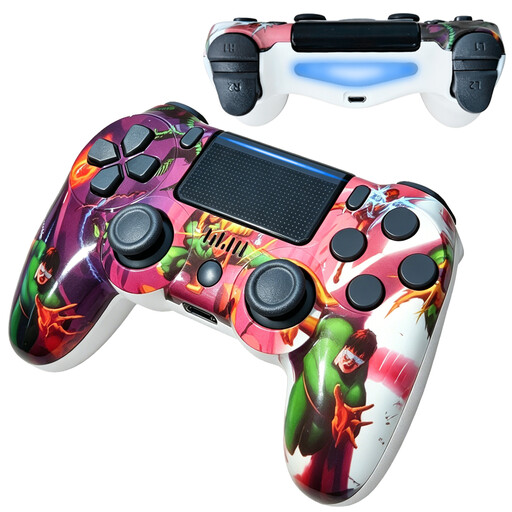 Image unavailable
For anyone looking for a wireless controller for PS4 gaming.
The product name lists Bluetooth, dual vibration feedback and a 600 mAh battery. Before buying, check that this model works with your console and supports the headphone connection you want.
 Image unavailable
For gaming on PC, Nintendo Switch or Switch 2. Check that the connections and connection method suit your setup.
The product name lists haptic feedback triggers and 6 programmable buttons. Don’t assume the controller has a headset socket without checking the exact model.
 Image unavailable
For anyone looking for a wired controller for Xbox, Windows or Steam.
The product name lists Hall Effect joysticks and triggers. The USB-C cable is detachable and 3 m long, so bear its reach in mind while you play.
 Image unavailable
For Switch 2 players who want to connect headphones to the controller.
Nintendo specifies a four-pole 3.5mm stereo socket that meets the CTIA standard, and an estimated battery life of around 40 hours. According to Nintendo, this controller only works with Switch 2.
Not through the headset socket in that setup: PlayStation Support requires a wired connection between the controller and the PC or Mac.
No. Nintendo Support states that the Switch 2 Pro Controller only works with Nintendo Switch 2.
Use an Xbox wireless controller with a 3.5mm socket and a headset with a compatible 3.5mm plug. If you’re using a PC, also check the specific headset and connection method. Xbox’s guidance on the Xbox One Chat Headset doesn’t automatically apply to every headset.
No. The Netherlands Enterprise Agency describes CE as a conformity marking, not an independent safety certification. The requirements for a specific controller depend on its product category and any applicable exemptions. The Agency’s information on this was checked on 15 January 2026 and 24 November 2025.