
PC gamer looking for peace of mind
You play story-driven games on Windows and want to check in advance that your controller works with your game. Steam has filters that let you check support by controller type.


First, choose a controller that works with both your gaming device and the specific game. For supported PC games, an Xbox controller offers Bluetooth and USB-C; a DualSense is worth considering if the game supports the haptic features you want, as haptic feedback on PC requires a USB connection. At your desk, choosing between a wired controller, a wireless one or a controller with a charging dock also depends on your cable space and charging preferences.
You play story-driven games on Windows and want to check in advance that your controller works with your game. Steam has filters that let you check support by controller type.
You’re looking for haptic feedback or adaptive triggers and want to know whether your platform and game support these features. PlayStation says that support depends on the game, and that haptic feedback on PC requires USB.
You play at a dedicated desk and want to choose between a cable, replaceable batteries or a charging dock. The right option also depends on the space you have and how you prefer to charge your controller.
Start by matching the controller to your gaming device and game. Then compare the features you want and how you’ll connect the controller at your desk.
| Buying concern | What should you check? | Who is this important to? |
|---|---|---|
| Compatibility with your device and game | Check the exact model, your gaming device and whether the individual game is supported. Steam (Valve) has filters for controller types. | I want to know before buying whether my device and the specific game will work together; around 36% of consumers put compatibility first. |
| Effects you can feel | Check each game’s support for haptic feedback and adaptive triggers. According to PlayStation, haptic feedback on PC requires a USB connection. | I want the effects I’m looking for to be available in my game; around 29% of consumers give tactile effects top priority. |
| Power and connectivity at your desk | Check the cable or receiver setup and how your chosen controller charges. Xbox Support says that separate rechargeable AA batteries do not charge inside the controller. | I don’t want to have to fiddle with cables or charging during a gaming session; around 21% of consumers prioritise a practical desk and charging setup. |
| How it feels in your hands and button layout | Compare the grip and layout of specific models, and consider whether extra assignable buttons would be useful to you. | I want a layout and grip that suit my hands; around 14% of consumers start with how a controller feels and its buttons. |
PlayStation says that haptic feedback and adaptive triggers depend on the game. Haptic feedback on PC also requires USB.
Check whether your game supports these features and what connection is required before choosing a controller for them.
The PowerA Enhanced Wired Controller we looked at has a 3 m cable. Separate rechargeable AA batteries for an Xbox controller do not charge inside the controller.
Check which cable or receiver comes with the version you’re considering, and decide in advance where the cable will run and how you’ll charge the controller.
ACM ConsuWijzer distinguishes between the statutory guarantee and any additional cover offered by the seller or manufacturer. An additional warranty does not replace your statutory rights.
Before choosing additional cover, compare what it includes with your statutory rights.
The wireless controller we looked at is a good fit for Windows and Xbox gamers who want Bluetooth and USB-C connectivity.
The DualSense is worth considering for PS5 gamers and PC gamers looking for features supported by their specific game.
The Ultimate 2.4G we looked at is an option for a dedicated Windows setup with a receiver and charging dock.
The G7 SE we looked at is a wired option for PC and Xbox if a cable suits your setup.
According to PowerA, the Enhanced Wired Controller for Xbox Series X|S is also compatible with Windows.
This selection includes wired and wireless controllers for PC, Xbox, PlayStation and Nintendo Switch.
 No image available
An option for Windows or Xbox gaming if you want the choice of Bluetooth or USB-C.
The product description lists Windows 10/11, Xbox, Bluetooth and USB-C.
The USB-C cable is sold separately. Separate rechargeable AA batteries do not charge inside the controller.
 No image available
The product title lists PS4 and PC as compatible platforms; also check support for your specific game.
The description lists a touchpad, a 6-axis gyroscope and dual vibration motors.
The description says you’ll need a USB cable for the initial pairing.
 No image available
An option for a PC or Nintendo Switch setup; check that the connection you choose is right for your device.
The product title lists haptic triggers and six programmable buttons.
The description lists wired, wireless and Bluetooth connections.
 No image available
An option for PS5 games; on PC, the features you want depend on whether the game supports them.
The product description lists haptic feedback and adaptive triggers. PlayStation says that support for these features depends on the game.
PlayStation requires a USB connection for haptic feedback on PC.
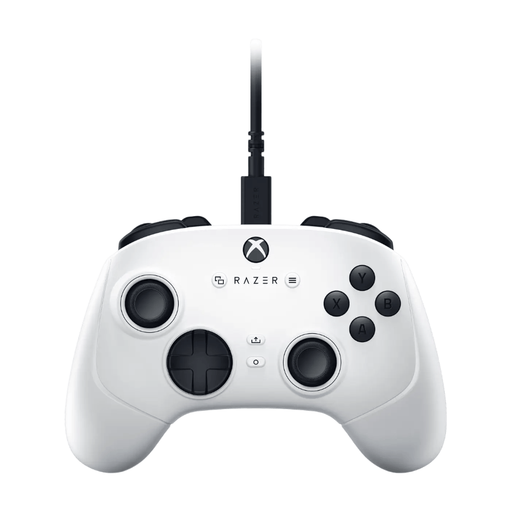 No image available
A wired option for a dedicated Windows or Xbox setup.
The description lists a detachable 3 m USB-C cable, Hall effect sticks, four rear paddles and six assignable buttons.
No. Check that the individual game supports the controller and the features you want to use. Steam shows support by controller type, while PlayStation distinguishes between connecting a controller and using DualSense features that depend on the game.
According to PlayStation, haptic feedback on PC requires both USB and support from the game. For standard controls in compatible games, you can also pair the controller via Bluetooth.
No. Xbox Support says that separate rechargeable AA batteries do not charge inside the controller. Use the charging method recommended by the battery manufacturer.
No. ACM ConsuWijzer distinguishes between an additional manufacturer’s or seller’s warranty and the statutory guarantee. With normal use, the product must meet what you could reasonably expect; if it’s faulty, the seller is responsible for providing an appropriate solution.
For many online purchases from a business, you have a statutory 14-day cooling-off period. Check the seller’s information about the cooling-off period and applicable terms; this is separate from your rights if the product is faulty.