
Players with a dedicated console
If you mainly play on a PS5, Xbox or Switch 2, first check that the controller is compatible with your device. PlayStation, Microsoft and Nintendo list compatibility by controller and platform.


First, choose a controller that works with your console or PC and the game you play. Then compare the controls and power options that suit your sessions. A different controller won’t make a screen that’s hard to see any brighter: Nintendo says you can only adjust the brightness of a Switch 2 in handheld or tabletop mode. A controller’s features aren’t proof that it will be more comfortable or perform better during your gaming sessions.
If you mainly play on a PS5, Xbox or Switch 2, first check that the controller is compatible with your device. PlayStation, Microsoft and Nintendo list compatibility by controller and platform.
If details in dark areas of a game are hard to see, check the screen and your viewing setup first. Nintendo says you can only adjust the brightness of a Switch 2 screen in handheld or tabletop mode.
If you play for long sessions, consider the button layout and how the controller is charged or its batteries are replaced. Battery life varies by model; Nintendo, for example, describes the Switch 2 Pro Controller’s battery life as an estimate.
Start with your device and game, then consider separately what you need for visibility, controls and power.
| What to consider | What to look for | Who is this important for? |
|---|---|---|
| Platform and game compatibility | Check the full model name, your console or PC version, and any features that depend on the game. | If I want to be sure my controller works with my device and game, I start by checking compatibility. Around 28% of consumers put this need first. |
| Visibility in a bright room | Check whether glare or screen brightness is the issue. On Switch 2, Nintendo says you can adjust brightness in handheld or tabletop mode. | If I find it hard to see game details in daylight, I check the screen first rather than the controller. Around 22% of consumers make visibility their top priority. |
| Comfort and power | Consider the shape and button layout, and check which charging or battery option the model uses. | For long quests, I want controls and a power option that suit my gaming sessions. Around 22% of consumers put this first. |
| Buttons, sticks and feedback | Check that your game supports the features and that any extra customisation options suit your play style. | If I want a specific button layout, type of stick or feedback, I check support for my device and game. Around 17% of consumers make controls their top priority. |
| Purchase and running costs | Check what comes with the controller and whether you can use an existing compatible controller or charging solution. | If I want to avoid unnecessary replacement or a separate power solution, I first check what I can already use. Around 11% of consumers put this consideration first. |
A controller operates the game, but it doesn’t control screen brightness. Nintendo describes the Switch 2 brightness setting as a screen setting.
Check your screen and viewing setup first. If you use your Switch 2 in handheld or tabletop mode, you can adjust the brightness there.
Supported platforms and features vary by model; wireless connectivity alone doesn’t tell you whether a controller works with your device.
Compare the full model name and listed platforms before choosing a controller.
The Xbox Wireless Controller uses AA batteries; Nintendo confirms that the older Switch Pro Controller can be used wirelessly with Switch 2.
Check what’s included and whether you prefer charging or batteries. If you already own a Switch Pro Controller, see whether it meets your needs before replacing it.
DualSense is an option for PS5 players who want to use haptic feedback and adaptive triggers in games that support these features.
The Xbox Wireless Controller is listed as compatible with supported Xbox consoles and Windows PCs.
The Nintendo Switch 2 Pro Controller is designed for Switch 2; Nintendo also says the older Switch Pro Controller can be used wirelessly with Switch 2.
The Ultimate 2 Wireless Controller is a customisable option for platforms including Windows.
This Joybuy selection includes controllers for platforms such as Switch and PC, PS5, Xbox and Switch 2. Which models are right for you depends on your device and game; none of these controllers will make a screen brighter on its own.
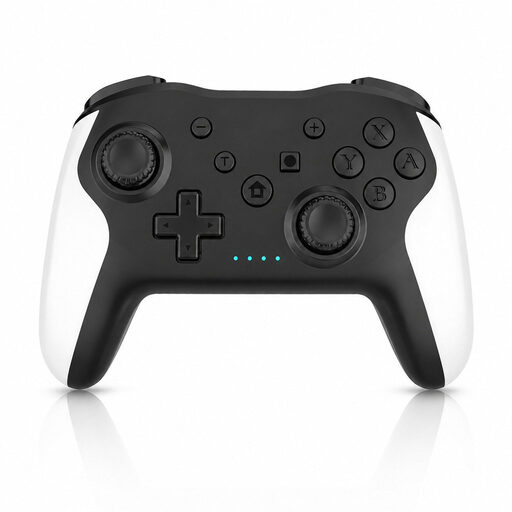 No image available
An option if you’re looking for a controller for Switch or PC; the product name also mentions Dual Vibration and Gyro.
The product information lists Switch, PC and Android as compatible devices.
 No image available
A PS5 controller for players who want to use haptic feedback and adaptive triggers in games that support these features.
The product name specifies the wireless V3 variant in Cosmic Red.
 No image available
An option if you’re looking for an Xbox controller for a supported Xbox console or Windows PC.
Microsoft lists up to 40 hours of battery life for the Xbox Wireless Controller, although actual battery life may vary. This model uses AA batteries.
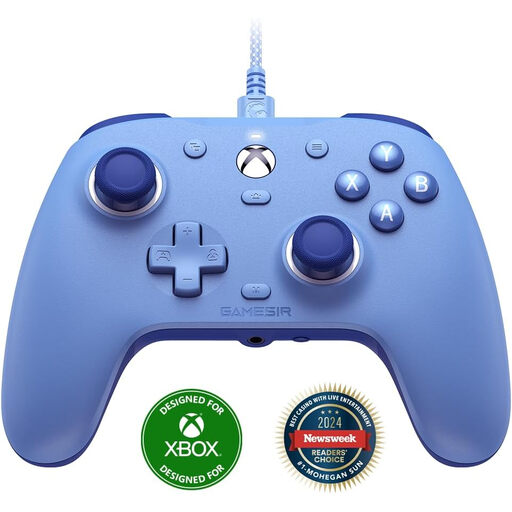 No image available
A wired option for players looking for an Xbox or Windows controller.
The product name lists Xbox Series X/S, Xbox One and Win10/Win11 as supported platforms.
 No image available
A controller for Switch 2; Nintendo lists this model for the platform.
Nintendo estimates battery life at around 40 hours. Actual battery life depends on the conditions.
Not directly: a controller operates the game, while screen brightness is a setting on the display device. Nintendo says you can adjust Switch 2 brightness automatically or manually in handheld or tabletop mode; this doesn’t apply as a setting for every TV or monitor.
Yes. Nintendo says you can pair the older Switch Pro Controller wirelessly with Switch 2 and charge it using a USB cable connected to the Switch 2 dock. It’s not the same model as the newer Switch 2 Pro Controller with assignable GL/GR buttons.
Before a long session, check which power option your model uses. Nintendo estimates around 40 hours of use and around 3 hours to charge for the Switch 2 Pro Controller, depending on conditions. The Xbox Wireless Controller uses AA batteries or a suitable rechargeable solution.
For online purchases, ACM ConsuWijzer says you often have a 14-day cooling-off period after delivery, with some exceptions. If a product doesn’t meet what you could reasonably expect during normal use, ACM ConsuWijzer says the seller must resolve the issue free of charge, for example by repairing or replacing it. The rules for the cooling-off period and for products that don’t meet expectations are different.