
Vandaag of morgen in huis

Kwaliteit gegarandeerd

Welkomstaanbiedingen ontgrendelen: GRATIS bezorging | Tot 80% korting | Gratis 30 dagen JoyPlus-proefperiode
Download de app
Buying a new game controller seems simple until you get tangled in a web of marketing jargon, vague promises, and technical specifications. Whether you're looking for a replacement for your worn-out gamepad or considering an upgrade, you're likely to pay for features you don't need or, worse, buy a controller that starts failing after just a few months. Let's break down the most common pitfalls and see what you really need to look for.
To avoid buyer's remorse, it's crucial to look beyond the marketing. Focus on the following three objective specifications that determine the quality and lifespan of your controller.
Don't just check if a controller is compatible, but how. A wireless controller can connect via Bluetooth or a 2.4GHz USB dongle. Bluetooth is widely supported, but a 2.4GHz connection often offers lower latency, which is critical for competitive games.
Sony DualSense works on a PC, but advanced features like haptic feedback and adaptive triggers are only supported in a limited number of PC games.Nintendo Joy-Con or Pro Controller guarantees full functionality.This is the most important factor in avoiding the stick drift pitfall.
gamepad with Hall Effect joysticks is a more durable investment.Also, look at the triggers. Analog triggers measure how far you press them, ideal for racing games. Microswitch triggers provide a fast, clicking response, similar to a mouse click, which can be an advantage in shooters.
How a controller feels in your hands is personal but essential. The two dominant layouts are:
Pay attention to the weight, the grip texture, and the button placement. A controller that isn't comfortable will lead to cramps and reduce your stamina during long gaming sessions.
Below are some popular choices, matched with specific user profiles. These recommendations are based on their objective specifications and how they address the pitfalls mentioned earlier.
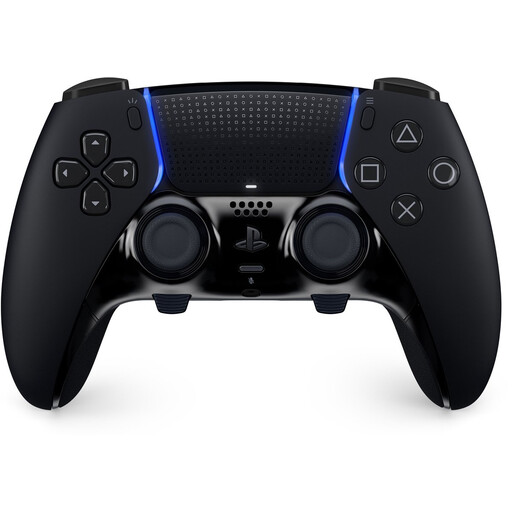
Why This Fits Their Persona: For the serious PlayStation 5 player seeking full control and customisation to gain a competitive edge. This is an official `pro controller` designed for performance.
The swappable joystick modules offer a direct solution to stick drift. Instead of replacing the entire controller, you just replace the module. The customisable buttons are functional, not a marketing gimmick.
Fully customisable buttons, triggers, and stick sensitivity. Retains all features of the standard `Sony DualSense`, including haptic feedback and adaptive triggers.
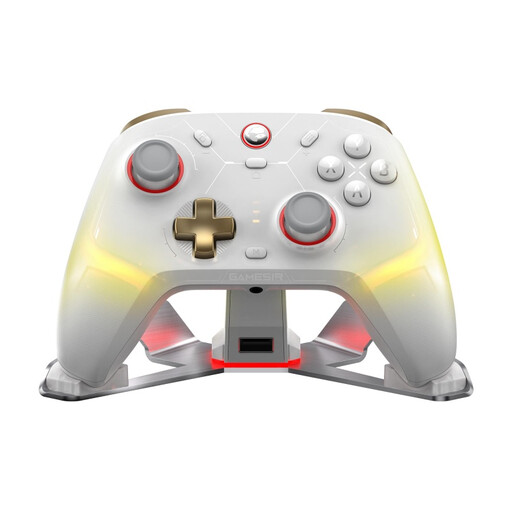
Why This Fits Their Persona: Ideal for gamers who play on multiple systems—like PC, Nintendo Switch, and mobile devices—and want a single, durable, high-performance controller for everything.
It directly addresses the pitfalls of compatibility and durability. Its tri-mode connectivity (Bluetooth, 2.4G, wired) ensures a stable connection on any platform. The combination of Hall Effect triggers and advanced joysticks minimises the risk of stick drift.
Broad compatibility with PC, Switch, iOS, and Android. Features durable Hall Effect technology in its triggers and advanced joysticks for precision and a long lifespan.
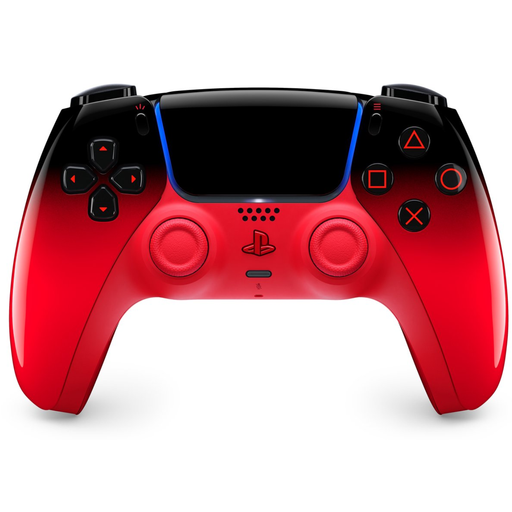
Why This Fits Their Persona: For the PS5 or PC gamer who wants the reliability and full functionality of an official controller but also seeks a personal and striking design.
As an official Sony product, you're guaranteed 100% compatibility and support for all unique PS5 features. This prevents the disappointment of third-party controllers that fail to deliver on promised features.
Delivers the trusted, high-quality experience of the DualSense controller, including haptic feedback and adaptive triggers. The unique colour from the Hyperpop collection adds a personal touch to your setup.
We have compiled a complete, up-to-date list of products that fully meet these strict selection criteria.
Stick drift is a defect where your controller's joystick registers movement even when you're not touching it. This is caused by wear on the internal sensors. The most effective way to prevent this is to buy a game controller with Hall Effect joysticks. These use a contactless magnetic system that doesn't wear down, significantly reducing the risk of stick drift.
Yes, a PS5 controller like the Sony DualSense can be connected to a PC controller via Bluetooth or a USB-C cable. Basic functionality works out of the box. However, for advanced features like adaptive triggers and haptic feedback, support depends on the specific game. For games that don't support them natively, third-party software may be needed to emulate these features.
Battery life varies greatly by model and usage, typically ranging from 8 to 40 hours. Controllers with many extras, such as intense haptic feedback and RGB lighting, consume more power. For example, the official Xbox controller is known for its long battery life (up to 40 hours with AA batteries), while the Sony DualSense, with its advanced feedback features, usually lasts around 10-15 hours. Always check the manufacturer's specifications for an estimate.
