
Vandaag of morgen in huis

Kwaliteit gegarandeerd

Welkomstaanbiedingen ontgrendelen: GRATIS bezorging | Tot 80% korting | Gratis 30 dagen JoyPlus-proefperiode
Download de app
A great game controller can be the difference between a frustrating evening and a legendary victory. But the market is flooded with options, and it's easy to fall for clever marketing ploys. Before you buy a new controller, it's crucial to know what to look for. Many gamers make the same mistakes, ending up with a gamepad that develops issues after just a few months.
Below, we'll discuss the most common pitfalls and how to avoid them, ensuring you choose a controller that suits your playstyle and platform.
The 3 most common pitfalls when buying a controller:
To make the right choice, it helps to understand a few technical specifications. These determine your controller's performance, durability, and ease of use.
The first and most important question: what will you be gaming on? A PS5 controller is designed for the PlayStation 5 and offers unique features like haptic feedback, but it won't simply work on an Xbox. An Xbox controller is often considered a great all-rounder and is usually directly compatible with Windows PCs. For the Nintendo Switch controller, official models provide the best support for features like HD Rumble and amiibo. If you're looking for a PC controller, check for support for standards like XInput, which is used by most modern games.
A wireless controller offers freedom of movement, which is ideal for couch gaming. Most modern wireless controllers have low latency, but for competitive gamers, every millisecond can count. A wired controller, by definition, won't suffer from signal loss or a dead battery and offers the lowest possible latency. The choice depends on your personal preference and the games you play.
This is a technical detail that makes a huge difference to your controller's lifespan. Most standard controllers use potentiometers, which wear down through physical contact and can cause 'stick drift'. A Hall Effect controller uses magnets and sensors to detect movement without physical contact. This makes the joysticks far more durable and accurate in the long run, and it's an effective solution against stick drift.
Based on these criteria, we've selected a few controllers that are perfect for different types of gamers.
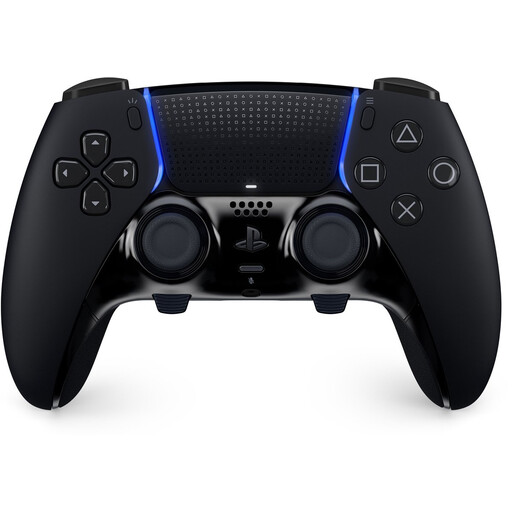
Why This Fits Their Persona: For the serious PS5 gamer looking to optimise their performance. With customisable buttons, triggers, and stick sensitivity, you can completely tailor the controller to your needs for competitive games.
This is a pro controller whose features have real practical benefits. The swappable joystick modules (sold separately) offer a direct solution for 'stick drift', meaning you don't have to replace the entire controller.
Fully customisable controls, swappable back paddles, and adjustable trigger stops. It retains the immersive haptic feedback and adaptive triggers of the standard DualSense.
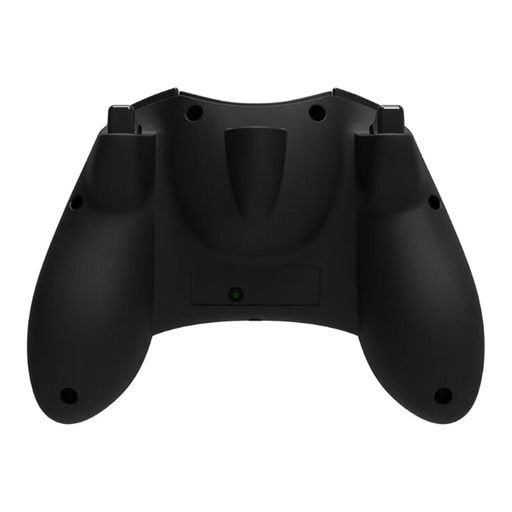
Why This Fits Their Persona: Ideal for Xbox and PC gamers who want a reliable, wired controller and are tired of 'stick drift'. The retro design is a nice bonus for those nostalgic for the original Xbox Controller S.
It tackles the 'stick drift' problem head-on with Hall Effect sticks. This technology prevents the wear and tear that leads to drift in traditional controllers, promising a much longer lifespan.
Durable Hall Effect joysticks for precision without drift. The 3-meter wired USB-C connection ensures a stable connection with minimal latency.
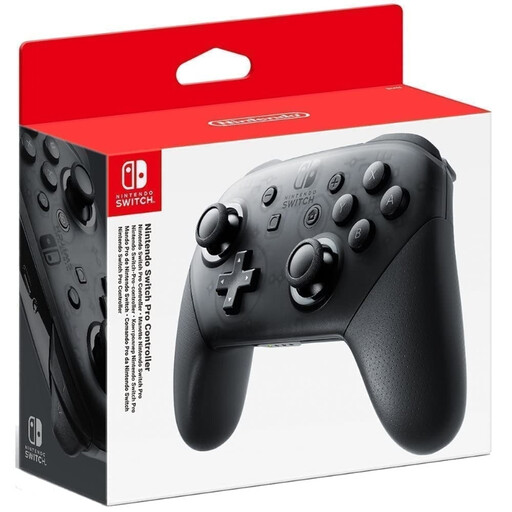
Why This Fits Their Persona: For Switch players who want a more traditional and comfortable gaming experience than the standard Joy-Cons can offer. Perfect for long gaming sessions on the TV.
It completely avoids the compatibility maze. As an official Nintendo product, this gamepad works seamlessly with the Switch and supports all native system features like HD Rumble and motion controls.
Ergonomic and comfortable design. According to Nintendo, the controller has an impressive battery life of up to 40 hours, meaning you'll rarely need to recharge.
We have compiled a complete, up-to-date list of products that meet these strict selection criteria and local regulations.
A Hall Effect controller uses magnetic fields to measure the position of the joysticks, instead of physical sliding contacts (potentiometers). Because there is no physical contact, there is virtually no wear and tear. This makes the joysticks much more durable and prevents the notorious 'stick drift' problem. For gamers who plan to use their controller intensively, this is a wise investment in the longevity of their gaming accessories.
Not always. Most modern PC games use the XInput standard, which was originally developed for Xbox controllers. Controllers that support XInput (like official Xbox controllers and many third-party models) usually work right out of the box. Older or cheaper controllers sometimes use the legacy DirectInput standard, which can lead to compatibility issues or the need to use software to manually map buttons. Always check if a PC controller supports XInput for a hassle-free experience.
The most effective way is to buy a Hall Effect controller. If you do opt for a model with traditional potentiometers, there are a few things you can do to extend its lifespan. Avoid applying excessive pressure to the joysticks, store the controller in a dust-free place, and clean it regularly with compressed air to remove debris from the mechanisms. Be careful not to drop or knock it, as this can damage the delicate internal components.
