What should you look for in an RTS monitor for a small desk?
First, measure the available space, including the monitor stand. Then decide whether map detail, achievable refresh rate or your desk layout matters most.
| What to consider |
What to look for when buying |
Who is this important for? |
| Will the monitor fit on the desk? |
Measure the available width and depth, compare the dimensions with the stand fitted, and leave room for your keyboard, mouse and cables. |
If my desk is shallow, I first want to know whether the stand, keyboard and mouse will all fit. Around 33% of consumers prioritise how well the monitor fits their space. |
| Are the map and interface detailed enough? |
Compare Full HD on a compact screen with QHD on a larger screen, and check whether the game's interface can be scaled appropriately. |
I want to see small interface elements clearly, so I weigh up extra pixels against the additional desk space required. For around 27% of consumers, map and interface detail comes first. |
| Can your setup make the most of the desired refresh rate? |
Check your PC output, cable and monitor port, and distinguish between the standard rate and an overclocked rate. |
If I often move around the map, I want to know whether my PC and connection can actually deliver the refresh rate I want. Around 20% of consumers put achievable smoothness first. |
| Are the connections and layout right for your workspace? |
Check whether you need speakers, which connections your PC uses and whether the VESA pattern is compatible with a monitor arm, if you plan to use one. |
I don't want unnecessary equipment taking up space on my small desk, so I check the audio, connections and mounting options in advance. For around 20% of consumers, connections and desk layout matter most. |
Joybuy gaming monitors for a compact setup
This selection features compact gaming monitors, mostly with Full HD resolution. Compare the stand dimensions and connections for each model before deciding whether it will suit your desk and PC.
 No image available
DELL SE2425HG 24-inch 200Hz monitor
An option to compare if you're looking for a 24-inch gaming monitor for a compact setup; check the stand depth against your desk.
The product information lists 200 Hz via DisplayPort; the achievable refresh rate via HDMI may be lower.
View at Joybuy
 No image available
KTC H24B9S 24-inch 144Hz Full HD monitor
For anyone looking for a 24-inch Full HD monitor with a quoted refresh rate of 144 Hz.
The product name specifies an IPS panel, 1080p Full HD and 144 Hz.
View at Joybuy
 No image available
GIGABYTE GS24F14A 23.8-inch Full HD gaming monitor
A compact Full HD option to compare if desk space is your main constraint; measure the full footprint before choosing.
GIGABYTE specifies 1920 × 1080 resolution, 144 Hz as standard and 175 Hz when overclocked. Dimensions with the stand fitted are 537.7 × 414.5 × 152 mm, and the VESA size is 75 × 75 mm. The stand has no height adjustment.
View at Joybuy
 No image available
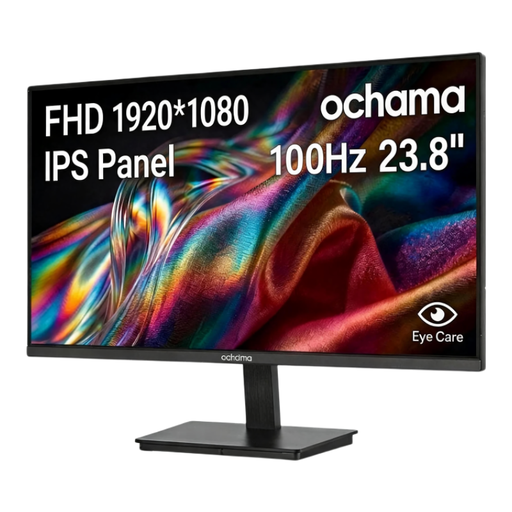
Ochama 23.8-inch 1080p 100Hz gaming monitor
An option to compare if you're looking for a 23.8-inch screen with Full HD resolution for a more compact setup.
The product name specifies 1080p resolution and a 100 Hz refresh rate.
View at Joybuy
 No image available
TITAN ARMY C24A1H 16:9 VA FHD 240Hz monitor, EU Version
Compare this model if you're looking for a Full HD gaming monitor with a high quoted refresh rate; check that your PC and connection can support that setting.
The product name specifies a VA panel, Full HD, 240 Hz and a 16:9 aspect ratio.
View at Joybuy
Frequently asked questions
Is 27-inch QHD automatically better for real-time strategy games?
No. QHD offers more pixels than Full HD, but a 27-inch screen takes up more space. The usable interface size also depends on the game and its settings. Measure your desk and check that your PC can deliver your preferred QHD setting.
How do I use the quoted refresh rate once the monitor is connected?
Check your PC's output, the cable and the monitor port, then select your preferred refresh rate in your computer's system settings. Dell lists a maximum QHD refresh rate of 180 Hz via DisplayPort and 144 Hz via HDMI for the G2725D. For the GIGABYTE GS24F14A, 175 Hz is an overclocked rate above the standard 144 Hz.
What are my rights if a monitor bought online doesn't fit or develops a fault too soon?
For a typical online consumer purchase, ACM ConsuWijzer says you generally have a statutory 14-day cooling-off period after delivery; check whether an exception applies. If a product is faulty, the retailer is responsible under the statutory guarantee, which in the Netherlands does not have a fixed term of exactly two years.
What should I check when buying an electronic screen intended for the Dutch market?
According to the Dutch government, electronic products placed on the market in the EU must have a CE marking. Check the marking and product information for the specific offer, especially if the seller is based outside the EU. A model specification alone doesn't confirm the marking on every individual product.


