
Team player in a shared room
Wants to communicate clearly while gaming and checks that the audio connections suit their headset and microphone. The MSI G244F E2 specifications list a headphone output; this alone does not confirm a microphone input.


A compact Full HD screen suits a small desk and fast-paced games. A 27-inch QHD screen may be a better fit if you also want room for study windows and your desk and gaming device can accommodate it. Check the resolution and refresh rate for each connection. A headphone output does not automatically mean the monitor also has a microphone for team chat.
Wants to communicate clearly while gaming and checks that the audio connections suit their headset and microphone. The MSI G244F E2 specifications list a headphone output; this alone does not confirm a microphone input.
Needs a screen that fits alongside a keyboard and other essentials, so compares the screen and stand dimensions with the available space. Philips lists the 24M1N3200ZA/00 as a 23.8-inch Full HD screen.
Wants to use games and study windows on the same screen, and weighs up a larger QHD model against the desk space available and the output of their PC or console. AOC lists the Q27G4XF as a 27-inch QHD model.
| What to consider | What should you check? | Who should pay extra attention? |
|---|---|---|
| Team chat and audio | Check where to connect your headset and microphone, and whether the exact model has a microphone input. MSI lists a headphone output for the G244F E2; LG does not list a microphone for the 27GS75Q-B. | If I want to communicate during team training, my microphone needs to work through the monitor or directly through my PC or console. Around 31% of consumers prioritise team chat and audio connections. |
| Desk space and picture | Measure the available width and depth, including the stand. Compare these with the dimensions of the exact model and check the refresh rate you want through the connection you plan to use. | At a small desk, I want to keep room for my other things while choosing a screen for fast-paced games. Around 31% of consumers give compact gaming and a smooth picture their highest priority. |
| Study as well as gaming | Compare 23.8-inch Full HD with 27-inch QHD and check that the screen and stand fit on your desk. Also check whether your PC or console can output the resolution you want. | If I want to use study windows and games on one screen, I weigh the extra screen space against the larger set-up. Around 23% of consumers prioritise this combination of study and gaming. |
| Source, port and Hz | Check the resolution and maximum Hz for each input on the exact model, then compare these with the video output and cable on your gaming device. Dell lists QHD up to 165 Hz via DisplayPort and up to 144 Hz via HDMI for the G2724D. | I want my existing PC or console to output the picture settings I’ve chosen through the connection I use. Around 15% of consumers make compatibility with their source and port their top priority. |
A headphone output does not confirm that the monitor also has a microphone function. MSI lists a headphone output for the G244F E2; LG explicitly states that the 27GS75Q-B does not have a microphone.
Before buying, check where your headset and microphone connect and whether that connection works with your PC or console.
If your set-up doesn’t have a suitable microphone, you may need a separate headset or microphone.
The refresh rate you can achieve depends on the source and connection you use. Response time measurements can also differ, so they are not always directly comparable: LG lists both 5 ms GtG in ‘Faster’ mode and 1 ms MBR for the 24GS50F-B.
Check the specifications for the port you’ll actually use, and only compare response times when the same measurement method is given.
The screen’s diagonal measurement doesn’t tell you how much space the complete set-up will take up. Remember to measure the width and depth of the stand on your desk, too.
Compare your available space with the dimensions of the exact model, including its stand.
The features listed below apply to the specific models mentioned and are not a judgement on every product from each brand.
Philips Netherlands lists the Evnia 24M1N3200ZA/00 as a compact 23.8-inch Full HD model with 165 Hz.
AOC Netherlands lists the AGON by AOC Q27G4XF as a 27-inch QHD model with 180 Hz and a height-adjustable stand.
MSI specifies the G244F E2 as a 23.8-inch Full HD model with 180 Hz through the listed video inputs.
LG Netherlands lists the UltraGear 24GS50F-B as having a 23.8-inch VA panel with a maximum refresh rate of 180 Hz.
Dell lists the G2724D as a 27-inch QHD screen with different maximum refresh rates for each connection.
This selection includes compact Full HD gaming monitors and 27-inch QHD models for gaming, with the option to study on the same screen.
 No image available
A 27-inch QHD model to consider if you want to combine gaming and study windows on one screen.
2560 × 1440; 180 Hz; 2 HDMI 2.0 ports and 1 DisplayPort 1.4.
 No image available
A compact Full HD option to compare if desk space is limited and you’re looking for a high stated refresh rate.
24 inches; Full HD; 200 Hz; HDMI and DisplayPort inputs.
Check the stand dimensions and the picture settings your gaming device supports through the connection you choose.
 No image available
A 27-inch QHD model to consider if you want to use one screen for gaming and studying and have enough desk space.
2560 × 1440; 240 Hz; adjustable stand; built-in speakers and a headphone output.
The headphone output does not confirm that a microphone for team chat is included; check your complete audio set-up.
 No image available
A 27-inch QHD model to compare if you’re looking for one screen for gaming and study windows.
2560 × 1440; 280 Hz; QD-OLED; HDMI 2.1, DisplayPort 1.4a and USB-C with DisplayPort Alt Mode.
Check that your gaming device supports the resolution and refresh rate you want through the connection you choose.
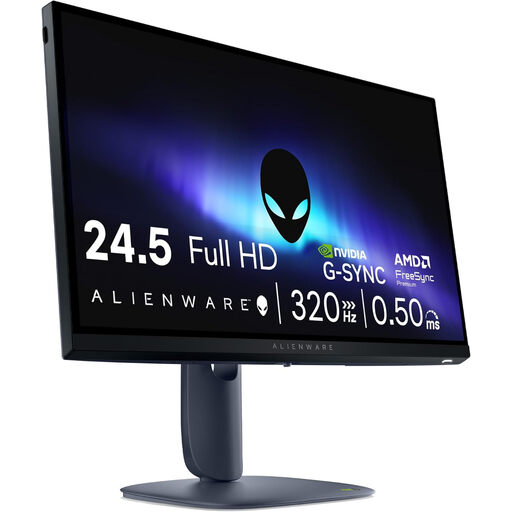 No image available
A compact Full HD model to compare if you play fast-paced games and want to take the desk space available into account.
1920 × 1080; 320 Hz; HDMI 2.1 and DisplayPort 1.4.
Check that your PC or console can handle the settings you want through the output and connection you’re using.
Not on the basis of a headphone output alone. Check whether the exact model has a microphone; if not, connect a suitable headset or microphone to your PC or console. MSI lists a headphone output for the G244F E2; LG states that the 27GS75Q-B does not have a microphone.
The source, cable and monitor connection you use all need to support the combination you want. For example, Dell lists QHD up to 165 Hz via DisplayPort and up to 144 Hz via HDMI for the G2724D. Check the specifications for your model and the port you’re using.
Electronic displays within the scope of the EU rules carry an EU energy label; the European Commission describes the scale from A to G. In the Netherlands, statutory guarantee rights apply alongside any manufacturer’s guarantee. ACM ConsuWijzer states that if a product breaks earlier than you could reasonably expect during normal use, the seller must resolve the issue free of charge.
As a private consumer, when you buy a new, similar appliance, you can hand in the old one free of charge under the old-for-new scheme, including when you buy online. The Dutch government also lists collection points and local authority options; check with the seller or your local authority to find out how to hand in your device.