
Filming pen details
You want to film the nib, finish and ink line close up, and can set up a camera and lens combination. Canon Netherlands states that the RF 35mm F1.8 MACRO IS STM, when purchased separately, offers up to 1:2 magnification.


For close-ups of the nib, engraving and ink line, the focusing ability of the complete camera and lens combination matters more than resolution alone. A camera with interchangeable lenses gives you the option to fit a suitable close-up lens; a compact vlogging camera may suit a solo presentation, while a webcam is a good choice for recording via your computer. Test sharpness and framing at your recording distance, and check the lighting, sound and editing setup before you choose.
You want to film the nib, finish and ink line close up, and can set up a camera and lens combination. Canon Netherlands states that the RF 35mm F1.8 MACRO IS STM, when purchased separately, offers up to 1:2 magnification.
You switch between speaking to camera and holding a fountain pen in front of the lens. Sony lists a Product Showcase setting on the ZV-E10 II, while DJI calls the Osmo Pocket 3’s focusing mode Product Showcase.
You record at your desk via a computer and want a camera that suits this way of working. Also check that the fountain pen stays in focus at close range in your setup.
Choose this if: you want to show the nib, engraving or ink line prominently and have space for a permanent setup.
Bear in mind: you may need a suitable close-up lens and extra setup; assess the working distance and video crop of the complete combination.
Choose this if: you mainly present on your own and hold the fountain pen in front of the camera from time to time.
Bear in mind: a presentation mode does not guarantee that a small nib will appear large enough in frame; test the crop at your recording distance.
Choose this if: you mainly record at your desk, directly via a computer.
Bear in mind: check in advance that the nib and writing surface appear sharp and large enough in your setup.
| Consideration | What should you check? | Who is this important for? |
|---|---|---|
| Visible pen details | Check the focusing distance, magnification, lens mount and video crop of the complete combination. Canon Netherlands states that the RF 35mm F1.8 MACRO IS STM, when purchased separately, offers up to 1:2 magnification. | If I want to show engraving or an ink line clearly, I focus on the actual crop and sharpness at my recording distance. Around 36% of consumers give visible pen details top priority. |
| Focusing while presenting | Test the focus transition with your fountain pen at the intended distance. DJI lists a minimum object distance of 20 cm for the Osmo Pocket 3. | When I hold the pen in front of the lens while speaking, I want to see whether the camera focuses on the intended subject. Around 29% of consumers prioritise a smooth solo presentation. |
| Recording via a computer | Check the connection, tripod position and whether the pen and writing surface are both framed well. Logitech specifies autofocus and a tripod thread for the Brio 4K, but not macro magnification. | For a desk setup, I want to record directly via my computer and frame the fountain pen appropriately. Computer recording is the top priority for around 21% of consumers. |
| Lighting and clear audio | Record a test clip under your own lights and listen back to your voice. For areas with a 50 Hz mains frequency, Sony suggests shutter speeds of 1/50 or 1/100 second as one possible way to reduce flicker. | When I record a spoken review, I want to avoid distracting bands of light and be able to check my voice. Around 14% of consumers give control over lighting and sound top priority. |
Resolution does not determine how large a small nib will appear in frame or how close the camera and lens combination can focus.
Check the lens, working distance and video crop before choosing a camera body or bundle.
You may need to choose a suitable lens separately to get the close-up you want.
A setting for showing a product does not confirm that a very small nib will appear large enough in frame. DJI lists a minimum object distance of 20 cm for the Osmo Pocket 3.
Test both the focus and framing with your fountain pen at the intended recording distance.
Flickering light sources can cause visible bands in your video.
Record a short test clip under the lights you actually plan to use. Sony describes adjusting the shutter speed as one possible solution.
Compare the features listed for each camera model and the lens you choose; a brand name alone won’t tell you which lens or bundle is right for your recording setup.
The EOS R50 supports RF and RF-S lenses. This gives you the option to use an interchangeable lens when putting together a close-up setup.
The ZV-E10 II is a camera with an interchangeable lens and a Product Showcase setting for showing a product during a solo presentation.
The Osmo Pocket 3 is a compact camera with a Product Showcase focusing mode.
The Brio 4K is a USB webcam for those who mainly record via a computer.
This selection includes compact vlogging cameras, webcams for recording via a computer and a 360° camera. For each option, check that the focus, framing and setup suit your fountain pen review.
 No image available
A compact vlogging camera for a fixed setup or solo presentation; test the focus and framing with your pen at the distance you want.
1-inch CMOS sensor; 4K/240fps video; 3-axis stabilisation; 2× lossless zoom; 107GB built-in storage; handle with 1/4-inch thread.
 No image available
A desktop webcam for recording via a computer; test it in your setup to see whether the fountain pen appears sharp and large enough at your chosen distance.
4K video; 8 MP; autofocus; two built-in microphones; privacy shutter; EU version.
No image available
A compact vlogging camera for product presentations; DJI states that the Osmo Pocket 3 has a minimum object distance of 20 cm, so test how the nib is framed.
1-inch CMOS sensor; 4K/120fps video; 3-axis stabilisation; fast focusing; microphone included.
 No image available
A webcam for recording via PC or Mac; test whether it captures the nib in focus and at the size you want in your desk setup.
4K webcam; 1/2-inch sensor; AI tracking; HDR; microphone with AI noise reduction.
 No image available
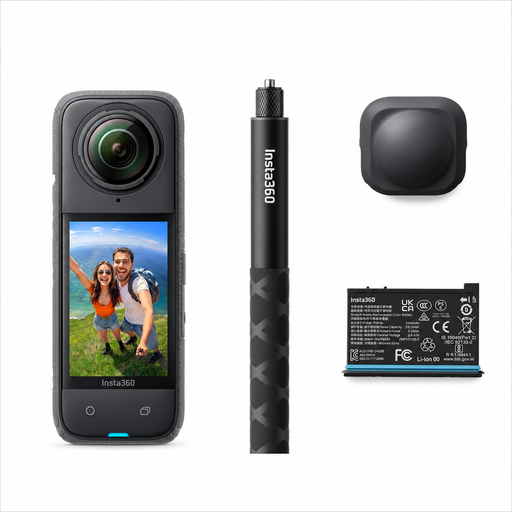
A 360° camera for choosing the angle after recording; consider whether this way of framing suits a focused fountain pen review.
165 g; 8K 30fps 360° video; FlowState stabilisation; reframe after recording.
No, 4K alone does not tell you how large or sharp the nib will appear in frame. Also check how close the chosen lens or camera can focus, and test the crop. Canon Netherlands states that the RF 35mm F1.8 MACRO IS STM, when purchased separately, offers up to 1:2 magnification; DJI lists a minimum object distance of 20 cm for the Osmo Pocket 3.
Start by recording a test clip under your own lighting. Sony describes adjusting the shutter speed as one possible way to reduce flicker and suggests 1/50 or 1/100 second for a 50 Hz mains frequency. Test which setting works with your camera and lights.
When you buy as a consumer, you are entitled to a product that works as it should, and the retailer is your point of contact if there’s a problem. The Government of the Netherlands states that there is no fixed statutory warranty period in the Netherlands. For distance purchases, a 14-day cooling-off period applies in many cases. Check the terms and any exceptions that apply to your purchase.
Recording for private use only is not the same as sharing footage more widely. The Dutch Data Protection Authority states that recognisable people in footage count as personal data, and that the exception for personal or household use no longer applies once you share footage more widely. Before publishing, consider whether others are recognisable and which privacy rules apply to your publication.