Which camera setup is right for you?

Filming nib details

You mainly want to show the nib, how it touches the paper and the trail of ink. In that case, sharp focus at your chosen recording distance matters more than general vlogging features. DJI lists a focusing range starting at 0.2 m for the Osmo Pocket 3; Canon Europe confirms that the EOS R50 is compatible with RF and RF-S lenses.

Creating writing samples

You’ll mainly be filming your hands and the paper from above, and need a setup that frames the writing clearly. Logitech describes Show Mode for desk work, while Insta360 describes DeskView as a temporary desk mode for the Link 2.

Reviewers who also present to camera

You switch between speaking to camera and showing the pen, so you’ll want to consider framing, focus changes and clear speech. Sony describes a Product Showcase Setting for the ZV-1 II; the Consumers’ Association also highlights using a tripod when filming at home.

What should you look for when choosing?

Webcam connected to a computer

Best for: recording through your computer and showing a writing sample or switching between that and your face.

Bear in mind: a downward-facing desk mode isn’t automatically a macro shot. Check the focus and framing at your working distance.

Compact standalone camera

Best for: filming yourself and the pen without keeping a computer connected.

Bear in mind: a Product Showcase Setting, such as the one Sony describes for the ZV-1 II, doesn’t in itself tell you how large a small nib will appear in sharp focus.

Mirrorless camera with interchangeable lens

Best for: close-ups are important and you want to choose a lens to suit your desired magnification.

Bear in mind: the camera body alone doesn’t determine how well you can shoot close-ups. Check which lens is included and the distance it requires.

Gimbal camera

Best for: capturing moving shots of the pen or yourself as well as desk footage.

Bear in mind: stabilisation matters less for a fixed writing sample. DJI specifies that the Osmo Pocket 3 can focus from 0.2 m.

What to consider What should you check? Who should pay most attention?
Nib and ink trail Check the focusing distance and frame a test shot from the distance you want to use. If you have a mirrorless camera, consider the lens too. If I want to see the nib and ink trail clearly, sharp focus at my working distance matters most. Around 31% of consumers prioritise nib details.
Writing sample from above Check that the camera frames your hand, pen and paper together and that your setup leaves enough room to write. If you want to film the whole writing movement clearly, consider the camera angle and the space around your desk. Around 25% of consumers prioritise an overhead view.
Easy recording Decide whether you’ll record through a computer or use a standalone camera. For a webcam, check the connection and software; for a standalone camera, check which storage media you’ll need. If I want to record without a complicated desk setup, my preferred way of working is a key consideration. Around 25% of consumers prioritise easy home recording.
Presenting and speaking Check the screen position, focus changes and microphone options on the exact camera model. If you want to present yourself and the pen, consider framing and how clearly you can be heard. Around 19% of consumers prioritise presenting and speaking.

Common buying mistakes

  • Assuming desk mode is a macro feature

    A wide shot of the paper and your hands won’t automatically show the nib in sharp focus, filling the frame.

    Check the focus and framing at your working distance, not just the name of the desk mode.

    You may still need a different camera, lens or mount to get the detailed shot you want.

  • Looking at the camera body alone

    With a mirrorless camera, your choice of lens matters. For standalone recording with the Osmo Pocket 3, you’ll need a microSD card.

    Check which accessories are included with the version you’ve chosen and what you’ll need for your recording setup.

    You may need to buy a suitable lens, memory card or tripod separately.

  • Prioritising stabilisation over close-up capability

    Stabilisation matters most when you’re moving, while a fixed writing sample mainly calls for a usable recording distance and good framing.

    Choose the Osmo Pocket 3 for moving footage only if its focusing range, which DJI specifies as starting at 0.2 m, also works for your pen shots.

Brands for different camera setups

Logitech

The MX Brio is a webcam option for recording through a computer and showing your desk work.

  • Logitech describes Show Mode and adjustable lighting and white balance.
  • These features don’t guarantee that every nib will be recorded in sharp focus, filling the frame.

Insta360

The Link 2 is a webcam option for occasional desk recordings.

  • According to Insta360’s instructions, you can use DeskView from a monitor or laptop without a separate overhead mount.
  • This temporary mode isn’t the same as a fixed overhead setup.

Sony

The ZV-1 II is a compact standalone camera for reviews where you also present a product.

  • Sony describes a Product Showcase Setting that shifts focus to an object you’re showing.
  • The feature doesn’t determine how large a small nib will appear at your recording distance.

Canon

The EOS R50 is a mirrorless camera for those who want to choose a lens to suit their recording needs.

  • Canon Europe confirms compatibility with RF and RF-S lenses.
  • The camera body alone doesn’t guarantee macro shots; results depend on the lens you use.

DJI

The Osmo Pocket 3 is a compact gimbal camera for those who want to capture moving review footage as well as desk shots.

  • DJI specifies three-axis stabilisation, microSD storage and focusing from 0.2 m.
  • The minimum focusing distance can affect how large the nib appears in the frame.

Cameras for review videos at Joybuy

These products are suited to review videos filmed from a home office, including both standalone cameras and webcams used with a computer. Check the product details for each version and make sure the recording distance suits the framing you want.

Osmo Pocket 4P Vlog Combo, black

Osmo Pocket 4P Vlog Combo - Black

A standalone pocket camera setup for recording review videos.

Version: Vlog Combo; colour: black.

View at Joybuy

Osmo Pocket 4P Standard Combo, black

Osmo Pocket 4P Standard Combo - Black

A standalone pocket camera setup for recording review videos.

Version: Standard Combo; colour: black.

View at Joybuy
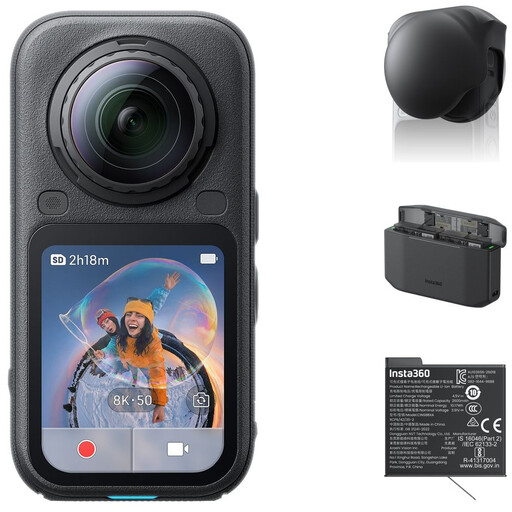
Insta360 X6 All-in-One Bundle with Standard Bundle, Lens Cap, Xtreme Battery and Fast Charge Case

Insta360 X6 All-in-One Bundle

A camera for recording review videos. Check that its recording format suits the footage you want to capture of your pen and writing sample.

Bundle: Standard Bundle, Lens Cap, Xtreme Battery and Fast Charge Case.

View at Joybuy

Mini 4K action camera with clip, 1.54-inch display and 140° wide-angle lens

Mini 4K action camera with clip

A compact camera option for recording review videos. Check that the clip suits your desk setup.

According to the product name: 1.54-inch display, 140° wide-angle lens, app control, LED light and 1200 mAh battery.

View at Joybuy

Logitech HD Pro Webcam C920e

Logitech HD Pro Webcam C920e

A webcam option for recording review videos through a computer.

View at Joybuy

Frequently asked questions

Is 4K enough to show the nib in sharp focus?

No, 4K alone won’t determine that. Check whether the camera and any lens can focus at your chosen distance, and whether the nib appears large enough in the frame. DJI specifies a focusing range starting at 0.2 m for the Osmo Pocket 3.

How do you position a webcam to film a writing sample?

Position the webcam so that your hand, pen and paper all stay in frame. Logitech describes Show Mode for the MX Brio; Insta360 describes DeskView for the Link 2 as a temporary option using a laptop or monitor. Check the framing and leave enough room for your writing hand.

What extra equipment should you check for desk recording?

For a mirrorless camera, check which lens is included; for standalone recording, check which storage media you’ll need. Also consider whether you need a tripod or mount for the angle you want. The equipment you need depends on your chosen camera and setup.

Can you return a camera bought online in the Netherlands?

For a standard online purchase by a consumer, there is generally a statutory 14-day cooling-off period after delivery. The ACM also explains the exceptions and rules on unboxing and trying out a product; check which terms apply to your purchase.

Can you publish your fountain pen review if other people are recognisable in the footage?

That depends on the footage and how you publish it. The Dutch Data Protection Authority says that, in most cases, you need permission to publish other people’s personal data online. The exception for personal or household use is subject to specific limits. If in doubt, film only yourself and the pen, or check in advance which legal basis applies.
