What should you look for when buying?
Windows laptop
Choose this option: if your cataloguing software supports Windows and you enter lots of descriptions and photos at a fixed workstation. Windows offers settings for text size, display scaling and Magnifier; Microsoft Support explains how these features work.
Bear in mind: a larger screen takes up more space and may be less practical to carry around. Also check the ports and what’s included with the exact model.
MacBook with macOS
Choose this option: if your cataloguing software and peripherals work with macOS, and you want to use its built-in settings for larger text and zoom. Apple Support explains how these features work.
Bear in mind: check in advance which ports or adapters your camera and storage need; according to Apple, the MacBook Air M5 has two Thunderbolt 4 ports.
Chromebook with ChromeOS
Choose this option: if you record your collection using a suitable web application and have tested the file and camera features you need. ChromeOS offers screen and page magnification, according to Google Chromebook Help.
Bear in mind: having magnification features doesn’t mean your database, files or peripherals are compatible.
When recording fossils, readability, photos, software compatibility and working on location can each be a different priority. Before choosing a model, test your preferred magnification with the cataloguing tasks you actually do.
| What to consider |
What should you check? |
Who is this important for? |
| Readability when magnified |
Test both the text and the full interface in your cataloguing application; see how much of the form and photo remains visible at the same time. |
I want to be able to see the entry fields and a specimen photo even after enlarging the display. Around 42% of consumers prioritise readable entry fields when magnified. |
| Photos and collection records |
Work out how much storage you need based on your own files, and check the ports for external storage or a camera. |
I want to keep object photos with the correct records and be able to find them later. Around 25% of consumers prioritise recording photos and keeping records. |
| Cataloguing software |
Check which operating system and version your software requires; also test magnification in the application. |
I want to keep using my existing catalogue and workflow. Software compatibility is the main buying concern for around 17% of consumers. |
| Working at multiple locations |
Weigh the screen size against portability and check the ports and included power supply for use on location. |
I want to take my cataloguing work to different locations without overlooking any equipment I need. Around 16% of consumers prioritise working on location. |
Joybuy products
These laptops include large-screen Windows models and a MacBook option for cataloguing a collection. For each model, check software compatibility, your preferred magnification and the ports you need.
 No image available
HP OmniBook 3 AI PC 17-dg0005ndx
This 17.3-inch model is an option for a fixed workstation where you want to view catalogue fields and photos with enlarged text.
The product name lists Intel Core 3 310, 12 GB RAM, 512 GB SSD, a Full HD IPS screen and Windows 11 Home. The description lists USB-A, USB-C and HDMI. The power adapter is not included.
Joybuy
 No image available
MSI Venture 16 AI A2HMG-068NL
This 16-inch Windows model is an option if you’re looking for an anti-glare screen and ports for your collection equipment.
The product name lists Intel Core Ultra 7 255H, 32 GB DDR5 RAM, 512 GB PCIe 4.0 SSD, a 1920 × 1200 screen and Windows 11 Pro. The description lists USB-A, USB-C with DisplayPort, HDMI and a weight of around 1.9 kg. The power adapter is not included.
Joybuy
 No image available
Apple MacBook Air 15-inch M5, 16 GB, 512 GB, Starlight
This macOS laptop is an option if your cataloguing software and peripherals work with macOS; Apple Support explains the text and screen zoom settings.
The product name lists an M5 chip, 16 GB memory and 512 GB SSD. The description lists a 15.3-inch screen and two Thunderbolt 4 ports.
Joybuy
 No image available
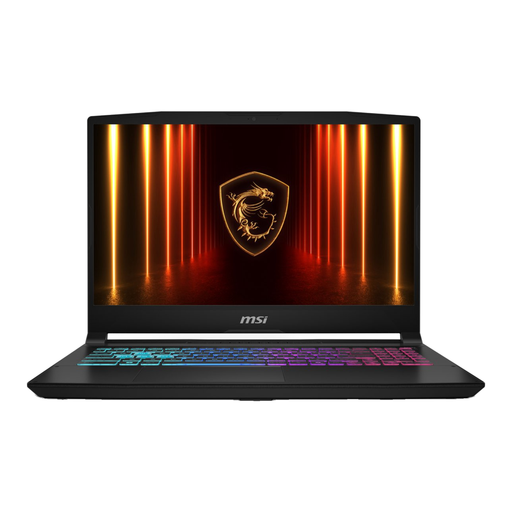
MSI 17 HX B14WGK-264NL, 16 GB, 1 TB SSD
The 17.3-inch screen is worth considering if you’re mainly looking for a large display for catalogue work at a fixed workstation.
The product name lists 16 GB DDR5 memory and a 1 TB SSD. The description lists a Full HD IPS screen and USB, HDMI and Ethernet ports. The power adapter is sold separately.
Joybuy
 No image available
MSI Cyborg 17 B2RWEKG-023NL
This 17.3-inch model is an option if you’d like a larger built-in screen for cataloguing.
The product name lists Intel Core 7 240H, 16 GB DDR5 memory, a Full HD IPS screen, 512 GB SSD and NVIDIA GeForce RTX 5050. The description lists USB-A, USB-C, HDMI and Ethernet. The charger must be purchased separately.
Joybuy
Frequently asked questions
Do you need to buy professional database software for a small fossil collection?
Not necessarily: OPEN Erfgoed lists a spreadsheet, a simple recording system and professional software as possible ways to catalogue a collection. Choose based on the information you need to record and how you work, then check that the software works with your laptop.
How can you enlarge entry fields or part of the screen?
As well as text size settings, Windows offers display scaling and Magnifier; Apple describes options for larger text and zoom on a Mac. Test the settings in your cataloguing application to check that forms and photos remain easy to use.
How can you prevent photos and catalogue records from being lost?
Keep recoverable copies outside the only folder you work from. Microsoft Support explains how to use Windows File History with an external drive or network location; check which folders are included and try restoring a file.
What if the laptop breaks down soon after you buy it?
For consumer purchases in the Netherlands, statutory consumer rights apply alongside any manufacturer’s warranty. According to ACM ConsuWijzer, the seller is responsible if a product, when used normally, fails to meet what you could reasonably expect; there is no single fixed statutory warranty period for every laptop in the Netherlands.
Can you try out the screen at home after buying online?
According to ACM ConsuWijzer, online purchases are generally covered by a statutory cooling-off period of up to 14 days after delivery, subject to exceptions and conditions. Check the terms before ordering, and treat any longer returns period offered by the retailer as an extra benefit, not a replacement for your statutory rights.


