Who is this for?

Players looking for a second controller

First, you’ll want to know whether the controller works with your console or PC and whether a second player can join in the football game you’ve chosen. EA describes Split Joy-Con for local EA SPORTS FC play on the original Switch; Sony and Microsoft describe controllers for their supported systems.

Players with a small seating area

You want to play together without a controller cable running across the room. Also consider how the controller pairs and gets its power. For example, Microsoft says the Xbox Wireless Controller uses AA batteries or a compatible rechargeable battery.

Switch players sharing one screen

You’ll want to know whether your existing Joy-Cons are enough, or whether an extra pair or a full-size controller would suit the way you play together better. EA describes Split Joy-Con for the original Switch; Nintendo says Joy-Con 2 only works with Switch 2.

What should you look for when buying?

What to consider What should you check? Who is this important for?
Compatibility and a second player Check your console or PC model, football game and local play mode. If I want to start playing with two people, both the controller and the game mode need to work on my system. Around 36% of consumers give compatibility and second-player support top priority.
A cable-free setup Think about where the system and seats are positioned; check whether any cable can be kept out of walkways. If space is limited, I want to avoid having a cable run between the seats and the system. Around 29% of consumers give a cable-free setup top priority.
Sharing Joy-Cons or using a full-size controller Try the controllers you already have and check whether your game supports the play mode you want. If I already own a Switch, I want to know whether my existing Joy-Cons are enough and whether they’re comfortable to use. Around 21% of consumers give sharing controllers or grip top priority.
Power and battery life Check the battery type and which charging option suits the way you use the controller. If I want to have an extra controller ready for the next match, I need to know how it’s powered. Around 14% of consumers give power and battery life top priority.

Common buying mistakes

  • Choosing a controller based on wireless use alone

    Wireless doesn’t automatically mean the controller will work with your system or your football game’s local play mode. For example, Nintendo says Joy-Con 2 is only compatible with Nintendo Switch 2.

    Before you buy, check your exact console or PC model, the controller model and the play modes supported by your game.

  • Assuming you always need an extra controller

    EA describes Split Joy-Con for local 1-v-1 or co-op play in EA SPORTS FC on the original Switch.

    Try your existing Joy-Cons first if your system and game support this play mode. Don’t assume the same applies to Switch 2.

  • Choosing a wired controller without checking the cable route

    PowerA says the Enhanced Wired Controller has a 3 m USB cable. In a small seating area, a safe setup depends on where the system and seats are positioned.

    Decide in advance where the cable will run and keep it away from walkways, feet and moving chairs.

  • Confusing an extended warranty with your statutory rights

    ACM ConsuWijzer distinguishes between statutory guarantees and additional commercial guarantees. A commercial guarantee doesn’t replace your statutory rights.

    First, check which statutory rights apply to your purchase, then consider what additional cover offers.

Brands to compare

Sony PlayStation

Sony describes the DualSense as a wireless controller for PS5.

  • Sony lists a built-in rechargeable battery and USB-C.
  • You need to pair the controller with your PS5. Haptic feedback and adaptive triggers are features, not proven improvements to performance in a football game.

Microsoft Xbox

Microsoft lists Xbox consoles, supported Windows PCs and certain mobile devices as compatible systems for the Xbox Wireless Controller.

  • Microsoft lists Bluetooth, a hybrid D-pad and a textured grip.
  • Xbox lists AA batteries or a compatible rechargeable battery as power options. Check which option is included with your purchase.

Nintendo

Joy-Cons and a Pro Controller give Switch players different ways to play together locally.

  • EA describes Split Joy-Con for local EA SPORTS FC play on the original Switch.
  • Nintendo says Joy-Con 2 only works with Switch 2. Also check whether your game supports the controls you want to use.

GameSir

GameSir describes the wired G7 SE as a controller for supported Xbox systems and PC.

  • GameSir lists Hall Effect sticks and says they help prevent stick drift; this isn’t an independently verified outcome for football games.
  • The cable may be impractical in a small seating area if you can’t route it safely.

PowerA

PowerA describes the Enhanced Wired Controller as an officially licensed wired option for Xbox Series X|S, Xbox One and Windows.

  • PowerA specifies two mappable extra buttons and a detachable 3 m USB cable.
  • The cable length gives you flexibility when positioning your setup, but you’ll still need to route it safely.

Joybuy products

This selection focuses on extra wireless controllers for local play without a controller cable running between the seats and the system. Check that each model is compatible with your console and football game.

Xbox Wireless Controller – Ice Breaker Special Edition

Xbox Wireless Controller – Ice Breaker Special Edition

An option to consider if you’re looking for a wireless controller for a compatible Xbox or Windows PC and don’t want a cable between the seats.

The product description lists Xbox Series X|S, Xbox One and Windows PC, Xbox Wireless and Bluetooth. It also says that two AA batteries are included.

View at Joybuy

PlayStation DualSense Wireless Controller – Grand Theft Auto VI White Limited Edition

PlayStation DualSense Wireless Controller – Grand Theft Auto VI White Limited Edition

An extra wireless controller to consider if you have a PS5 and want to play without a controller cable.

The product information lists PS5, PC, Mac and mobile devices, Bluetooth, a built-in battery and USB-C. Check that your game and device support the features you want.

View at Joybuy
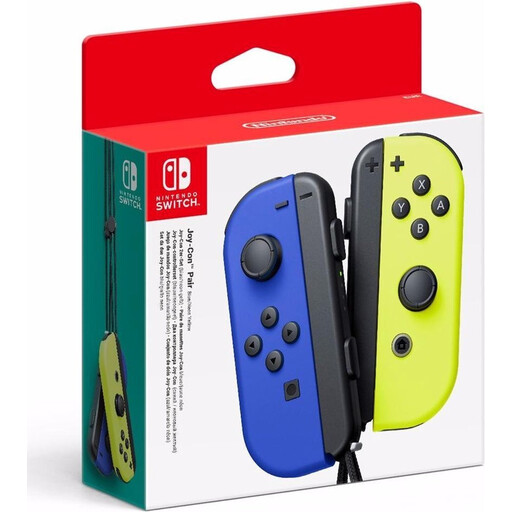
Nintendo Switch Joy-Con Pair – Neon Blue/Neon Yellow

Nintendo Switch Joy-Con Pair – Neon Blue/Neon Yellow

A pair of Joy-Cons could be a good fit if you play locally on a Nintendo Switch and your chosen game supports separate Joy-Con controls.

The product information describes a left and right controller that can be used separately for multiplayer. EA describes Split Joy-Con for local EA SPORTS FC play on the original Switch; check that your version of the game supports it.

View at Joybuy

BEITONG PanGu Modular Wireless Gaming Controller

BEITONG PanGu Modular Wireless Gaming Controller

A wireless option to compare if you use a PC or Nintendo Switch/Switch 2; check that your specific football game supports the controller.

The product name lists PC, Nintendo Switch, Switch 2, Steam and Android. The product description mentions wireless connectivity and a modular design with interchangeable parts.

View at Joybuy

Nintendo Switch 2 Joy-Con 2 Pair – Light Blue/Light Red

Nintendo Switch 2 Joy-Con 2 Pair – Light Blue/Light Red

An extra pair to consider if you play on Nintendo Switch 2 and your game supports these controls.

The product description lists two Joy-Con 2 controllers, two wrist straps and Bluetooth. Nintendo says Joy-Con 2 only works with Switch 2, not the original Switch.

View at Joybuy

Frequently asked questions

Do I need to buy a second controller to play EA SPORTS FC together on the original Switch?

Not necessarily: EA describes Split Joy-Con for local 1-v-1 or co-op play in EA SPORTS FC on the original Switch, without extra equipment. Check that your version of the game supports this mode and that sharing the controls works for you; don’t assume it also applies to Switch 2.

How do I add a second DualSense on PS5?

According to PlayStation, you can pair an extra controller wirelessly via Settings > Accessories > General > Bluetooth Accessories. On the second controller, hold down the Create button and PS button, then select the controller on screen.

Can I use Joy-Con 2 with my original Nintendo Switch?

No. Nintendo says Joy-Con 2 can only be used with Nintendo Switch 2.

What should I check about powering an extra Xbox controller?

Xbox lists AA batteries and a compatible rechargeable battery as power options. Rechargeable AA batteries can’t be charged in the controller, so check which type of battery you’re using and what charging equipment you’ll need.

What are my rights when buying a controller online in the Netherlands?

According to the Dutch government, when you buy at a distance you generally have a 14-day cooling-off period, but this doesn’t apply to every purchase. ACM ConsuWijzer explains that your statutory guarantee depends on what you could reasonably expect from the product under normal use; a commercial guarantee doesn’t replace your statutory rights.
