
Housemates who play together on Switch
They want to know first whether the Joy-Cons they already have are enough for a local football match. Electronic Arts describes Split Joy-Con for 1-v-1 or co-op on a single Switch, with no extra equipment.


First, choose a controller that works with your console or PC and with your football game’s local play mode. According to Electronic Arts, you can play EA SPORTS FC on a single Nintendo Switch using split Joy-Cons, with no extra equipment; for other systems or games, check the controls separately. Wireless play keeps cables out of the way, while a wired controller is only practical if you can route the cable safely.
They want to know first whether the Joy-Cons they already have are enough for a local football match. Electronic Arts describes Split Joy-Con for 1-v-1 or co-op on a single Switch, with no extra equipment.
They’re looking for a controller that works with their existing console and lets them play in a small space without a controller cable. PlayStation explains how to connect a second DualSense wirelessly; Xbox states that its controller works with Xbox consoles and Windows PCs.
They’re weighing up wireless play against a wired controller and checking that the connection works with their PC game. Microsoft lists Windows support for the Xbox Wireless Controller; PowerA states that the Enhanced Wired Controller for Xbox Series X|S is compatible with Windows.
Start with your device and game, then work out how many controllers you actually need. Finally, consider whether wired or wireless play suits your room layout and charging preferences.
| What to consider | What should you check? | Who is this important for? |
|---|---|---|
| Platform and game | Check the exact console model or PC, the game version and the controller’s stated connection method. | If I want to play on my existing system, I need to make sure that both the controller and the local play mode are supported by my game. Around 33% of consumers say platform and game compatibility is their top priority. |
| Number of controllers | First check the game’s local play modes; for EA SPORTS FC on Switch, Electronic Arts describes Split Joy-Con. | If I’m playing with someone else on one Switch, I want to know first whether the Joy-Cons I already have are enough. Around 27% of consumers prioritise working out how many controllers they need. |
| Room to move and cables | Consider where people will sit and where the walkway is; if you choose a wired controller, also check the stated cable length. | If there’s little room to walk past the console, I don’t want a controller cable across the walkway. Around 27% of consumers prioritise keeping walkways clear. |
| Batteries and charging | Check which batteries or charging equipment you need, and whether a cable is included with the controller. | If I want to know in advance what I’ll need to use and charge a wireless controller, I compare those requirements with what I already own. Around 13% of consumers say power, charging and extra accessories are their top priority. |
For EA SPORTS FC, Electronic Arts describes Split Joy-Con for two players on the same Switch, with no extra equipment.
Try your game version’s local play mode first. Only then decide whether to get an extra pair of Joy-Cons or a Pro Controller for a different way to play.
According to PowerA, the wired Enhanced Wired Controller has a detachable 3-metre USB cable. It can still run between the players and the console.
Choose a wired controller only if you can route the cable safely out of the way; otherwise, look for a wireless option that works with your system.
Connection options vary by model. 8BitDo lists 2.4 GHz and wired connections for the Ultimate 2C Wireless on Windows, and Bluetooth on Android; these specifications don’t confirm support for Xbox, PS5 or Switch.
Before buying, check the full model name, connection type and compatibility with your device and game.
ACM ConsuWijzer distinguishes between a commercial guarantee and your statutory rights if a product is faulty.
Keep your proof of purchase and contact the seller if there’s a fault. The available solution depends, among other things, on the fault and how the product would normally be used.
Joy-Cons and the Switch Pro Controller are relevant options for local play on Switch. For Switch 2, check the game version and how to charge the controller.
DualSense is a wireless option designed for the platform if a PS5 player needs a second controller.
The Xbox Wireless Controller is a wireless option for players on Xbox or Windows PC.
The Enhanced Wired Controller for Xbox Series X|S is a wired alternative for compatible Xbox consoles and Windows.
The Ultimate 2C Wireless is one option for Windows PC players who want to use 2.4 GHz.
This selection includes controllers for Xbox and Windows PC, Nintendo Switch and Switch 2, plus a wireless PS5 controller. Always check that the game and connection you want are supported by your particular setup.
 No image available
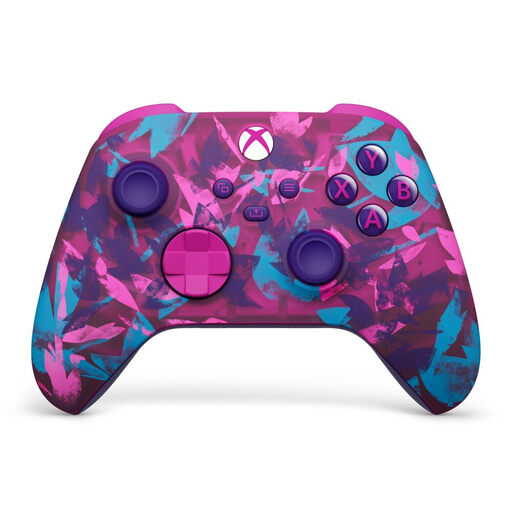
A wireless option for playing on a compatible Xbox console or Windows PC, without a controller cable running across the room.
The product description lists Xbox Wireless and Bluetooth, two AA batteries included, and up to 40 hours of battery life.
Remember that you’ll need to replace the AA batteries or use a suitable charging solution.
 No image available
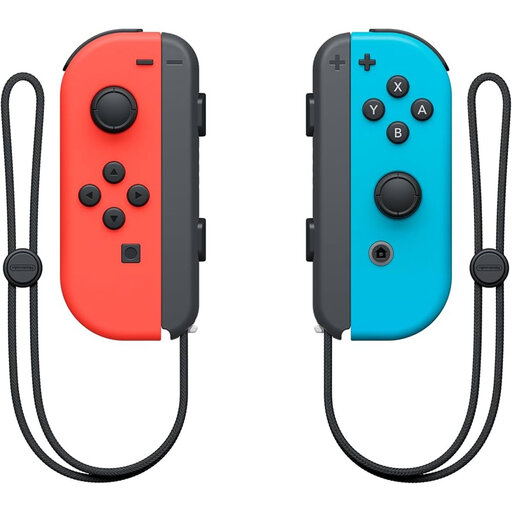
A pair of Joy-Cons for Switch players who want to use separate controllers; check that your game supports the local play mode you want.
The product description lists wireless play, using each Joy-Con separately and up to 20 hours of battery life per charge.
Electronic Arts describes Split Joy-Con for EA SPORTS FC on Switch; the available play mode depends on the game version.
 No image available
A wireless PS5 controller for bringing in a second player without running a controller cable across the playing area.
PlayStation explains how to connect a second DualSense wirelessly. The standalone listing we checked doesn’t include a cable.
Haptic feedback and adaptive triggers depend on whether the game supports them.
 No image available
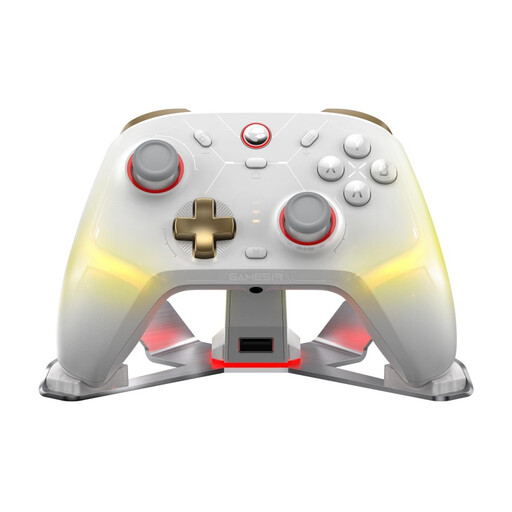
An option to explore if you play on PC or Switch and want a controller with wired and wireless connection options.
The product description lists PC, Switch, iOS and Android, plus three connection options: 2.4 GHz, Bluetooth and wired.
Check compatibility with your exact device and game before choosing.
 No image available
A wireless Pro Controller for playing on Nintendo Switch 2; check that your football game supports the local play mode you want.
The product description lists Bluetooth and a rechargeable battery. HD Rumble, motion controls and amiibo functionality are also mentioned.
Not necessarily: Electronic Arts describes Split Joy-Con for 1-v-1 or co-op on the same Switch, with no extra equipment. An extra pair of Joy-Cons or a Pro Controller is another option; check the play modes available in your game version.
PlayStation explains that, using the controller that’s already connected, you should go to Settings, Accessories, General and Bluetooth Accessories. On the second controller, press and hold the Create button and PS button at the same time, then select the controller that appears.
According to Nintendo, older Joy-Cons can sync wirelessly with a Switch 2, but can’t be attached to the console. You’ll need an original Switch or a suitable accessory to charge them; also check that your game supports the play mode you want.
Check whether you need batteries or a charging cable, and what’s included in the box. Microsoft specifies AA batteries or a charging solution for the Xbox Wireless Controller; the standalone DualSense listing we checked doesn’t include a cable. Whether you need anything extra depends on what you already own.
Check the product information for the exact model and look for the relevant product markings. The European Commission describes the Radio Equipment Directive as the regulatory framework for radio equipment on the EU market; a CE marking alone doesn’t tell you whether a controller will work with your console or game.