Who is this choice relevant to?

Player looking to keep noise down

You play while someone else is using the bedroom. You want to know whether sound and chat can go through a compatible headset; that doesn’t automatically mean the buttons are quiet. PlayStation, Microsoft and Nintendo list headset or audio features for specific models.

Player who wants to play a match together

You’re looking for an extra controller for the same device. Check that the controller is compatible with your platform and that your chosen game mode supports local multiplayer. PlayStation and Nintendo describe additional controllers for their systems.

PC player short on space

You want to weigh up whether a cable will work on your desk or whether you’d rather play wirelessly with the right receiver and power supply. Microsoft and 8BitDo list different connection options for their PC controllers.

What should you look for when buying?

PS5: DualSense

Choose this option: if your football game runs on a PS5 and you’re looking for a compatible extra controller.

Keep in mind: the white controller is sold separately without a USB cable; haptics and adaptive triggers depend on support from the game. These are Sony specifications, not proof of an extra benefit in a football game.

Xbox or Windows PC: Xbox Wireless Controller

Choose this option: if you play on Xbox or a Windows PC and want to connect a compatible headset.

Keep in mind: check which connection and power supply are suitable for your device. Bluetooth doesn’t guarantee that every headset feature will work on every device.

Nintendo Switch 2: Switch 2 Pro Controller

Choose this option: if you play on a Switch 2 and want a controller with an audio jack.

Keep in mind: Nintendo lists a 3.5mm CTIA connection and an estimated battery life of around 40 hours; the controller doesn’t work with the original Switch. EA says FC on Switch and Switch 2 doesn’t support cross-play with PC, PlayStation or Xbox.

Windows PC: 8BitDo Ultimate 2C Wireless

Choose this option: if you play on a compatible Windows PC and want a 2.4GHz receiver or a wired connection.

Keep in mind: the Wireless and Bluetooth editions are different variants. 8BitDo describes some buttons as ‘clicky’; this isn’t a comparative sound test and doesn’t prove that the controller is quiet.

Consideration What to check Who is this important for?
Compatibility Check the console or operating system, the full model name and the game version. For example, the Switch 2 Pro Controller doesn’t work with the original Switch. If I want to avoid buying a controller that won’t work with my device or game, I’ll check full compatibility first. Around 36% of consumers put this check first.
Sound and chat Check your headset connection, audio settings and whether you want to use the microphone. A headset jack tells you nothing about mechanical button noise. If I play in a shared room, I want to use a compatible headset for game sound and chat. Around 29% of consumers prioritise keeping room noise and chat to a minimum.
Playing together Check how many controllers and local players your game mode supports, and how to connect a second controller. If I want to play locally with someone else, I need to know whether both a second controller and the game mode support this. Around 21% of consumers put playing together first.
Cable and power Check whether you have a USB port or receiver available, what’s included and whether the controller is rechargeable or uses batteries. If I have limited desk space, I’ll weigh up a cable against a wireless connection and the power supply it needs. Around 14% of consumers prioritise connection and power.

Common buying mistakes

  • Confusing a headset jack with a quiet controller

    Headset audio can reduce sound from speakers, but it tells you nothing about the noise made by buttons, triggers or sticks in the same room.

    Check the headset connection separately from information about button noise. Without a comparable sound test, don’t assume the controls are ‘whisper quiet’.

  • Buying a Switch 2 Pro Controller for an original Switch

    Nintendo says this model only works with the Switch 2.

    Before buying, check the full name of your console and the specific controller.

  • Confusing the Wireless and Bluetooth versions of the Ultimate 2C

    8BitDo lists different platforms and connections for these two variants.

    Check the full model name and the connection your device supports; ‘Ultimate 2C’ alone isn’t enough to identify the variant.

  • Buying a second controller without checking the game mode

    An extra controller doesn’t automatically mean you can play your football game locally with multiple players. You may also need accessories for a different setup.

    Check your game’s local multiplayer mode, which controllers you already have and what’s included with the controller you choose.

Brands to compare

PlayStation

DualSense is an option if you’re looking for an extra controller for PS5. PlayStation Direct also lists the separately sold white version for PC, Mac and mobile.

  • Sony lists a built-in microphone and rechargeable battery.
  • Haptics and adaptive triggers require support from the game. The white version reviewed doesn’t include a USB cable.

Xbox

The Xbox Wireless Controller is an option for Xbox consoles and Windows PCs; Microsoft also lists support for mobile devices.

  • Microsoft lists Bluetooth, button mapping and a 3.5mm jack for a compatible headset.
  • Check the power supply and audio features that suit your connection and device. The specifications don’t prove that the controls are quiet.

Nintendo

The Switch 2 Pro Controller is designed for playing football games on a Nintendo Switch 2.

  • Nintendo lists a 3.5mm CTIA connection, customisable GL/GR buttons and an included USB charging cable.
  • Nintendo says this controller doesn’t work with the original Switch. The stated battery life is an estimate.

8BitDo

The Ultimate 2C Wireless is a separate option for Windows and Android; the Ultimate 2C Bluetooth is a different variant for Switch.

  • According to 8BitDo, the Windows version uses a 2.4GHz receiver or USB connection.
  • The manufacturer describes some buttons as ‘clicky’. Without a comparative sound test, it’s not possible to tell how suitable they are for quiet gaming sessions.

Controllers at Joybuy

This selection includes controllers for Xbox and Windows PC, as well as mobile and multi-platform models. Before choosing, check the platforms, connection and headset jack listed for each product.

Xbox Wireless Controller for Xbox Series/PC - Heart Breaker Special Edition

Xbox Wireless Controller, Heart Breaker Special Edition

An option to compare if you play on a listed Xbox platform or Windows PC and want to connect a compatible headset.

The description lists Xbox Series X|S, Xbox One and Windows PC, Xbox Wireless and Bluetooth, a 3.5mm headset jack and two included AA batteries.

View at Joybuy
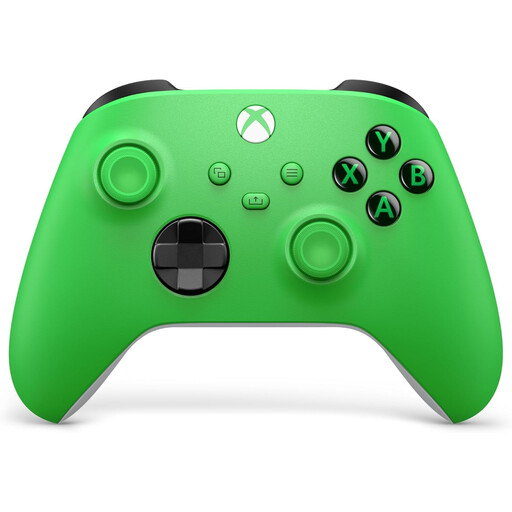
Xbox Wireless Controller Velocity Green for Series X/S and Xbox One

Xbox Wireless Controller, Velocity Green

An option to compare for Xbox and Windows PC users; check which connection is right for your device.

The product description lists Xbox Series X|S, Xbox One and Windows PC, wireless use, USB-C, a hybrid D-pad and a 3.5mm headset jack. The controller supports AA batteries; check the packaging to see what’s included.

View at Joybuy
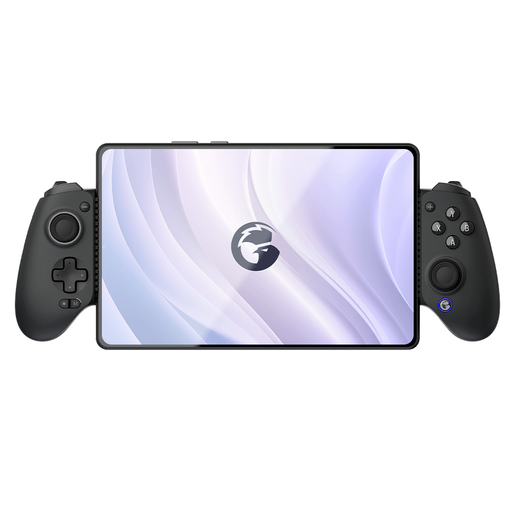
GameSir G8 Galileo Plus Bluetooth Wireless mobile gaming controller

GameSir G8 Galileo Plus Bluetooth Wireless

A model to compare if you play football games on a mobile device or one of the other listed platforms.

The product description lists Switch, iOS, Android, smartphones, tablets and PC, as well as an adjustable phone holder.

View at Joybuy
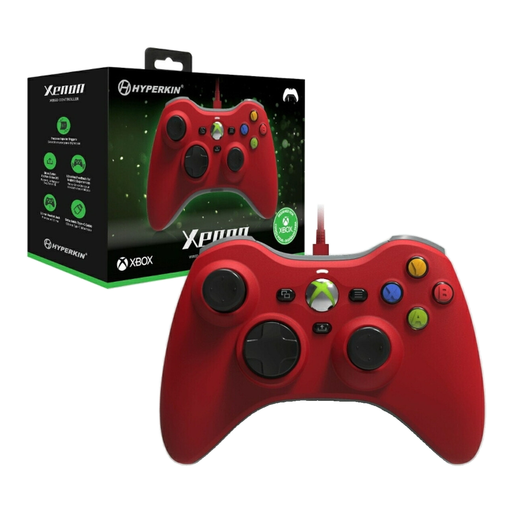
Hyperkin Xenon WiRed Controller for Xbox, red

Hyperkin Xenon WiRed Controller, red

A wired option to compare if you play on a listed Xbox platform or Windows PC.

The description lists Xbox Series X|S, Xbox One and Windows 10/11, a detachable Type-C cable and a 3.5mm headset jack.

View at Joybuy

GameSir Cyclone 2 Multi-platform Controller, White Bundle Edition

GameSir Cyclone 2, White Bundle Edition

An option to compare if you want to choose between wired and wireless use on one of the listed platforms.

The description lists PC, Switch, iOS and Android, with USB, 2.4GHz and Bluetooth. It also mentions Mag-Res TMR sticks and two trigger options.

View at Joybuy

Frequently asked questions

Can I also use a Switch 2 Pro Controller with the original Switch?

No. Nintendo says this controller only works with the Switch 2.

How do I pair a second Switch 2 Pro Controller?

Nintendo explains that you can pair it using the supplied USB-C cable connected to the system or dock, or wirelessly via CONTROLLERS and CHANGE GRIP/ORDER. Also check whether your chosen game mode supports multiple local players.

Can another controller enable EA SPORTS FC cross-play between Switch 2 and PlayStation, Xbox or PC?

No. EA says FC on Switch and Switch 2 doesn’t support cross-play with those platforms; using another controller won’t change that.

What if I’m not happy with a controller I bought online, or it breaks too soon?

According to ACM ConsuWijzer, online purchases often come with a cooling-off period of up to 14 days after the product has been delivered. The seller must also put right, free of charge, any product that doesn’t meet reasonable expectations under normal use, in line with the statutory guarantee. Any manufacturer’s guarantee doesn’t replace this statutory right.

Where can I dispose of an old controller in the Netherlands?

Take electrical equipment to a suitable collection point, or ask about take-back when you buy a new, similar device. The Dutch government says the old-for-new take-back scheme also applies to online purchases; ask the seller how collection is arranged.
