
Player sitting off-centre
You want to sit at an angle to the screen or further along the sofa without a controller cable dictating where you sit. Bear in mind that you’ll need to assess the screen’s viewing angle separately.


Start with a controller that works with your console or PC and the local game mode. Wireless play gives you more freedom to sit off-centre; a wired controller may also work if the cable route is safe and long enough, and your platform supports the controller. A controller won’t change the screen’s viewing angle.
You want to sit at an angle to the screen or further along the sofa without a controller cable dictating where you sit. Bear in mind that you’ll need to assess the screen’s viewing angle separately.
You’re looking for a controller that works with your existing PS5, Xbox, PC or Switch and the local match mode. The word ‘wireless’ alone doesn’t tell you whether it’s compatible.
You want to know in advance whether controllers can be paired individually and how many players the match mode supports. On Switch, EA also describes split Joy-Con controls for certain local FC modes.
First, check that your platform and game mode are supported. Then consider whether your seating position works with the cable route or wireless connection, and which controllers you already own.
| What to consider | What to check before buying | Who is this important for? |
|---|---|---|
| Freedom to sit where you like | Check which wireless connections are supported, or measure the full, safe cable route to your seat. | If I’m sitting at an angle to the screen, I don’t want a cable to dictate where I sit. For around 36% of consumers whose main reason is freedom to move, this would be the deciding factor. |
| Platform compatibility | Check the full model name, console model and supported connection. On PC, also check that the game supports it. | If I’m buying a second controller, I want to make sure it works with my existing console or PC. For around 29% of consumers whose main priority is compatibility, this would be the most important reason. |
| Player controls | Check how to select players or sides in the game mode you want to play, and count the controllers you already have that can be used. | If friends are joining in, I want to know whether everyone can play with a separate controller without buying one unnecessarily. For around 21% of consumers who prioritise the number of local players, this would be the main reason. |
| Power and use | Check which batteries, charging equipment or cable you’ll need, and which controller features the game uses. | I want to know in advance whether I’ll need to change the batteries or run a cable during play. For around 14% of consumers who focus mainly on power and additional running costs, this would be the most important consideration. |
The models reviewed support different platforms, and similar model names may also have different compatibility.
Before buying, check the full model name, platform and connection method.
The number of controllers that can be synced with a Switch doesn’t tell you how many players a specific football game supports. EA also describes split Joy-Con controls for certain local FC modes.
Check player selection in the game you want to play and count the controllers you can already use.
The PowerA Wired Controller reviewed has a 3 m cable, but it’s designed for use with a Switch in its dock and doesn’t include features such as motion controls and HD Rumble.
Check that the Switch will be in its dock, that the full cable route reaches your seat, and that you’re happy to do without the features your game may need.
DualSense controllers are an option for PS5 players looking for an extra wireless controller.
Microsoft says the Xbox Wireless Controller is designed for supported Xbox consoles and Windows PCs.
Joy-Con and the Switch Pro Controller are options for local matches on Switch. The right controls depend on how you want to play.
The wired Wired Controller for Nintendo Switch NSGP0142-01 is designed for a Switch in its dock and a seat within cable reach.
According to 8BitDo, the Ultimate 2 Bluetooth is designed for use with Switch and Windows.
These Joybuy products include wireless options for Xbox and PC, PlayStation platforms and Switch, as well as a GameSir controller with several connection options for Switch and PC. Check that the full model is compatible with your console and football game.
 No image available
The wireless version may suit you if you play on a supported Xbox console or PC and don’t want a controller cable to dictate where you sit.
The product description lists AA batteries, Bluetooth and Xbox Wireless. Check which connections your device and game support.
 No image available
This wireless controller may suit you if you don’t want to arrange your seating around a controller cable.
The product title lists compatibility with PS4 and PC. Check that your football game and device support this model.
 No image available
A full-size wireless controller may suit you if you play on Switch and don’t want to use shared Joy-Con controls.
The product description lists motion controls, HD Rumble and amiibo functionality.
 No image available
This wireless controller may suit you if you play on PS5 and are looking for an extra controller for someone sitting elsewhere.
The product description lists a rechargeable battery, haptic feedback and adaptive triggers.
 No image available
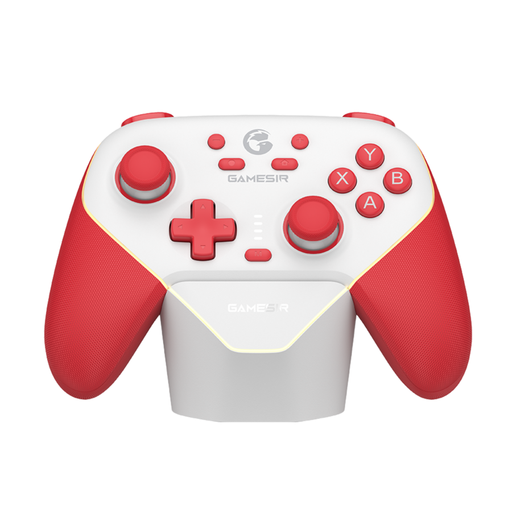
This controller may suit you if you switch between Switch and PC and its listed connection options work with your devices.
The product description lists Bluetooth, a wired connection and a wireless dongle connection, as well as support for Switch and PC.
No. A wireless controller can make your seating position less dependent on a cable, but it won’t change the screen’s viewing angle. Check the screen position separately for each player.
Not always. For certain local modes of EA SPORTS FC on Switch, EA describes using a second pair of Joy-Con or a Pro Controller, as well as split Joy-Con controls. Before buying anything, check the game mode you want to play and which controllers you already have.
The pairing steps vary by system and model. PlayStation explains how to pair a second DualSense through the PS5’s Bluetooth accessories. According to Nintendo, a Switch Pro Controller can be synced using the SYNC button or via USB; the Switch must be switched on.
No. According to PlayStation, some DualSense features on PC depend on the game and connection; the manufacturer says haptic feedback requires USB and game support. Also check that your football game supports the model you’ve chosen.
ACM ConsuWijzer states that, for a standard online purchase of a product, you generally have a statutory cooling-off period of up to 14 days after delivery; any exceptions should be considered separately. ACM ConsuWijzer also states that your statutory guarantee applies alongside any seller’s guarantee. A manufacturer’s guarantee does not replace your statutory rights.