First, choose a controller that works with your console or PC. Then check that your football game supports the local multiplayer options and controller layout you want; PlayStation Support, Xbox and Nintendo UK set out platform- and game-specific requirements. Wireless play keeps the space between your sofa and screen clear, while a wired controller won’t need charging but does require a suitable cable route. Bright daylight is mainly a matter of your TV and its picture settings, not your controller; Samsung explains the settings available on its own TVs.
Who is this buying guide for?
Player with a dedicated console
You’re looking for an extra controller that suits your PS5, Xbox or Switch generation. Check compatibility with your system first; Nintendo UK, for example, confirms that the Switch 2 Pro Controller doesn’t work with the original Switch.
Host for sofa-based matches
You want everyone to be able to join in with a suitable controller. Check how many players your football game supports and which controller layouts it works with: Nintendo UK notes that the number of supported controllers can depend on the controllers and features being used.
PC player sitting away from the screen
You’re choosing between the freedom to move without a cable and a wired connection that won’t need charging. Check the connection, the distance to your PC and whether the game supports the controller and features you want; PlayStation Support distinguishes between connecting to a PC and support from the game itself.
What should you consider when choosing?
Start with your device and football game. Then decide whether your existing controllers will do, and which connection best suits the distance between your sofa and screen.
| What to consider |
What should you check? |
Who is this important for? |
| Compatibility |
Check the console generation or PC connection, as well as support in the specific game. |
If I’m buying an extra controller, I want to be sure it works with my device and football game. Around 36% of consumers prioritise compatibility with their platform and game. |
| One controller per player |
Check the local player limit and whether the game supports the controller layout you have in mind. |
I want friends on the sofa to be able to join in and use the controllers I already own. Around 29% of consumers prioritise an extra local player and the game’s play style. |
| Connection and distance |
Measure the cable route for wired play; for wireless use, check the receiver or pairing method. |
If the console or PC is further from the sofa, I want to know whether a cable will cross the seating or walking area. Around 21% of consumers choose mainly on the basis of connection and freedom to move. |
| Power and warranty |
Check which cable or battery is included and what power supply you already have; review your existing warranty rights before considering extra cover. |
I want to know in advance which accessories I’ll need and whether extra cover would benefit me. Around 14% of consumers place the most weight on power, additional costs and warranty. |
Avoid common buying mistakes
-
Choosing a Switch 2 controller for the original Switch
Nintendo says the Nintendo Switch 2 Pro Controller works only with Switch 2. A controller that isn’t compatible with your console won’t work for the match you have in mind.
Compare your console’s full name with the controller’s compatibility information before choosing.
-
Choosing a wired controller without measuring the distance
The cable needs to reach from your seat to the console or PC. PowerA lists a detachable 3 m cable for the Enhanced Wired Controller; this doesn’t automatically apply to other models.
Measure the cable route and check whether it crosses a walkway.
-
Confusing a PC connection with support for every game feature
A controller may connect to a PC without every feature being supported in your football game. PlayStation Support says that haptic feedback on PC requires game support and a USB connection.
Check support for your specific game, connection and desired features separately.
-
Buying extra warranty cover without checking your existing rights
In the Netherlands, if a product is faulty despite being used normally, you have statutory rights with the retailer. ACM ConsuWijzer and the Dutch government explain that there’s no fixed statutory warranty period for this.
Before considering additional cover, check what you can expect from the retailer if the product develops a fault.
Relevant brands to consider
PlayStation
DualSense is designed for PS5 and supported PC games; DualSense Edge is a separate option with customisable settings.
- PlayStation Support lists USB and Bluetooth support on certain PC systems.
- Features depend on the game; haptic feedback on PC requires USB. This alone doesn’t mean it offers an advantage in football games.
Xbox
The Xbox Wireless Controller is designed for Xbox consoles and Windows PCs.
- Microsoft lists Bluetooth, button remapping and a textured grip.
- A rechargeable battery pack is sold separately; check which power source is included with the version you choose.
Nintendo
The original Switch Pro Controller is designed for Switch and, according to Nintendo, can also be used wirelessly with Switch 2. The Switch 2 Pro Controller is for Switch 2 only.
- Nintendo lists a battery life of around 40 hours for the original Pro Controller.
- The stated battery life may vary depending on software and features; the Switch 2 Pro Controller doesn’t work with the original Switch.
PowerA
The Xbox-licensed Enhanced Wired Controller is a wired option for Xbox Series X|S, Xbox One and Windows.
- PowerA lists a detachable 3 m cable and assignable extra buttons for this model.
- A cable may be awkward in a living room; these specifications apply to this model and not automatically to other PowerA controllers.
8BitDo
According to 8BitDo, the Ultimate 2C Wireless is designed for Windows via 2.4GHz USB-A and for Android via Bluetooth.
- 8BitDo lists Hall Effect sticks for this model.
- The stated compatibility doesn’t include PS5, Xbox or Switch; check the exact model, as similar names may have different platform support.
Controllers at Joybuy
This selection includes wired and wireless controllers for Xbox, Windows and Nintendo Switch, as well as a GameSir model whose product name also mentions iOS, Android, tablet and PC. Check that the connection, controls and local player setup are supported for each device and football game.
 No image available
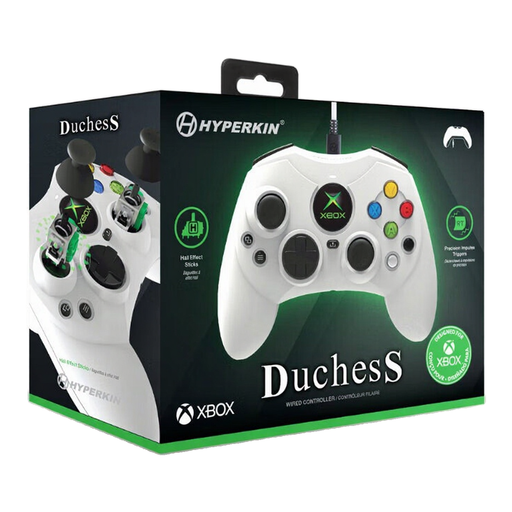
Hyperkin Duchess Wired Controller for Xbox Series X|S / One / Windows 11/10 (White)
A wired option if you play on one of the listed Xbox systems or a Windows PC and a cable connection suits your seating setup.
The product description lists Hall Effect sticks, impulse triggers and a detachable 3 m USB-C cable.
View at Joybuy
 No image available
Xbox Wireless Controller Robot White
A wireless option if you play on a listed Xbox console or Windows 10 PC and want to avoid a controller cable.
The product description lists Xbox Wireless and Bluetooth, plus a hybrid D-pad and textured grip. Check which power source is included with this version.
View at Joybuy
 No image available
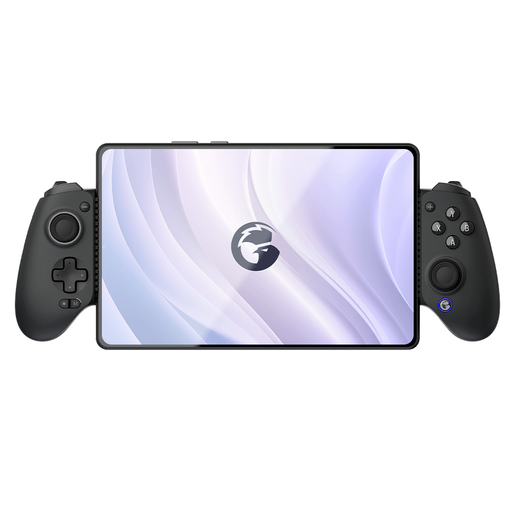
GameSir G8 Galileo Plus Bluetooth Wireless Mobile Game Controller
An option if you’re looking for a controller with an adjustable phone holder; check that your chosen football game and device work with this controller.
The product name mentions Switch, iOS, Android, tablet and PC. The product description lists an extendable design with an adjustable phone holder.
View at Joybuy
 No image available
Nintendo Switch Pro Controller - Black
A wireless option if you play on a Nintendo Switch; also check that the football game supports the local play style you want.
The product description lists a wireless connection and a built-in battery.
View at Joybuy
Frequently asked questions
Can I use a Switch 2 Pro Controller with my original Switch?
No. Nintendo UK says the Switch 2 Pro Controller works only with Switch 2. Nintendo also says that the original Switch Pro Controller can be paired wirelessly with Switch 2.
How do I pair and charge an extra Switch Pro Controller?
Nintendo explains that you can pair it wirelessly or by placing the Switch in its dock and connecting the controller. A full charge takes around six hours according to Nintendo; the stated battery life of around 40 hours may be shorter depending on software and features.
Will a different controller solve distracting daylight on my TV screen?
Not directly: visibility depends on the screen and picture settings. Check the position and settings of your own TV; Samsung describes a picture mode for very bright conditions on its TVs, but this doesn’t automatically apply to every make or model.
Should I buy extra warranty cover for a controller in the Netherlands?
Not automatically. According to ACM ConsuWijzer, if a product is faulty despite being used normally, you have statutory rights with the retailer. The Netherlands has no fixed statutory warranty period for this; what you could reasonably expect from the product is also taken into account.


