
PC gamer at a shared desk
You want to play football games without cables, a USB receiver or switching between work devices getting in the way of your setup. Microsoft, Sony and 8BitDo describe different connection options for PC.


Start by choosing a controller that works with your PC or console and the football game you play. Then choose between a wired connection, Bluetooth or a USB receiver to suit your desk setup. Extra features are only useful if your game and connection support them.
You want to play football games without cables, a USB receiver or switching between work devices getting in the way of your setup. Microsoft, Sony and 8BitDo describe different connection options for PC.
You want to be sure the controller works with your Xbox, PS5 or Switch 2. Microsoft, Sony and Nintendo provide platform-specific information; a similar shape doesn’t automatically mean the same level of support.
You’re comparing buttons or sticks, but extra features are only useful if your platform and game can use them. Manufacturers such as Nintendo, 8BitDo and GameSir describe features for each model.
Choose this option: if you want to play on both a Windows PC and Xbox, and Bluetooth or a compatible USB-C data cable suits your setup.
Bear in mind: it uses AA batteries or a separate charging solution; connecting to a PC doesn’t automatically mean every game supports all its features. Microsoft describes the platform and connection options.
Choose this option: if you play on PS5 or want the PlayStation button layout on PC.
Bear in mind: features vary by game and connection. For EA SPORTS FC 26 on PC, EA lists haptic feedback and adaptive triggers via USB, compared with basic vibration via Bluetooth.
Choose this option: if you have a spare USB port and can accommodate the cable at your desk. 8BitDo lists Windows support for the Ultimate 2C Wired; GameSir lists Windows and Xbox support for the G7 SE.
Bear in mind: the cable needs to be long enough and easy to route around your workspace. Hall effect sticks are a model specification, not a guarantee that a controller will never develop a fault.
Choose this option: if you want to play wirelessly on Windows and have a USB port for the 2.4GHz receiver.
Bear in mind: 8BitDo lists Bluetooth for Android and 2.4GHz or USB for Windows, so don’t assume Bluetooth is a Windows connection option for this version.
Choose this option: if you play football games on a Nintendo Switch 2 and want to use a separate controller.
Bear in mind: Nintendo lists this controller for Switch 2 only and says it doesn’t work with the original Switch.
| What to consider | What should you check? | Who is this important for? |
|---|---|---|
| Platform and game | Check the exact model variant, your PC or console, the football game and the connection you want to use. | I want to make sure my controller works with my device and game first, especially if I’m expecting special features. Around 31% of consumers prioritise compatibility. |
| Connection and desk space | Check the available ports, the distance to where you sit, and whether the model supports USB, Bluetooth or 2.4GHz for your device. | I don’t want my workspace cluttered with cables or receivers, so I’m checking which connection will work best. Around 25% of consumers prioritise connectivity and desk space. |
| Buttons and controls | Compare the layout and check that the controller and game support the button mapping you want. | If I want to customise the buttons, the features need to work in my game too. Around 19% of consumers prioritise controls and customisation. |
| Running costs | Check what’s included with the version you’re buying and whether you’ll need batteries or a separate charging solution. | I want to know what power source and accessories I’ll need, and whether any extra services offer useful benefits. Around 13% of consumers prioritise total running costs. |
| Sticks and repairs | Check the stick technology used in the exact model and keep your proof of purchase in case a fault develops. | If stick wear is my main concern, I want to know which technology the model uses and who to contact if it develops a fault. Around 12% of consumers prioritise stick technology and repairs. |
The 8BitDo Ultimate 2C Wired and Ultimate 2C Wireless are different versions. For Windows, 8BitDo lists 2.4GHz or USB for the Wireless; Bluetooth is listed for Android.
Check the full model name and connection type for your device before ordering.
For EA SPORTS FC 26 on PC, EA lists haptic feedback and adaptive triggers via USB; via Bluetooth, EA lists basic vibration.
Check support for your specific game and connection before choosing a controller for these features.
The Dutch government distinguishes between statutory rights and an additional warranty. An extra warranty is most relevant if it offers something beyond your existing rights.
Compare the terms of any additional service with your statutory rights, and contact the seller if a fault develops.
The Xbox Wireless Controller is an option for Xbox and Windows PC, with an Xbox button layout.
DualSense is the PS5 option and may also suit supported Windows PC games.
The Switch 2 Pro Controller is designed for use with Nintendo Switch 2.
The Ultimate 2C Wired and Ultimate 2C Wireless offer different connection options for Windows.
GameSir lists the G7 SE as a wired controller for Xbox and Windows.
These controllers are aimed at football games on PC or Xbox. Check which connections and platforms are supported for each version.
 No image available
A wired option if you play on one of the listed Xbox platforms or a Windows PC.
The product name lists Xbox Series X|S, Xbox One, Windows 11|10 and the colour black.
 No image available
A wireless option to compare if you play on Xbox or a Windows PC.
The product name lists Xbox, PC and cloud gaming; check which connection your device supports.
 No image available
One to consider if you play on PC and want to compare programmable buttons.
The product name lists six programmable buttons and PC, NS, NS2, iOS and Android as platforms.
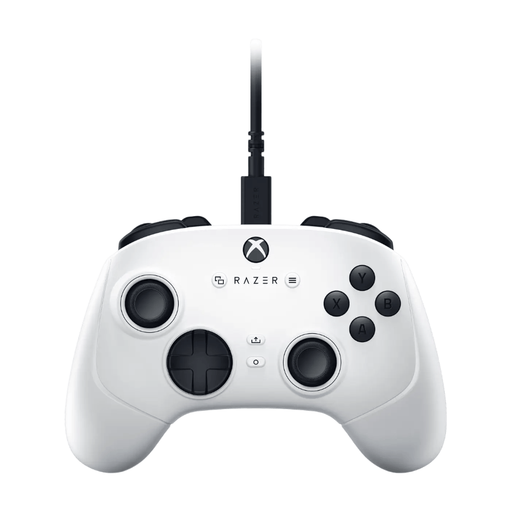 No image available
A wired option to compare if you play on PC or Xbox.
The product name lists PC, Xbox Series S and Xbox Series X.
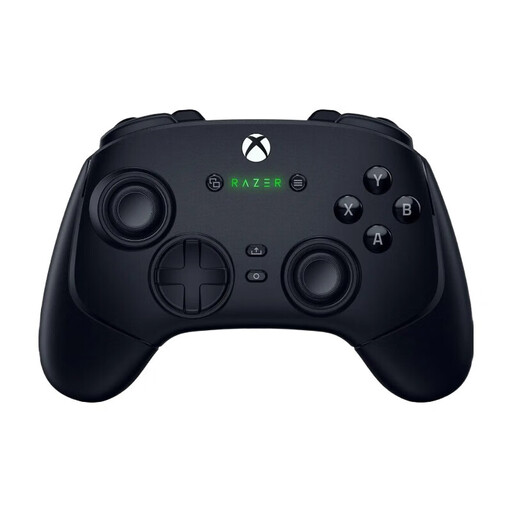 No image available
The product listing says this version is for playing on PC or Xbox; check the connection and compatibility of the exact version.
No. For EA SPORTS FC 26 on PC, EA lists haptic feedback and adaptive triggers via USB, and basic vibration via Bluetooth. This doesn’t necessarily apply to another football game.
Microsoft lists USB-C with a data-transfer cable, Bluetooth or Xbox Wireless with compatible support. Check which options your PC has.
No. Nintendo says the Switch 2 Pro Controller doesn’t work with the original Nintendo Switch.
No. Microsoft says rechargeable AA batteries can’t be charged in the controller. Charge them according to the battery manufacturer’s instructions.
For eligible distance sales, you’ll generally have 14 days to change your mind, as explained by the Dutch government. You also have rights if a product is faulty; the Netherlands has no fixed statutory warranty period, and the seller is your point of contact if something goes wrong. Different rules may apply in certain situations, such as buying from a private seller.