First, measure the distances between the TV and the seats, and check the picture from seats at the sides too; a bigger screen isn’t automatically the better choice. An OLED TV is a sensible option to compare if lots of guests will be watching from an angle. In a bright room, you can also assess LCD and mini-LED models for brightness and reflections. The right choice depends on the room and the specific model.
Who is this buying guide for?
Host with seats at the sides
You arrange chairs around the screen and want guests sitting off-centre to be able to follow the match. Compare the viewing angle of the specific model; the Consumentenbond notes that a wider viewing angle is generally an advantage of OLED TVs.
Viewer with guests sitting further back
You have seats at different distances and want to choose a screen size that suits the room. Measure the nearest and furthest seats before comparing models.
Viewer in a bright room
You watch with the group in daylight and want to take account of incoming light and reflections, as well as the view from the sides. The Consumentenbond points out that LCD TVs can often be bright; assess the specific screen in the room where you’ll be watching too.
What should you look for when choosing?
Start by measuring the viewing distances and considering the light in the room. Then compare the picture from the seats at the sides and check that the broadcast, connections and sound will work with your set-up.
| What to consider |
What should you check? |
Who should prioritise this? |
| Viewing angle from seats at the sides |
View the specific model from the furthest seats to the sides where people will be sitting, preferably with sports footage on screen. |
If guests will be sitting on either side of the screen, you’ll want to know whether the picture remains comfortable to watch when viewed off-centre. About 25% of consumers prioritise a good view from the sides. |
| Screen size and viewing distance |
Measure the distance from both the nearest and furthest seats. The Consumentenbond suggests around 2.4 times the screen diagonal as a comfortable starting point, based on its own research dated 5 May 2026. Treat this as a guide, not a fixed rule for every viewer. |
If guests at the back need to follow the action, you’ll want to choose a size that works at different viewing distances. About 25% of consumers give a clear view from the furthest seats top priority. |
| Light and reflections |
Assess the screen in similar lighting conditions and from the seats where people will be sitting. |
In daylight or in a room with lamps, you’ll want to see in advance how the picture looks and whether there are any reflections. About 20% of consumers are most concerned with watching in a bright room. |
| Motion handling |
Compare football footage on the exact models and check which features are used by the TV and the broadcast. |
If you’re particularly focused on the ball and fast camera movements, don’t rely on a stated hertz figure alone. About 20% of consumers say smooth action is their main concern when buying. |
| Reception, sound and set-up |
Check the broadcast source, the connection or app you’ll need, the sound and any installation requirements. |
If you want the picture and commentary ready for the group, check in advance how the match will be received and how it will sound. About 10% of consumers prioritise reliable reception and sound. |
Pitfalls to avoid when buying
-
Choosing based on screen size alone
A screen size that suits the furthest seat may be less comfortable for viewers sitting close to the TV. You’ll also need to consider the space available for the screen and its stand.
Measure several seating positions and check the TV’s overall dimensions, including the stand, before choosing a model.
-
Assuming mini-LED automatically offers a wide viewing angle
Mini-LED describes the backlighting used in an LCD TV; it doesn’t, by itself, tell you how the picture looks from the side.
View the specific model from an angle before making a decision based on brightness or the type of backlighting.
-
Assuming a 4K or hertz rating reflects the quality of the broadcast
A 4K screen doesn’t automatically make a broadcast 4K. A stated panel refresh rate doesn’t tell you what features are used to broadcast the picture or how motion looks on the specific model.
Check the source of the match and compare sports footage on the exact models, rather than looking at specifications alone.
-
Confusing an optional service plan with your statutory rights
A paid service plan and your statutory rights are not the same thing. If a product is faulty, the retailer remains your point of contact for your statutory rights.
Check what additional rights a service plan actually provides before taking it out.
Brands worth considering
LG
The OLED65C5ELB is a 65-inch OLED model to compare if you’ll have people sitting at the sides.
- LG lists OLED and 4K among this model’s features.
- A general description of OLED viewing angles isn’t a measurement of this specific variant. Check for reflections too, and confirm the full model code.
Sony
The K-65XR5 is a 65-inch LCD and mini-LED model to compare with OLED options, particularly in a bright room.
- Sony lists a resolution of 3840 × 2160 pixels, mini-LED and 120 Hz for this model.
- These specifications alone don’t confirm the viewing angle or motion handling; assess these separately.
Philips
The 65OLED810/12 is a 65-inch OLED model with Ambilight to compare if screen placement and lighting are important to you.
- Philips lists 4K, OLED and Ambilight among this model’s features.
- Check the picture from the seats at the sides and consider whether the room is suitable for the lighting behind the TV.
Samsung
The QE65S95HFTXXN is a 65-inch OLED model to compare with other screens, including for reflections.
- Samsung lists Glare Free for this variant.
- This is a manufacturer claim, not an independent comparison with other models. Check the full model code; the name S95H alone doesn’t uniquely identify the variant.
TVs at Joybuy
This selection includes OLED and QLED models in different screen sizes and with different specifications for you to compare for group viewing. Choose a size based on your viewing distances and check the picture and motion handling of the specific model.
 No image available
LG OLED65C68LA 65-inch OLED evo AI C6 4K Smart TV
Compare this OLED model with seats at the sides in mind, and assess the picture on the exact TV.
65 inches; 4K; 120 Hz.
View at Joybuy
 No image available
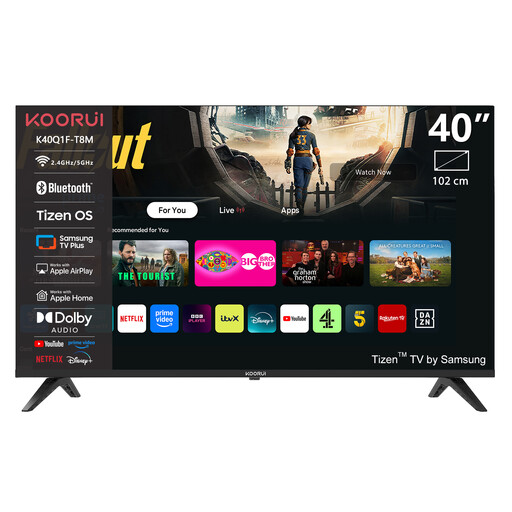
KOORUI K40Q1FQ-T8 40-inch Full HD QLED Smart TV
Compare the 40-inch size with your measured viewing distances and consider where the TV will go.
Full HD; QLED; Tizen OS.
View at Joybuy
 No image available
KOORUI K65N3UQ-T8 65-inch 4K UHD QLED Smart TV
Compare the 65-inch size with your guests’ viewing distances and check that the screen resolution suits the match source.
4K UHD; QLED; Tizen OS.
View at Joybuy
 No image available
TCL 65T8D 65-inch QD-Mini LED 4K TV
Use the stated motion specification as a point of comparison, and watch sports footage on the exact model too.
65 inches; 4K; 144 Hz VRR.
View at Joybuy
 No image available
METZ 86MQE8000Z 86-inch QLED 4K Google TV
Check whether the 86-inch size suits your viewing distances and available space; compare the sound from the seats where people will be sitting too.
4K; 144 Hz; integrated 2.1.2 sound system with subwoofer.
View at Joybuy
Frequently asked questions
What screen size should you choose if not everyone is sitting the same distance away?
Measure both the nearest and furthest seats. Based on its own research, the Consumentenbond suggests around 2.4 times the screen diagonal as a comfortable starting point. Use this ratio as a guide and compare nearby screen sizes too.
Does a football final need to be broadcast in 4K to make a 4K TV worthwhile?
No. A 4K TV doesn’t automatically make the broadcast you receive 4K. Check with your provider to see what resolution is available for the match.
What should you check before your guests arrive?
Test the actual source of the broadcast and the sound from the seats where people will be sitting. Check the picture settings in advance too; the Consumentenbond describes both a set-up wizard and manual adjustments.


