First, choose a controller that works with the console or PC you use to play your football game. Then check how many players the game mode supports, taking into account the controllers you already own. An extra wireless controller keeps cables off the floor; a wired model can save you from needing batteries, but you’ll need a safe cable route and the right connection. If you have a Switch 2, you may already be able to use an existing Switch Pro Controller.
Who is this choice relevant to?
Player with a dedicated console
Primarily wants a controller that works with their existing PS5, Xbox or Switch and their chosen local football game mode. Sony, Microsoft and Nintendo describe their controllers as being for specific platforms, so check that your game supports the controller too.
Host playing with a second player
Wants to check first whether they need another controller for the match. For example, Sony presents the DualSense as an extra controller that lets more players join in on PS5.
Player with limited floor space
Weighs up wireless play against having a cable that needs to run safely between the seat and console. A wired controller can save you from charging it, but the cable needs to be long enough and suit your setup.
What should you look for when buying?
First check your platform and game mode, then count the controllers you already have. Next, decide whether a wireless connection or a cable better suits your bedroom setup. Only compare models that meet these requirements.
| What to consider |
What should you check? |
Who is this most relevant to? |
| Platform and game |
Check the exact console or PC, and whether the controller is supported by your chosen game and game mode. |
If I want to be sure the controller works with my console or PC and football game, compatibility comes first. Around 36% of consumers rank platform and game compatibility as their top purchasing priority. |
| Another player |
Count the compatible controllers you have and check how many players the local game mode supports. |
If someone else is playing, I want to check first that we have enough controllers. Around 29% of consumers give letting another player join in their top priority. |
| Cable and room to move |
For wired use, check the cable length, connection and whether you can route it safely from your seat. |
If a cable could cross a walkway in my bedroom, I want to know whether it’s long enough and can be routed safely. Around 21% of consumers put cable routing first. |
| Buying and using the controller |
Check whether you can use a controller you already own, and whether a new model requires cables, batteries or charging. |
If I don’t want to buy a controller I don’t need, I first check what I already have and what my setup requires. Around 14% of consumers make avoiding unnecessary purchase and running costs their top priority. |
Common purchasing mistakes
-
Choosing a Switch 2 Pro Controller for the original Switch
Nintendo says the Switch 2 Pro Controller can only be used with Switch 2. It’s therefore not suitable for a match on the original Switch.
Check the full platform name before you choose. If you play on Switch 2, first see whether you can use an existing Switch Pro Controller.
-
Buying a wired controller without measuring your setup
The PowerA Enhanced Wired Battle-Ready Link we looked at is designed for use with the Switch in its dock and has a 3 m cable. The connection and your setup are therefore key considerations.
Measure the route from where you’ll be sitting and check that the cable won’t get in the way of a walkway.
-
Assuming extra features will give you an advantage in a football game
Sony says haptic feedback and adaptive triggers depend on support from the game. The fact that a controller has these features doesn’t mean your match will use them.
Check platform compatibility and how many controllers you need first. Choose extra features only if you want to use them.
Relevant brands to consider
Sony PlayStation
The DualSense is designed for anyone looking for an extra controller for PS5.
- Sony highlights haptic feedback and adaptive triggers.
- How useful they are depends on the game supporting them. PS5 compatibility doesn’t automatically make the controller suitable for another console.
Microsoft Xbox
Microsoft says the Xbox Wireless Controller is designed for Xbox consoles and Windows PCs.
- Microsoft highlights Bluetooth, button mapping, textured grip and a hybrid D-pad.
- Check that the connection and game you want to use are supported; these features don’t prove that it offers an advantage in football matches.
Nintendo
Nintendo says an existing Switch Pro Controller can connect wirelessly to Switch 2; the Switch 2 Pro Controller is designed for Switch 2.
- The Switch 2 Pro Controller has GL and GR buttons, as well as a headset jack.
- A Switch Pro Controller can’t wake Switch 2 from sleep using the HOME button. The Switch 2 Pro Controller doesn’t work with the original Switch.
PowerA
The Enhanced Wired Battle-Ready Link we looked at is a wired controller for docked-style Switch play.
- PowerA lists a 3 m cable and no need for batteries for this model.
- This model is designed for use with the Switch in its dock and doesn’t have several Nintendo features. These details don’t necessarily apply to the entire PowerA range.
8BitDo
The manufacturer says the Ultimate 2 Bluetooth can be used with Switch and Windows.
- 8BitDo highlights a charging dock and customisable controls.
- According to the manufacturer, a firmware update is required to use it with Switch 2. Performance claims haven’t been independently verified for football games.
Controllers at Joybuy
These Joybuy products are designed for different platforms: PlayStation 5, Xbox and Windows PC, Nintendo Switch and Switch 2. Before buying, check which controller works with your game and game mode.
 No image available
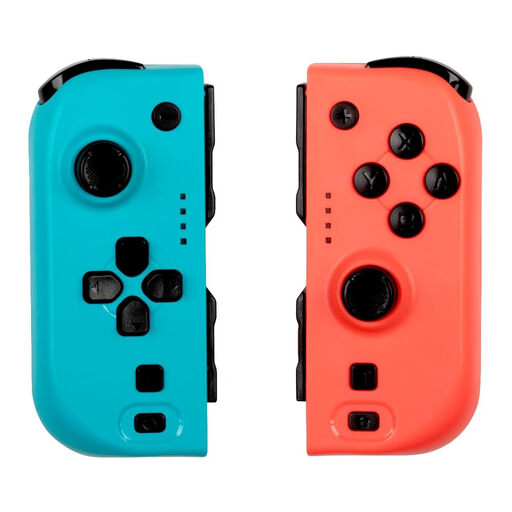
KONIX JoyPad Controller Pair, blue and red
A pair of controllers for two-player games on a supported Nintendo Switch.
The product information lists Nintendo Switch, Switch OLED and Switch 2, Bluetooth, vibration and up to 8 hours of battery life.
View at Joybuy
 No image available
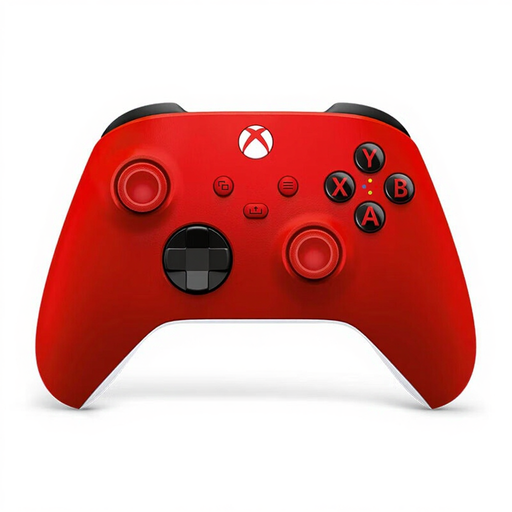
Xbox Wireless Controller, Pulse Red
An option for a local match on a supported Xbox console or Windows PC.
The product information lists Xbox Series X, Xbox One and Windows PC, with Xbox Wireless and Bluetooth. It also mentions a hybrid D-pad and textured grip.
View at Joybuy
 No image available
Nintendo Switch Pro Controller, black
A wireless controller for Nintendo Switch; Nintendo also says it can connect wirelessly to Switch 2.
The product information lists motion controls, HD Rumble and amiibo functionality. On Switch 2, this controller can’t wake the console from sleep using the HOME button.
View at Joybuy
 No image available
Sony PlayStation 5 DualSense Wireless Controller, white
An extra controller for a local match on PS5, provided the game supports the game mode you want to play.
The product information lists wireless connectivity, a rechargeable battery, haptic feedback and adaptive triggers. Whether you can use the extra features depends on the game.
View at Joybuy
 No image available
Official Nintendo Switch 2 Pro Controller, black
An extra controller for a local match on Switch 2; Nintendo says this model doesn’t work with the original Switch.
The product information lists Bluetooth, HD vibration, motion controls and a rechargeable battery.
View at Joybuy
Frequently asked questions
Can I use my existing Switch Pro Controller for a match on Switch 2?
Yes. Nintendo says a Switch Pro Controller can connect wirelessly to Switch 2. You can’t use its HOME button to wake Switch 2 from sleep; also check that your game and game mode support it.
Does the Switch 2 Pro Controller also work with my original Switch?
No. Nintendo says the Switch 2 Pro Controller can only be used with Switch 2.
Can I use the wired PowerA controller without the Switch in its dock?
Not the Enhanced Wired Battle-Ready Link we looked at: PowerA says this model only works when the Switch is in its dock. Check other models individually.
What can I do if a controller I bought online turns out to be unsuitable?
For online purchases from a business, the Dutch government says you’ll often have a 14-day cooling-off period; check which terms apply to your purchase. If a product is faulty, your statutory guarantee is separate from any manufacturer’s warranty, and you should contact the seller.
Which Dutch safety rule is relevant to a controller?
The Dutch Authority for Digital Infrastructure says electrical and electronic equipment must carry the appropriate CE marking; radio equipment is also subject to European requirements. A CE logo in a product description doesn’t, by itself, establish that a specific item meets the requirements.


