If you mainly mix after recording your folk demo, compare wired open-back models for use in a quiet room. If you also record vocals or acoustic instruments with microphones, consider a closed-back model to reduce sound leakage. Wired headphones don't need their own mains adapter, but check that they’re compatible with your existing headphone output and provide a useful listening level. Check your mix on another playback device too, as headphones present stereo differently from speakers.
Who is this guide for?
Home mixer working with acoustic recordings
You mainly mix pre-recorded vocals and instruments in a quiet room, and want to judge balance and stereo positioning without adding another mains-powered listening device. Sonarworks explains that headphones present the left and right channels differently from speakers.
Musician who also records live
You use microphones for vocals or acoustic instruments and want to stop the monitor mix bleeding into the recording. VeiligheidNL notes that well-fitting headphones let less sound escape.
Mixer with limited access to power sockets
You have few power sockets and want to know whether wired headphones will work directly with the compatible headphone output on your existing equipment.
What should you look for in studio headphones?
Wired and open-back
Best for: mixing in a quiet room, when there isn’t an open microphone nearby.
Bear in mind: open-back earcups provide less isolation and let sound escape. Check your mix on another playback device too.
Wired and closed-back
Best for: recording with microphones or mixing when background noise is distracting.
Bear in mind: a closed-back design reduces sound leakage, but doesn’t prove that a model reproduces your mix accurately.
| What to consider |
What to look for when buying |
Who is this most relevant to? |
| Balance and sense of space |
Check whether the model is open-back and wired. Use familiar reference tracks and check your mix on another playback device too. |
When I’m judging vocals, guitar and room sound, I want to know how the mix will sound beyond my headphones. Around 36% of consumers prioritise decisions about balance and space in their mix. |
| Sound leakage when recording |
Check that the earcups are closed-back and fit well; make a test recording while the monitor mix is playing. |
When I’m recording vocals or acoustic instruments with a microphone, I want to avoid the monitor mix being picked up audibly. Around 29% of consumers prioritise reducing sound leakage during recording. |
| Connecting without an extra power socket |
Check the plug size and whether your existing output can drive the headphones to a useful level. An adapter doesn’t change the available amplification. |
When I want to use my existing equipment, I look for a setup that doesn’t need a separate mains-powered headphone amp. Around 21% of consumers prioritise listening through an existing connection without using an extra power socket. |
| Comfort and maintenance |
Try the fit if possible, and check which cables and ear pads can be replaced on each model. |
For longer sessions, I want a comfortable fit and to know whether parts can be replaced. Around 14% of consumers prioritise long-wearing comfort and maintenance. |
Common mistakes when choosing
-
Using open-back mixing headphones right next to a microphone
Sound from open-back earcups can be picked up by a microphone. So, a closed-back design is worth comparing if you monitor while recording, but that alone doesn’t tell you how accurately a model will reproduce your finished mix.
First decide whether you’ll mainly mix or also record with the same headphones. If you’re unsure, make a test recording with your own setup.
If you need different designs for mixing and recording, you may need to consider two models.
-
Assuming impedance or an adapter guarantees enough volume
A compatible plug only proves that you can physically connect the headphones. The headphone output and the headphones together determine whether the volume will be useful.
Check the specifications of your own output and try the combination at a moderate volume before buying extra equipment.
If your existing setup doesn’t deliver a useful level, you may need a different output or additional amplification.
-
Not checking your spacious-sounding headphone mix elsewhere
With headphones, the left and right channels reach your ears differently from the way they do through speakers. This can make stereo width and space sound different.
Listen to your folk demo on another playback device too, and use familiar reference tracks.
Brands and models to compare
beyerdynamic
Compare the open-back DT 900 PRO X for mixing with the closed-back DT 700 PRO X if you also monitor while using microphones.
- beyerdynamic lists an impedance of 48 ohms, detachable cables and replaceable parts for the wired DT 900 PRO X.
- The open-back design lets sound escape. So compare the closed-back DT 700 PRO X if you monitor while recording.
Sennheiser
The open-back, wired HD 490 PRO is worth comparing for mixing sessions in a quiet room.
- Sennheiser lists two interchangeable sets of ear pads for production and mixing, replaceable pads and a detachable cable.
- The open-back design is less suitable for monitoring next to a microphone. Also check that your output can drive this version to a useful level.
AKG
The wired, closed-back K371 is worth comparing if you want to use the same headphones while recording.
- AKG lists a closed-back design, a detachable cable and a nominal impedance of 32 ohms.
- You’ll need to assess the fit and suitability for your finished mix separately; a closed-back design doesn’t guarantee a particular sound in your mix.
Audio-Technica
The closed-back, wired ATH-M40x is worth comparing if recording use and replaceable cables matter to you.
- Audio-Technica lists two detachable cables, closed-back over-ear cups and a supplied 6,3 mm adapter.
- The description ‘flat-tuned’ is a manufacturer’s claim, not independent proof that the model will sound neutral for every mix.
Sony
The closed-back, wired MDR-7506 is designed for recording and studio use; Sony Netherlands identifies this version as MDR7506.EU.
- Sony lists an impedance of 63 ohms and an adapter for 3,5 mm and 6,3 mm connections.
- Check that the fixed cable and fit suit your workspace. Sony’s assessment of the sound is a manufacturer’s claim.
Joybuy products related to this topic
The Joybuy options below are headphones and headsets with different connections and intended uses. Check each model’s listening mode, connection and application to make sure they suit your mixing and recording setup.
 No image available
Sennheiser MOMENTUM 4 Wireless, black
The described passive wired listening mode may be useful if you want to listen through a compatible headphone output; assess for yourself whether the model suits your mixing work.
The product description mentions a supplied 3,5 mm audio cable and passive use without a battery. The title also mentions Bluetooth, noise cancellation and 60 hours of battery life.
View at Joybuy
 No image available
Jabra Evolve2 75 headset
The product description positions this model for office and call-centre use; check that its connection and sound suit your mixing setup.
The description mentions Bluetooth, connection to two devices and up to 36 hours of audio playback.
View at Joybuy
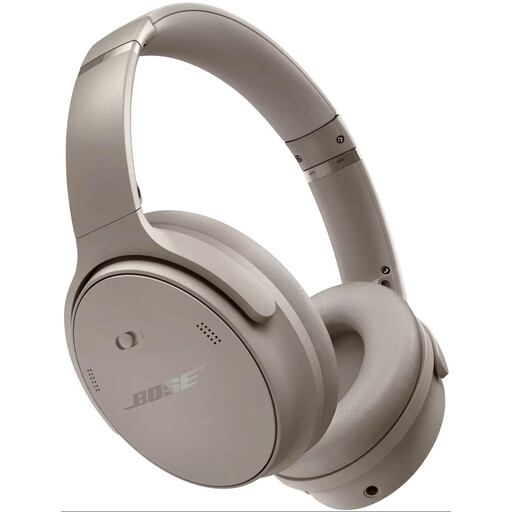 No image available
Bose QuietComfort Headphones, Sandstone
The description mentions listening to music over Bluetooth, so check whether the listening mode suits the way you want to mix your folk demo.
The product description lists active noise cancellation and a USB-C charging cable.
View at Joybuy
 No image available
Logitech G G432 7.1 Surround Sound Wired Gaming Headset
The wired connection options may be useful if your existing equipment supports one of them; check the connection before choosing this model for mixing.
The product description lists a 3,5 mm connection and a USB DAC; the title mentions 7.1 surround sound.
View at Joybuy
 No image available
Razer Blackshark V2 X 7.1 Wired Gaming Headset, black
The stated analogue connection may work if your equipment has a suitable 3,5 mm output; check the fit and decide for yourself whether the headset suits mixing.
The product description lists a 3,5 mm connection, passive noise isolation, memory foam ear cushions and a weight of 240 grams.
View at Joybuy
Frequently asked questions
Do I need a separate headphone amp if I have few power sockets?
Not necessarily: you can connect wired headphones to the headphone output on your existing device. Check the plug size and whether the combination gives a useful volume with your specific output; impedance alone won’t tell you whether you need a separate amp. For example, Focusrite lists a 6,35 mm headphone output for the fourth-generation Scarlett 4i4; this doesn’t tell you anything about another device.
How can you stop your headphones bleeding into the vocal mic when recording a folk track?
For microphone recordings, compare a well-fitting closed-back model and make a short test recording while the monitor mix is playing. An open-back model may let more sound escape in this setup; the result also depends on fit, volume and positioning.
Do I need a headphone profile to correct my mix?
No, a headphone profile is an optional tool. Before buying software, check that it supports your exact model. Sonarworks says you should disable the SoundID Reference plug-in when exporting, so the listening correction isn’t applied to the audio file.
What are your rights when buying headphones online in the Netherlands?
According to ACM ConsuWijzer, online consumer purchases generally come with a statutory cooling-off period of up to 14 days after delivery, with some exceptions. The seller is also responsible for the statutory guarantee if a product doesn’t meet what you could reasonably expect. These rights are separate from any additional manufacturer’s warranty.
Does every pair of studio headphones need a CE mark?
That depends on the product rules that apply to the specific version. According to the European Commission, CE marking is only mandatory for products covered by relevant EU rules; if no such rules apply, the mark must not be used. So don’t draw conclusions about an unfamiliar version based only on whether it has a CE mark.


