
Vandaag of morgen in huis

Kwaliteit gegarandeerd

Welkomstaanbiedingen ontgrendelen: GRATIS bezorging | Tot 80% korting | Gratis 30 dagen JoyPlus-proefperiode
Download de app
A folding desk can make a small home more functional, but not every model suits every working setup. A desk that seems convenient during the day may turn out to have too little legroom, feel unstable or still take up a lot of space when folded away.
For a student room, bedroom or compact home office, there are three common pitfalls to watch out for:
First, measure the space where you plan to put the desk. Allow for room for your chair and to move around, as well as the distance from any radiator or plug socket. A compact model measuring around 56 × 32 cm may be enough for a laptop table beside the sofa. If you use a laptop, monitor and documents every day, you’ll usually benefit from a larger work surface of around 100 × 60 cm.
When choosing a space-saving desk, check:
A wall-mounted desk saves floor space, but it needs a suitable wall and must be fitted correctly. Check the fixings supplied and the wall’s load-bearing capacity beforehand.
Check the stated load capacity for the work surface and any shelves separately. A desk may, for example, support a total of 50 kg, while a shelf can hold only 10 kg. Don’t put heavy equipment on a folding section unless the instructions say you can.
These details also matter if you use a laptop every day:
Never use a folding desk as a seat or step. Remove items before folding the work surface away, and keep your fingers clear of hinges and folding points.
Many models combine MDF or particleboard with a metal frame. A melamine or PVC finish is generally easy to clean, but check that spilled liquid can’t seep in around the edges or seams. A metal frame can add strength, but the joints and legs determine how stable the whole desk is.
An adjustable desk or tilting laptop desk can be useful for reading and drawing. If you’re considering one, check:
For a desk in a small space, easy storage is often more important than having lots of features. Choose features you’ll actually use.
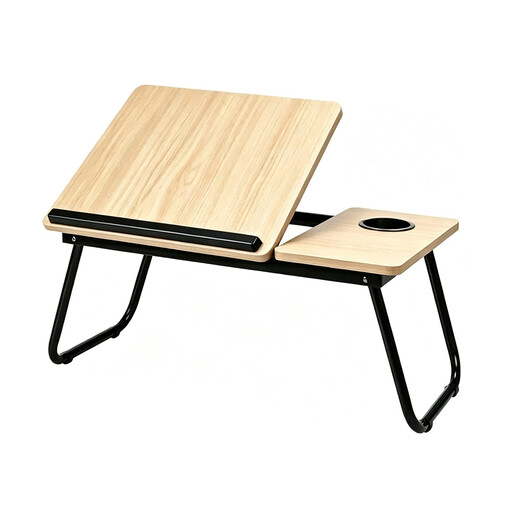
Why it suits this profile: This compact folding laptop desk is ideal for working on a laptop, reading or studying from the sofa or bed. It weighs 2 kg and has a 56 × 32 cm work surface.
The open dimensions and weight are clearly stated. The retaining lip helps stop a laptop or book from sliding off the tilted surface.
Folding legs, tiltable work surface, side shelf with cup holder and a choice of several colours.
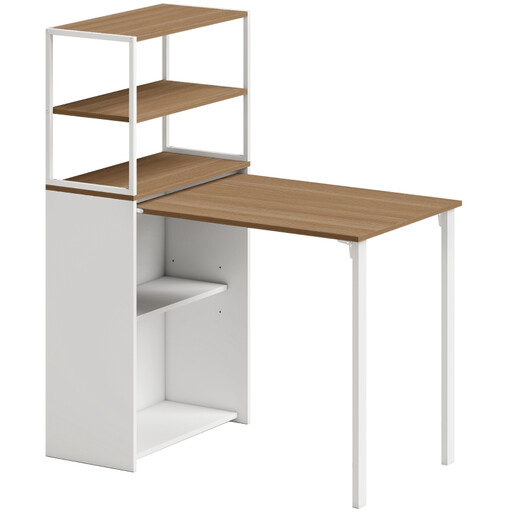
Why it suits this profile: This desk combines a 105 × 60 cm work surface with four storage shelves. It’s a good fit for a compact home office where books, documents and accessories need a dedicated spot.
The folded width is 30 cm, and the load capacity is specified as a maximum of 5 kg per shelf. This makes it easier to work out how much space you’ll need in advance.
Melamine surface, adjustable feet, four shelves and a stated total load capacity of 80 kg.
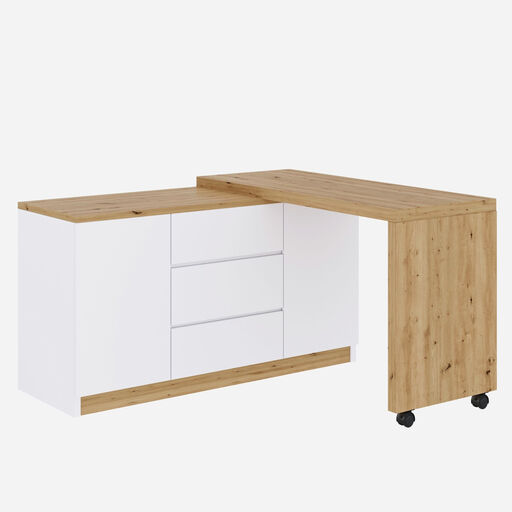
Why it suits this profile: This model is designed for people who switch between a straight desk, an L-shaped workspace and a compact sideboard. Two doors, three drawers and an adjustable shelf provide plenty of storage.
The different configurations and dimensions are clearly stated: the work surface measures 120 × 50 cm, and the product has lockable castors. This makes it clear that added flexibility requires extra space and assembly.
Rotating tabletop, two doors, three drawers, adjustable shelf and a stated maximum work surface load of 50 kg.
We’ve put together a complete, up-to-date list of products that meet these strict selection criteria and the applicable European safety regulations.
That depends on its dimensions, stability and how you sit while working. A laptop table may be enough for short sessions. If you work for several hours, you’ll usually benefit from a full-sized work surface with enough depth for your laptop, mouse and documents. Also check that your chair fits under the surface and that your legs won’t bump into a storage compartment.
Its lifespan depends on the materials, hinges, assembly and load. A desk will generally last longer if you don’t overload it, use it on a level surface and avoid forcing the hinges. Fold it away carefully, remove all items first and follow the assembly and care instructions.
A desk without built-in electronics doesn’t use any electricity itself. With a model that has a power socket or USB ports, electricity is only used when a device is plugged in. Before setting the desk in its final position, check the product information for built-in connections, cable clearance and the location of the plug socket.
