First decide where the camera will go, then check from that position whether both the work surface and small floral details are in focus and framed appropriately. A mirrorless camera with a suitable lens gives you flexibility to adjust the framing; a downward-facing webcam is a good fit for demonstrations via a computer, while a compact gimbal camera is particularly useful if you also film while moving. Test the colour reproduction under your own lighting, and factor in the lens and mounting setup your arrangement requires.
Who is this buying guide for?
Filming floral details
You want to show small elements clearly as you arrange them. So check the focus and framing from the distance at which you’ll actually use the camera. DJI specifies a focusing distance of 0.2 m for the Osmo Pocket 3; Canon specifies 15 cm and 0.25× magnification for the RF-S 18–45 mm lens specifically in MF mode.
Creating colour-critical footage
You film in natural or room lighting and want flower colours to look consistent from one shot to the next. Lighting and white balance are important considerations: Canon Netherlands explains that different lighting conditions may mean you need to adjust the white balance.
Creating table-top demonstrations
You mainly want to show your hands and the work surface, possibly via a computer. A suitable overhead view and a practical mounting position are important. Logitech describes Show Mode for the MX Brio as a way to point the webcam downwards.
What should you look for when buying?
Start with the planned camera position and the type of footage you want: a fixed work surface, small details and moving shots all call for different checks. Then take a test shot in the lighting you’ll be filming in.
| What to consider |
What to look for |
Who should prioritise this? |
| Floral details in focus and large enough |
Check the focusing distance and framing you want for the exact camera-and-lens combination, from your planned camera position. |
I want to capture small actions involving flowers clearly and in focus from one position. Around 36% of consumers give floral details top priority. |
| Colour and lighting indoors |
Take a test shot in your usual natural or artificial light and check whether you can adjust the white balance. |
When I film in changing indoor light, I want to be able to assess the flower colours in my footage accurately. Around 29% of consumers prioritise colour and lighting. |
| The whole work surface in shot |
From the intended height, check that the vase, workspace and both hands fit in the same frame. |
I want to show the arranging process as a whole, without my hands or parts of the work surface disappearing out of shot. Around 21% of consumers give a full table view top priority. |
| Filming while moving around the arrangement |
Decide whether you’ll actually be filming while moving, and check both the stabilisation and the detail framing you want. |
If I also want to film around the finished arrangement, freedom of movement matters more than a fixed shot of the table alone. Around 14% of consumers choose movement as their main consideration. |
Buying pitfalls
-
Choosing a camera model without considering the shooting distance
With a mirrorless camera, focusing and the size of a floral detail in the frame depend in part on the lens and focus mode you use. A kit lens isn’t automatically suitable for every close-up.
Check the exact lens version, then test the focus and framing from the position where you plan to place the camera.
You may need a different lens or mount to get the shot you want.
-
Assuming a downward-facing webcam guarantees an overhead view
Logitech’s Show Mode is designed to show desk work, but it doesn’t guarantee that your flower arrangement and working hands will both fit in the frame.
Check the entire work surface in a test shot from your planned mounting position.
You may need a different mounting position or setup.
-
Choosing a gimbal when you only film from one fixed position
DJI describes the Osmo Pocket 3’s gimbal stabilisation as being for moving shots. That feature doesn’t automatically determine the framing for a fixed shot of a table.
Choose stabilisation for moving footage if it’s genuinely part of the way you film.
You may still need a fixed camera mount for a set overhead view.
Relevant brands
Sony
A mirrorless camera option for creators who want to choose a lens that works for both the whole arrangement and close-up details.
- Sony specifies an interchangeable E-mount for the ZV-E10 II and lists the E PZ 16–50 mm F3.5–5.6 OSS II zoom lens with the lens kit.
- Check whether your chosen lens can capture the floral detail in focus and at a large enough size from your shooting distance.
Canon
The EOS R50 with an RF-S lens is a mirrorless camera option for anyone weighing up lens choice and framing.
- Canon specifies 4K 30p for the EOS R50. The RF-S 18–45 mm lens offers zoom.
- Canon’s specified focusing distance of 15 cm and magnification of 0.25× for this lens apply specifically in MF mode; check the conditions for your shooting mode.
DJI
The Osmo Pocket 3 is a compact option for filming the finished arrangement while moving.
- DJI specifies three-axis gimbal stabilisation and a focusing range starting at 0.2 m.
- The lens is fixed, so you can’t swap it for a different close-up framing.
Logitech
The MX Brio is a webcam option for a computer-based home working or demonstration setup.
- Logitech describes Show Mode as a way to point the webcam downwards and lists adjustable white balance in the software.
- Check separately whether the arrangement and your hands will both fit in the frame from your chosen mounting position; Show Mode alone doesn’t indicate whether the webcam is suitable for macro shots.
Products on Joybuy
Below are compact gimbal cameras for moving shots and webcams for computer-based flower-arranging demonstrations.
 No image available
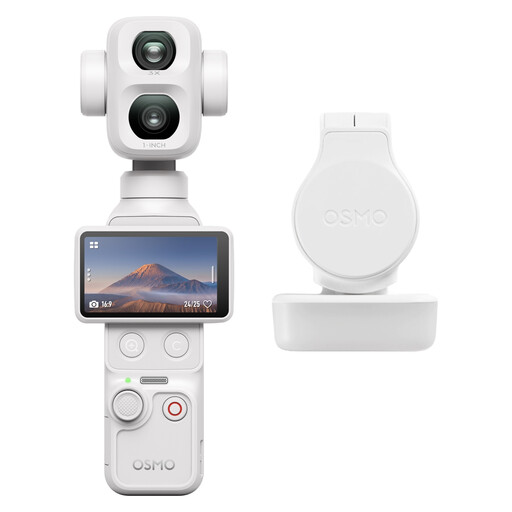
DJI Osmo Pocket 4P Standard Combo (White)
A compact gimbal camera for filming flower arrangements, including when you want to use different framings.
The product name lists 2× lossless zoom, built-in storage, a rotating screen and three-axis stabilisation.
View on Joybuy
 No image available
DJI Osmo Pocket 3 + Ulanzi VL49 RGB LED Video Light
This bundle combines a compact gimbal camera with an extra video light for indoor filming.
The bundle description lists a Ulanzi VL49 RGB LED light and three-axis gimbal stabilisation. You may also need a fixed mount for a set overhead view.
View on Joybuy
 No image available
Logitech HD Pro Webcam C920e
A webcam for a computer setup where you want to demonstrate flower arranging at a table.
The field of view is fixed, so check in advance that the work surface fits in the frame from your chosen mounting position.
View on Joybuy
 No image available
Osmo Pocket 4 Creator Combo
A compact gimbal camera for flower videos where you also want to capture moving shots.
The product name lists a 1″ CMOS sensor, 4K/240fps, three-axis stabilisation, 2× lossless zoom and 107 GB of built-in storage.
View on Joybuy
 No image available
Philips 4000 Series 4K UHD Webcam, SPL6408BT/00, EU Version, Black
A desktop webcam for a computer-based flower-arranging demonstration.
The product name lists 4K UHD, 8 MP and autofocus.
View on Joybuy
Frequently asked questions
How can I check whether a camera can focus close enough to a flower?
Check the focusing range of the exact camera or lens, then take a test shot from your planned mounting position. DJI specifies a focusing distance starting at 0.2 m for the Osmo Pocket 3; Canon lists a focusing distance of 15 cm for the RF-S 18–45 mm lens specifically in MF mode. The minimum distance alone doesn’t tell you how large the floral detail will appear in the frame.
What can I do if flower colours change when I film indoors?
Take a test shot in the lighting you’ll be filming in, and adjust the white balance if needed. Canon Netherlands explains that different lighting conditions can cause a colour cast; Logitech lists adjustable white balance in the software for the MX Brio.
Do I need to buy a warranty of exactly two years for a camera?
No. Your statutory guarantee doesn’t depend on buying a commercial warranty. ACM ConsuWijzer explains that there is no fixed general period of exactly two years for the statutory guarantee: what you can reasonably expect from a product is also taken into account. The seller is your point of contact if a fault is covered by the statutory guarantee.
Can I share a flower-arranging video publicly if other people are recognisable in it?
First check which privacy rules apply. According to the Dutch Data Protection Authority, the exception for personal or household use doesn’t apply when you share images of recognisable people with a wider audience. You need a legal basis under the GDPR to publish them; according to the regulator, this will often be consent.


