
Pilot with an existing stick
Wants to add separate controls for thrust and extra manoeuvres without buying a second stick. Thrustmaster describes the TWCS and Sol-R 6 as standalone throttles.


If you already have a suitable stick, compare standalone throttles by their extra controls and how they sit on your desk. If you’re starting without a stick or want to keep separate components to a minimum, compare a complete HOTAS set with a stick that has built-in throttle levers. In every case, control of lateral or vertical thrust depends on how you map the axes in your game.
Wants to add separate controls for thrust and extra manoeuvres without buying a second stick. Thrustmaster describes the TWCS and Sol-R 6 as standalone throttles.
Needs to choose between a controller that can sit freely, a compact throttle that needs mounting, and a stick with built-in levers. Check how the exact model is positioned.
Wants to decide whether a complete HOTAS set or a single stick with throttle levers offers enough control. Check what’s included in the version you choose and which functions your game lets you configure.
Start with the controls you need for your manoeuvres, then check whether the setup suits your existing equipment and available space.
Choose this if: you’re happy with your existing stick and want separate controls for thrust and extra functions.
Bear in mind: it means a second device on your desk; your game determines which functions you can assign to the available axes.
Choose this if: you need both a stick and a throttle; the Thrustmaster T.16000M FCS HOTAS includes both.
Bear in mind: two control units take up desk space, and an existing stick may be redundant.
Choose this if: you’d rather have just one control unit on your desk; the Turtle Beach VelocityOne Flightstick has two levers on its base.
Bear in mind: the levers are on the stick base rather than on a separate throttle.
Compare this if: you want to practise controlling separate directions with both hands; the Thrustmaster Sol-R 2 HOSAS has two sticks, each with a built-in throttle.
Bear in mind: this isn’t a traditional standalone throttle, and you’ll need space for two stick bases.
| What to consider | What to look for when buying | Who this matters to |
|---|---|---|
| Thrust and directional control | Check which axes or mini-stick the model has and whether your game lets you assign movements to separate axes. | I want separate controls for thrust and manoeuvring directions; around 33% of consumers give the available manoeuvring axes top priority. |
| Desk space and mounting | Measure the space needed for the base and your hand movements. Check whether the exact model can sit freely or needs mounting to a desk, chair or sim rig. | With a small desk, I want to know whether my controller can sit freely or needs to be mounted; around 27% of consumers prioritise positioning and mounting. |
| Adding to an existing stick | Compare what’s included in the version with your current controls, and check the connections and platform requirements. | I already have a stick and only want to add a throttle, not accidentally buy a second stick; around 20% of consumers prioritise adding specific components. |
| Getting started easily | Decide whether you want a standalone throttle, a complete set or one stick with built-in levers. Then check the input mode and axis settings for your game. | As a beginner, I want a straightforward setup and to know what I need to configure myself; around 20% of consumers prioritise getting started easily. |
A standalone TWCS isn’t the same as the T.16000M FCS HOTAS, which includes both a stick and a TWCS.
Before buying, compare what’s included in the exact version with the controller you already own.
According to VKB’s European product page, the STECS Space Throttle Mini needs to be secured to the desk for tabletop use.
Check in advance that you have a suitable place to mount it, and don’t confuse the Mini with another STECS version that has a desk base.
A manufacturer may specify a gimbal or mini-stick, but that doesn’t determine how it will be mapped in your game.
Check which axes your game lets you configure and set up controls for thrust and manoeuvring directions.
ACM ConsuWijzer distinguishes between additional warranties and the statutory guarantee, which applies subject to the relevant conditions.
Read which extra risks an additional warranty product covers, and remember your statutory rights.
Worth considering for standalone throttles, a HOTAS set or a HOSAS setup; the contents and controls vary by product range.
The European STECS Space Throttle Mini is a standalone control for space sims.
The VPC CDT-VMAX is a standalone PC throttle with adjustable controls.
The X56 H.O.T.A.S. is a set with a stick and dual throttle.
The VelocityOne Flightstick has throttle levers on the stick base rather than a separate throttle.
The selection below includes flight simulator controls and a cockpit listing; these aren’t equivalent throttle options. Check whether each product suits your game and available space.
 No image available
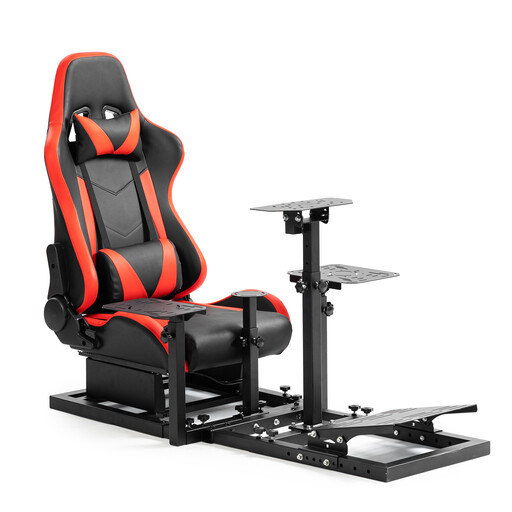
This is a racing cockpit, not a flight throttle; only consider it if you’re also looking for a cockpit for a racing simulator.
The product name mentions Logitech G29/G923, Fanatec CSL-DD and Thrustmaster T300. The steering wheel, pedals, handbrake and joystick aren’t included.
 No image available
A quadrant-style flight simulator controller; check that its controls and axis mapping suit the space game you play.
The product name lists USB and PC, Xbox, Xbox One X and Xbox Series S. Check compatibility and features for your specific game.
 No image available
A flight control combo for anyone looking for a stick and throttle; check exactly which parts are included and how you want to map the axes in your game.
The product name lists PC. Before buying, check that it’s compatible with your platform and will fit on your desk.
No, not if you want to keep using your current stick and are only looking for a standalone throttle. Thrustmaster offers the TWCS and Sol-R 6 as standalone throttles; the T.16000M FCS HOTAS includes both a stick and a TWCS. Check what’s included in the exact version.
According to VKB’s European product page, the Mini needs to be secured to the desk for tabletop use. If you don’t have a suitable place to mount it, compare it with a version that has a desk base.
First, check that the input mode is set to PC and that the USB cable is connected to a Windows 10/11 PC. Turtle Beach then recommends configuring the axes and functions in the game; this doesn’t confirm that every game supports all functions.
No, not automatically. An extra analogue axis or gimbal only gives you the virtual controls you want if you can assign it to the right movement in your game. Check your game’s configuration options before choosing a model for this feature.
According to ACM ConsuWijzer, when you buy a product online you generally have up to 14 days after delivery to change your mind, subject to some exceptions. The statutory guarantee is separate from any manufacturer’s warranty or paid additional warranty. If a product doesn’t perform as you could reasonably expect under normal use, the seller is responsible for providing a solution, subject to the applicable conditions.