
Relaxed sightseer
You share a bedroom and want to decide first whether extra physical controls are worth the potentially audible buttons, levers and mounting hardware. An existing gamepad is still an option if you don’t need a physical throttle.


You don’t necessarily need a separate throttle for virtual sightseeing: Microsoft also lists an Xbox controller as an option for Microsoft Flight Simulator 2020 if you mainly want to enjoy flying. If you do want physical throttle controls, first decide whether you need just a throttle or a joystick or yoke too. Comparable noise measurements aren’t available for the models discussed, so none can be described as quieter on that basis.
You share a bedroom and want to decide first whether extra physical controls are worth the potentially audible buttons, levers and mounting hardware. An existing gamepad is still an option if you don’t need a physical throttle.
You use the same desk for other things too, so you’re looking for controls you can move or put away after your flight. A detachable HOTAS and a throttle quadrant with mounting brackets offer different ways to set up your controls.
You want to control different types of virtual aircraft, so you may be looking for interchangeable lever layouts or adjustable controls rather than one fixed cockpit layout.
First decide whether you need a physical throttle. Then compare the space required, platform compatibility and controls that suit your flights.
| What to consider | What should you check? | Who is this important for? |
|---|---|---|
| Bedroom noise | Consider the buttons, levers and mounting as one complete setup; don’t rely on an unsubstantiated claim that a model is quiet. | If my roommate needs peace and quiet, I want to know how much noise the complete setup makes before adding more physical controls. Around 31% of consumers prioritise a quiet shared bedroom. |
| Desk space and storage | Measure the available space, including the clamp or mounting bracket and room for the levers to move. | When I use the same desk for other activities, I want to be able to move or put away the controls after flying. Around 25% of consumers give desk space top priority. |
| Platform and simulator | Check the exact model version, support for your platform and any required components. | If I fly on my own PC or console, I want to know before buying that my chosen setup works with my simulator. Around 25% of consumers start by checking compatibility. |
| Controls for each aircraft type | Check which functions and axes you need, and whether the levers are interchangeable or the detents can be switched off. | If you switch between aircraft types, you’ll want controls suited to the aircraft you’ve chosen, without adding functions you don’t need. Around 19% of consumers give their preferred aircraft layout top priority. |
Buttons, levers, mounting hardware and other game sounds may be audible in a shared bedroom. Comparable noise measurements aren’t available for the models discussed.
Consider the complete setup and agree times of use with your roommate. The Dutch government advises people dealing with noise nuisance to try agreeing arrangements together first.
The required setup varies by model. Honeycomb lists an Alpha XPC and Xbox Hub as necessary to use the Bravo with Xbox; Thrustmaster describes the TCA Quadrant Airbus Edition as a PC product.
Before buying, check the full model name and the setup required for your platform.
For the Xbox setup with the Bravo described above, you’ll need the additional components specified by Honeycomb as well as the throttle.
The stated dimensions of the Honeycomb Bravo exclude the mounting plate and clamp. This means it may take up more desk space than the device’s dimensions alone suggest.
Check that you have enough clearance for both mounting and lever movement.
The Flight Throttle Quadrant is designed for anyone who already has another form of aircraft control and is looking for separate levers.
The T.Flight Hotas One family combines a joystick with throttle controls, while the TCA Quadrant Airbus Edition is a separate quadrant designed around Airbus controls.
The Bravo is a comprehensive quadrant for different aircraft layouts; the Bravo LITE is a separate version with interchangeable levers.
VelocityOne Flight is worth considering if you’re looking for a yoke as well as throttle controls in one system.
These Joybuy products range from flight control systems to cockpit equipment. Check whether each product includes a throttle and whether you’ll need a joystick, yoke or other components as well.
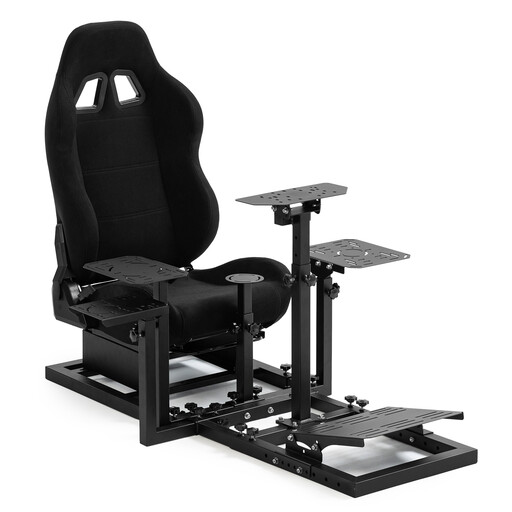 Image unavailable
The product name describes a cockpit with a racing seat, not a separate flight throttle. Before buying, check which flight controls are included with the setup.
The product name states that the steering wheel, pedals, handbrake and joystick are not included.
 Image unavailable
A flight control system with a joystick and throttle controls is worth considering if you’re looking for both types of physical control.
The product information lists a metal lever, a 3D rudder and an adjustable grip range. Check the settings and compatibility with your simulator.
 Image unavailable
This throttle quadrant could be a good choice if you’re looking for physical lever controls for flight simulation and the Boeing layout suits the way you play.
The product information lists three axes, four interchangeable levers and 17 action buttons. For Xbox use, it states that the TCA Yoke Boeing Edition must be connected; check the exact platform setup before buying.
No. Microsoft also lists using an Xbox controller as an option for Microsoft Flight Simulator 2020 if you mainly want to enjoy flying. Check that the controls suit the version of the simulator you use.
No. Don’t assume a throttle will work with Xbox just because it works on PC. For the Bravo, Honeycomb lists an Alpha XPC and Xbox Hub as the required setup; Thrustmaster describes the TCA Quadrant Airbus Edition as a PC product.
Before buying, check the exact model, supported platform and whether the package contains just a throttle or includes a joystick or yoke too. Set up your preferred axes and functions in the simulator; Microsoft says that controls can be customised in Microsoft Flight Simulator 2020.
According to the Dutch government, online distance purchases from a business generally come with a 14-day cooling-off period, subject to exceptions. The European Union also sets a minimum legal guarantee of two years for goods that don’t work properly or don’t match their description. Check the terms that apply to your purchase; a manufacturer’s warranty doesn’t replace your statutory rights.