
Vandaag of morgen in huis

Kwaliteit gegarandeerd

Welkomstaanbiedingen ontgrendelen: GRATIS bezorging | Tot 80% korting | Gratis 30 dagen JoyPlus-proefperiode
Download de app
A small computer can seem like the ideal solution for a home office, student room or living room. However, marketing claims about a mini PC Ryzen 5 7640HS, “gaming performance” and multiple screens can give you the wrong impression. The FIREBAT F1 Mini PC packs plenty of hardware into a compact case, but it’s important to check in advance that its connections, storage and graphics performance suit the way you plan to use it.
A listing such as 24GB RAM mini PC tells you about temporary working memory, not how many files you can store. According to the product specifications, the FIREBAT F1 has 24GB LPDDR5 RAM and a 512GB PCIe 4.0 SSD. That’s useful for multitasking, but 512GB may feel limiting if you store large video files, games or photo libraries.
So, look out for:
The FIREBAT F1 uses integrated Radeon 760M graphics. The product listing describes it as a compact gaming desktop, but integrated graphics generally share system memory with the processor. This may work well for casual gaming, older titles and many esports games. For recent, graphically demanding games, check the recommended system requirements and resolution settings.
So, don’t expect a compact gaming PC to offer the same capabilities as a large desktop with a dedicated graphics card. You may need to use lower detail settings or a lower resolution.
The product information lists support for 4K triple-screen output, including USB 4.0 and HDMI 2.1. This describes the connections available. Picture quality and refresh rate also depend on your monitors, cables, drivers and the application you’re using.
Before buying, check:
According to the product name, the AMD Ryzen 5 7640HS has 6 cores and 12 threads. That’s suited to everyday multitasking, video calls, word processing, spreadsheets and using several browser tabs at once. For sustained, demanding rendering or professional video editing, a desktop with more room for cooling may be a better choice.
A mini PC for working from home should have enough connections for a keyboard, mouse, webcam, storage and monitors. The FIREBAT F1 lists:
Wi-Fi 6E can provide access to the 6GHz band when used with a compatible router. Your actual connection depends on your router, distance, walls and local network congestion. For large downloads or a fixed workspace, 2.5G Ethernet is a practical option, provided your network equipment supports it.
A mini desktop PC saves space, but smaller cases have less room for airflow and heat dissipation. The product listing describes the FIREBAT F1 as compact and quiet. Treat “quiet” as product positioning, rather than a guaranteed noise level in every situation. Fan noise may increase during gaming, updates or sustained workloads.
Place the computer on a flat, uncovered surface and keep the ventilation openings clear. This helps it dissipate heat more effectively.
The selection below matches the available products to different use cases. Only the FIREBAT F1 is a mini PC; the other products are practical additions for a compact workspace or content creation setup.
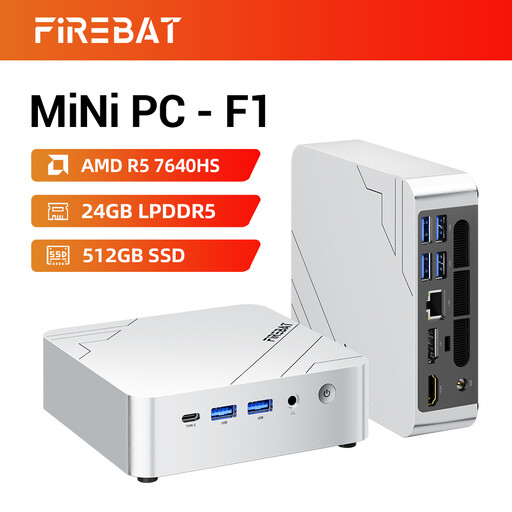
Why it suits this profile: A compact option for working from home, studying, streaming and light gaming, without a large desktop tower on or under your desk.
The listed configuration specifies 24GB LPDDR5, a 512GB PCIe 4.0 SSD and Radeon 760M graphics. This makes it easier to compare the hardware with your own requirements.
6-core/12-thread processor, 2.5G Ethernet, Wi-Fi 6E and, according to the product information, support for three 4K screens.
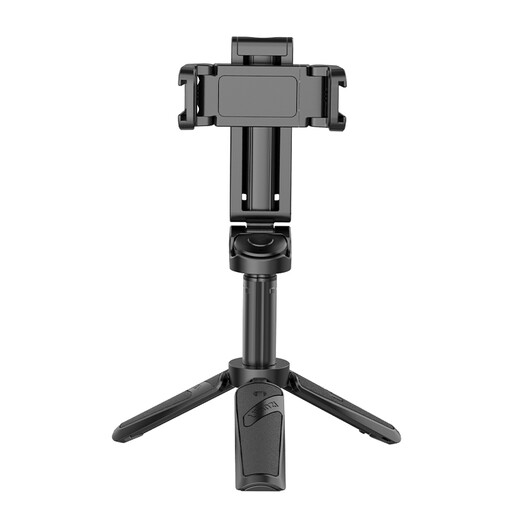
Why it suits this profile: A practical addition if you use your mini PC for video calls, online lessons or creating content in a compact space.
The 3-in-1 design combines a phone holder, extendable stick and tripod. Always check its stability and maximum phone compatibility.
Bluetooth remote control and two cold-shoe mounts, according to the product information.

Why it suits this profile: Handy for anyone who maintains their own compact workspace and regularly assembles small electronics or accessories.
The set includes 60 bits, 15 extended bits and a manual torque of 3N.m. Check that the bit fits the screw before use.
Digital torque display, USB-C charging and a stated electric torque setting of 0,1–0,3N.m.
We’ve put together a complete, up-to-date list of products that meet these strict selection criteria and current European safety regulations.
According to the product listing, the mini PC supports 4K triple-screen output. Before buying, check the available ports, cables, monitor compatibility and your preferred refresh rate. Support for three screens doesn’t automatically mean every application will run smoothly across three 4K displays.
The Radeon 760M is an integrated graphics solution. It’s better suited to casual gaming than to running every demanding new game at high settings. Check the minimum and recommended system requirements for each game, and bear resolution and graphics settings in mind.
For documents, browsing, video calls and office software, 512GB can be a useful starting point. If you store lots of videos, photos or games, you may need additional external storage. Before ordering, also check whether the SSD can be easily replaced or upgraded.
