
Painter using a fixed overhead setup
You want to show the paper and your movements in one shot without constantly rearranging your work table. The angle of view and mount need to suit your space.


Start with how you plan to film. For a fixed overhead view, the right angle of view and a secure mount matter more than extra video modes. A mirrorless camera gives you more choice of lens and recording settings for pre-recorded videos; a webcam may be more practical for a live lesson on a computer. For long recordings, check the requirements for power, storage and your chosen video mode too.
You want to show the paper and your movements in one shot without constantly rearranging your work table. The angle of view and mount need to suit your space.
You want to capture watercolour shades consistently and be able to edit your footage. Controllable lighting and white balance are important considerations.
You want to share your painting process on a computer during a lesson and switch easily between your work and your commentary.
Choose this if: you mainly want to show your work table live while your computer is on. Logitech describes a Show Mode for desk work on the MX Brio.
Bear in mind: the camera angle needs to suit your table and paper size; the feature doesn’t guarantee that every size will fit fully in the frame.
Choose this if: you make pre-recorded demonstrations and want more control over framing and recording settings. Canon lists 4K 30p and use as a USB webcam for the EOS R50; Sony lists 10-bit video modes, among other features, for the ZV-E10 II.
Bear in mind: the lens, mount and any power supply are separate choices. More video features won’t, by themselves, give you true-to-life watercolour colours.
Choose this if: you want to record a painting process for a long time without a computer. Panasonic states that the LUMIX GH5 II offers unlimited recording time with certain settings.
Bear in mind: the battery and memory card may limit the actual recording time, and some modes may stop automatically.
| What to consider | What to check before buying | Who is this important for? |
|---|---|---|
| Filming paper and hands from above | Measure your paper and the camera-to-subject distance; check the angle of view and the mount for your chosen setup. | If I want to show my paper and paintbrush in one steady overhead shot, the framing needs to suit my table. Around 36% of consumers say an overhead view is their main buying requirement. |
| Capturing watercolour colours consistently | Check whether white balance and exposure can be adjusted; make a test recording with your own lighting and paper. | If I want the paper and paint to look consistent from one recording to the next, I look for fixed lighting and adjustable white balance. Around 29% of consumers prioritise colour consistency. |
| Teaching a live lesson on a computer | Check the connection and required software; test whether your entire work table fits in the frame. | If I want to share my work table on a computer during a lesson, a suitable connection and a useful camera angle are important. Around 21% of consumers make live teaching their top buying priority. |
| Long recording without interruption | Check the requirements for the exact video mode and allow for power and memory card capacity. | If I want to record a long painting process without supervision, I need to know how long the chosen mode will work with my power supply and storage. Around 14% of consumers give long recordings top priority. |
High video resolution doesn’t tell you whether the whole sheet of paper will fit in the frame from the distance available.
First, work out your paper size, camera distance and preferred angle of view. Depending on the camera and mounting position, you may also need a suitable lens or mount.
Different white balance settings can make light-coloured subjects look different.
Make a test recording under your room lighting, and keep the light and white balance as consistent as possible throughout a session.
Panasonic notes that the battery and memory card may limit recording time, and that some modes may stop automatically.
Check the requirements for the exact video mode you plan to use, and make sure you have enough power and storage.
The EOS R50 may be worth considering if you’re thinking about both pre-recorded videos and webcam use.
The ZV-E10 II is an option for creators who want to use interchangeable lenses and a range of video settings.
The MX Brio webcam may suit lessons on a computer where you also want to show desk work.
The LUMIX GH5 II is an example of a mirrorless camera with settings for long recordings.
These Joybuy product picks are suited to filming videos, including tutorials and recordings at a work table. Check for each model that its angle of view, mounting options and recording settings suit your watercolour work.
 Image unavailable
The wide-angle lens listed may be useful when filming from a short distance; check the framing with your paper and camera position.
The product description lists a 1-inch CMOS sensor, a 20 mm f/2.0 wide-angle lens and 4K/240fps slow motion.
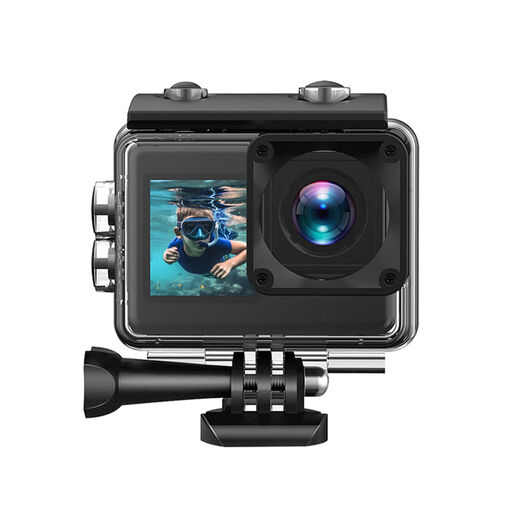 Image unavailable
If you want to mount this camera above your work table, make a test recording to check that your paper and hands are clearly in the frame.
The product title lists a 170° lens and an included 64 GB card; the description lists video up to 4K/30fps.
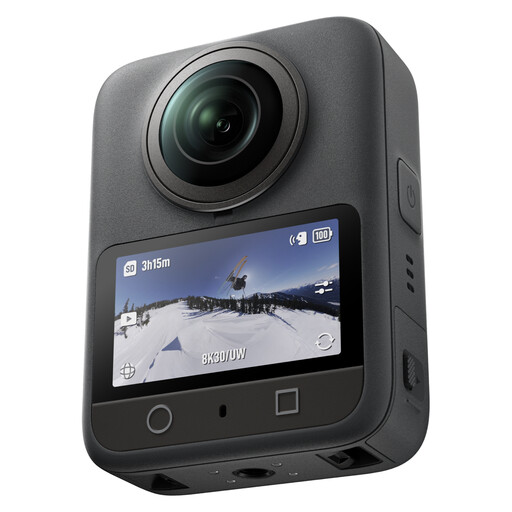 Image unavailable
The product description mentions 360° video and adjusting the composition in the app; check whether this way of recording and reframing suits your tutorial workflow.
The description also lists 8K/30fps video, 105 GB of built-in storage and up to 190 minutes of recording time.
 Image unavailable
The product description mentions a detachable touchscreen that can be used from up to 20 metres away, a feature to consider for solo recordings.
The description also lists a dual lens, a 1-inch main sensor, 8K/30fps video and 10-bit I-Log.
 Image unavailable
The included zoom lens can help you try different framings; check whether you can achieve the angle of view you want from your mounting distance.
The product description lists a 16–50mm power zoom lens, a vari-angle LCD screen and 4K video at 30fps.
Keep the lighting as consistent as possible throughout your session and set the white balance to suit the light you’re using. Nikon shows that automatic white balance and white balance set using a white card can produce different results, so check the outcome with a test recording of your own paints and paper.
Yes, a webcam may be an option for a lesson on a computer. Logitech describes a Show Mode for the MX Brio to display desk work; test whether your paper and hands fit fully in the frame from the available camera position.
For a standard online consumer purchase, you generally have a statutory cooling-off period of up to 14 days after delivery, with some exceptions. You’re also entitled to a product that meets what you could reasonably expect; contact the seller if there’s a fault. ACM ConsuWijzer explains these rights. Check which terms apply to your order before buying.
If other people are recognisable in footage shared publicly or for business purposes, the exception for personal or household use may not apply. The Dutch Data Protection Authority distinguishes between recordings kept private and footage shared more widely; make sure you follow the relevant privacy rules before publishing such footage.