
Knitting instructor with a permanent tabletop setup
Wants hands, stitches and yarn colours to be clearly visible, so pays attention to working distance, focus and how the picture looks under artificial light.


Start by considering the distance between the lens and your knitting, and where you can position the camera. Focusing and framing from your working position matter more than a high video resolution alone. A webcam suits live demonstrations from a computer, a mirrorless camera lets you choose your lens and framing, and a compact video camera is an option if you also film handheld. Whatever type you choose, test the picture under your own artificial lighting and consider the mounting and storage you’ll need.
Wants hands, stitches and yarn colours to be clearly visible, so pays attention to working distance, focus and how the picture looks under artificial light.
Wants to show knitting on the table during a broadcast and check the framing without repeatedly moving a separate camera.
Films explanations from different positions as well as close-ups, and takes portability and stabilisation into account.
Choose this option: if you mainly give live demonstrations from a fixed table and use a computer. Logitech describes a Show Mode for the MX Brio, designed to show work on a desk.
Bear in mind: the camera angle, computer, software and working distance. A desk mount doesn’t prove that stitches will be in focus and large enough in the frame at every distance.
Choose this option: if you want to match the lens and framing to your tabletop setup. The Canon EOS R50 V and Sony ZV-E10 II are examples with interchangeable lenses.
Bear in mind: the lens you choose and how you mount the camera both affect working distance and framing. The camera body alone doesn’t guarantee a sharp picture of small stitches.
Choose this option: if you regularly change position as well as filming at a table. DJI specifies a three-axis gimbal and a focusing range from 0.2 m for the Osmo Pocket 3.
Bear in mind: stabilisation isn’t a substitute for a suitable mount for fixed overhead shots. DJI states that the Osmo Pocket 3 uses a microSD card and has no built-in storage.
| What to consider | What should you look for? | Who is this most important for? |
|---|---|---|
| Seeing stitches from your working position | Measure the distance to the lens and check the focusing distance and framing of the exact camera and lens. | If I want to see whether stitches are clear from my usual spot without losing sight of my hand movements. Around 36% of consumers prioritise being able to see stitches from their working position. |
| Flicker and colour under artificial light | Make a test recording with your own lights and check the shutter speed and white balance. Sony Support recommends shutter speeds of 1/50 or 1/100 second in areas with a 50 Hz mains frequency; available features vary by model. | I want to avoid stripes or changing colours disrupting my demonstration, so I test with the lights I actually use. Around 29% of consumers make artificial lighting their top purchase priority. |
| Fixed live setup | Check the camera angle, mounting, computer connection and software with a view of your hands working at the table. | If I’m giving a live explanation, I want to show my work and check the picture from my computer. Around 21% of consumers prioritise a fixed computer and tabletop setup. |
| Moving around and spoken explanations | Check the mounting, storage required and whether your voice will be recorded clearly in your space. | I sometimes want to change position while explaining, rather than always filming from one fixed spot. Around 14% of consumers prioritise portability and spoken explanations. |
High resolution alone won’t tell you whether stitches will appear sharp and large enough at your working distance.
Check the focusing distance and framing with the exact camera-and-lens combination or fixed-lens camera, and make a test recording from the position you plan to use.
Sony describes visible banding under flickering light and notes that correction features vary between camera models.
Test with the lights you use and check which shutter speeds and other relevant settings are available on the exact model.
A gimbal helps with camera movement and a desk mount can show work on a table, but neither proves that the device can be safely positioned directly above your knitting.
Decide on the camera angle you need and check how you’ll mount the exact device there before you buy.
Mirrorless cameras for makers who want to match their lens choice and video framing to their tabletop setup.
Interchangeable-lens cameras, including the ZV-E10 II, for makers who want to tailor their lens and framing.
The Z50II is worth considering if you want focus to switch between you and an object close to the lens.
The Osmo Pocket 3 is a compact camera for makers who also film away from a fixed tabletop setup.
Webcams such as the MX Brio for demonstrations streamed via a computer.
This selection includes cameras and computer webcams for demonstrations at a work table. Check that the focus, framing and mounting on each model suit your knitting.
 No image available
For anyone looking for a camera to record video; check that the focus, working distance and camera angle suit your demonstration.
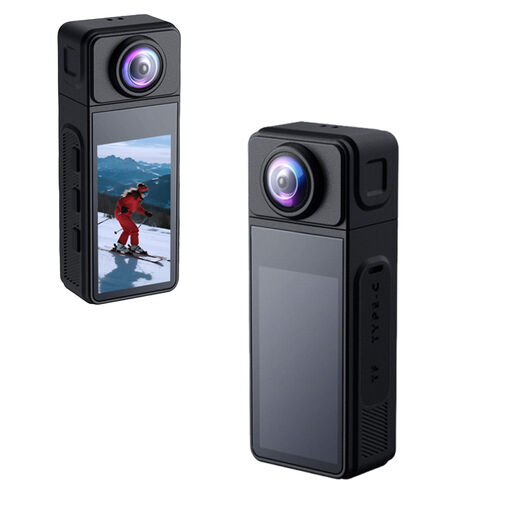 No image available
Worth considering if you want to position the camera flexibly; check that the mount allows you to achieve the angle you need.
2K recording; 270° rotating lens; 1.86-inch IPS screen.
 No image available
For a knitting demonstration, check that the focus and mounting angle suit your working distance.
 No image available
For a computer setup; check that the webcam shows your knitting clearly and at a large enough size from the position you’ve chosen.
4K UHD; autofocus; two built-in microphones; privacy cover.
 No image available
For anyone wanting to use a webcam with a computer; check that the clip holds it at the height and angle you need.
2K QHD; clip-on design; built-in microphone with noise reduction.
Set the camera at the distance you actually plan to use, knit a few stitches and view the recording on the screen your audience will watch. Compare the focusing distance and framing with the exact lens or fixed-lens camera. For example, DJI gives the Osmo Pocket 3 a focusing range from 0.2 m.
First, make a test recording under those lights. For areas with a 50 Hz mains frequency, Sony Support recommends trying a shutter speed of 1/50 or 1/100 second. Available features and results vary depending on the camera and light source.
Check that the lens, mount and storage suit the way you film. According to DJI, the Osmo Pocket 3 has no built-in storage and uses a microSD card. With a mirrorless camera, the usable framing also depends on the lens you choose.
Yes. Your statutory guarantee may still apply after a manufacturer’s warranty has expired if a product doesn’t perform as you could reasonably expect under normal use. According to ACM ConsuWijzer, the retailer is responsible for providing an appropriate solution; there isn’t one fixed statutory two-year guarantee period for every camera.
That depends on who is filming and how the footage is used. The Dutch Data Protection Authority says the exception for personal or household use doesn’t apply to wide public distribution or commercial use; in those cases, processing requires a legal basis under the GDPR. Consent is one possible legal basis in many cases, but it isn’t the only one.