
Jewellery detail maker
You want to show tiny settings or engravings clearly. So pay attention to the lens’s magnification and focusing distance, not just the camera body.


For tiny engravings and settings, a mirrorless camera with a suitable close-up or macro lens is the way to go: it’s the lens, not just the camera body, that determines magnification and minimum focusing distance. If you mainly film yourself and regularly move your setup, a compact camera with a fixed lens may be more practical. Just check that your smallest piece of jewellery fills enough of the frame from the distance you need to shoot at. In either case, when filming by a window, keep an eye on reflections and changing light.
You want to show tiny settings or engravings clearly. So pay attention to the lens’s magnification and focusing distance, not just the camera body.
You film at a fixed table and want to show off the shine without reflections hiding the details or changing daylight overpowering your presentation.
You switch between filming yourself, your hands and the product, or regularly take your camera with you. In that case, a suitable working distance and controls that suit your presentation style are important.
First decide how small the detail you want to show is. Then choose between the lens flexibility of a mirrorless camera and the simplicity of a compact camera with a fixed lens. Treat window light as a separate setup consideration: changing the camera body alone won’t get rid of unwanted reflections.
| What to consider | What should you check? | Who is this most important for? |
|---|---|---|
| Tiny details | For the exact lens, check the maximum magnification, minimum focusing distance and compatible lens mount. | I want to show engravings and settings clearly, even if that means using a different lens. Around 36% of consumers are most concerned about how well details are captured. |
| Window light and reflections | Take test shots from your planned camera angle and check the exposure and white balance settings. Also see whether you can soften or bounce the incoming light. | I want to show off the shine without unwanted reflections and be able to handle changing daylight. Around 29% of consumers prioritise managing light and reflections. |
| Speaking and showing | Check the focusing modes and any microphone input, then test the framing with a trial recording from the intended distance. | I want to switch smoothly between myself and the jewellery while speaking. Around 21% of consumers prioritise a smooth product presentation. |
| Portability and simplicity | Compare how much equipment you’ll need to take with you, and test whether your smallest piece of jewellery is framed well at the stated minimum focusing distance. | I want to film demonstrations in different places and would rather carry fewer items. Around 14% of consumers put portability and simplicity first when buying. |
Magnification and focusing distance depend on the lens you use. The 0.5× and 1:1 specifications listed by Canon, Sony and Nikon apply to specific lenses, not automatically to every kit lens.
First decide how large your smallest piece of jewellery needs to appear in the frame. Then check the lens, mount and complete setup.
A focusing mode can help when you hold a product in front of the camera, but it doesn’t automatically mean the lens can focus close enough or make the jewellery appear large enough in the frame.
Test a piece of jewellery of the usual size from your intended shooting distance. DJI lists a minimum object distance of 20 cm for the Osmo Pocket 3.
Reflective jewellery can show bright spots and reflections, whatever camera body you choose. Shopify highlights reflections and bright spots as considerations when photographing shiny products.
Review test shots as you change the position of the light, camera and jewellery.
A diffuser or reflector may mean extra equipment and adjustments to your setup.
ACM ConsuWijzer distinguishes between purchases for private use and contracts used mainly or exclusively for business.
Before buying, check in what capacity you’re making the purchase and which sales and service terms apply.
The EOS R50 is compatible with RF and RF-S lenses. Canon lists the RF 35mm F1.8 IS Macro STM as a separate close-up lens for use with the EOS R50.
The Sony ZV-E10 II is a mirrorless camera with interchangeable lenses and Product Showcase mode. The E 30mm F3.5 Macro is a separate APS-C macro lens.
The Z 30 is a Z-system mirrorless camera designed for video. Nikon also describes the NIKKOR Z MC 50mm f/2.8 as a separate macro lens for use with DX cameras.
The Osmo Pocket 3 has a fixed lens and Product Showcase mode, making it suitable for presentations where you regularly move the camera.
The LUMIX G100D is a Micro Four Thirds mirrorless camera. Panasonic describes the DC-G100DW kit as including 12–32mm and 45–150mm zoom lenses.
This selection includes compact video and vlogging cameras, as well as a webcam option for demonstrations. For each specific lens, check that your smallest piece of jewellery is in focus and appears large enough in the frame.
 No image available
The product title mentions 3-axis stabilisation. Also test whether the fixed lens can focus on your smallest piece of jewellery and show it large enough from your preferred distance.
The title lists 4K/240fps video, 2× zoom and a rotatable screen.
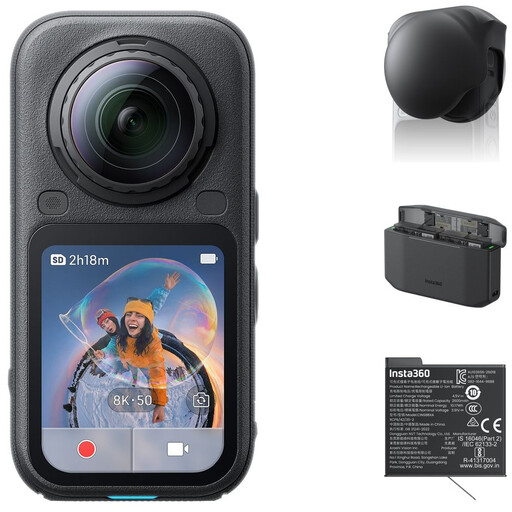 No image available
The product description mentions 360° recording and reframing afterwards. Check whether this approach suits the way you want to frame a fixed jewellery demonstration.
The description lists 8K 50fps 360° video and 4K InstaFrame video. The bundle name includes a lens cap, Xtreme Battery and Fast Charge Case.
 No image available
The product title mentions 3-axis stabilisation and a rotatable screen. Check with your smallest piece of jewellery whether the lens focuses well at your preferred distance.
The title lists a 1″ CMOS sensor, 4K/240fps video, 2× lossless zoom and 107GB of built-in storage.
 No image available
The product description mentions Product Showcase, which switches focus between a face and an object. Check separately whether the supplied zoom lens can focus close enough for your jewellery.
The description lists 4K video, digital Active Mode stabilisation and a vari-angle screen.
 No image available
According to the product title, this webcam is designed for use with a PC or Mac, streaming and video calls. Check whether this recording setup suits your demonstration.
The description lists 4K video, PDAF autofocus, Auto Framing, HDR and gesture or smartphone controls.
Not necessarily: 4K video doesn’t tell you how close the lens can focus or how large the jewellery will appear in the frame. Check the minimum focusing distance and magnification of the exact lens. Canon and Sony list these lens specifications separately from camera resolution.
Take a test shot and change the angle between the window, jewellery and camera to see where reflections appear. Shopify’s general advice on photographing shiny products covers reflections and bright spots; a diffuser or reflector could be part of your setup. Recheck the exposure and white balance when the daylight changes.
No. Sony’s Product Showcase mode is a focusing feature; it doesn’t confirm that the lens can focus close enough or show a small piece of jewellery large enough. Test the setup with the smallest product you want to film.
For online consumer purchases in the Netherlands, ACM ConsuWijzer generally states that you have a statutory cooling-off period of up to 14 days after delivery, subject to exceptions. The statutory guarantee is separate from any manufacturer’s warranty. If you’re buying mainly for your business, don’t assume the same consumer protections automatically apply: ACM ConsuWijzer distinguishes between contracts based on how they’re used.