
Collector filming coin details
You want to capture inscriptions, dates and raised details up close. So, look beyond the camera itself and consider the lens’s magnification and working distance too.


To capture small dates and raised details clearly, choose a camera and lens whose magnification, working distance and mount suit your setup. A compact gimbal camera may be more practical for a moving, spoken tour, but check that its fixed lens can show your smallest coin close enough. Test both options under the lights you’ll actually use so you can assess reflections, colour reproduction and video flicker.
You want to capture inscriptions, dates and raised details up close. So, look beyond the camera itself and consider the lens’s magnification and working distance too.
You film a fixed setup under lights and want to check whether the picture flickers, reflections hide details or colours look different from how they should.
You walk past coins or display cases while explaining things as you go. Stabilisation and audio recording may matter, as long as the camera can also capture the coin details you want.
Choose this option if: clear close-ups and framing small inscriptions are your priorities.
Bear in mind: the lens must fit the camera mount and may be sold separately from the camera body. A short working distance can also leave less room for lights.
Choose this option if: you mainly film a spoken tour as you move around your collection.
Bear in mind: the fixed lens gives you less freedom to choose a macro setup, so check the framing with a coin of your own size.
| What to consider | What should you check? | Who should pay particular attention? |
|---|---|---|
| Clear close-ups | Check the magnification, working distance, camera mount and which lens is actually included in the bundle. Sony specifies 1:1 magnification and a working distance of 2.4 cm at the closest setting for the SEL30M35; Canon specifies up to 1:2 for the RF 35 mm F1.8 Macro. | If I want to fill the frame with small dates, the lens needs to capture that detail while leaving room for my lighting. Around 36% of consumers prioritise close-up detail. |
| Video flicker | Record a test using your own lights and review the footage. Sony describes the ZV-E10 II as offering fine shutter-speed adjustments for video when the selected exposure mode allows manual shutter-speed control. | If I film a fixed setup under artificial light, I want to spot banding or changes in brightness before choosing a camera. Around 29% of consumers prioritise flicker-free video. |
| Reflections and colour | Test the positioning and diffusion of your lights, and check the white balance under the lighting you plan to use. Make sure the raised details remain visible without distracting hotspots. | If I film shiny coins, I want to be able to adjust the lighting without reflections hiding important details. Around 21% of consumers prioritise control over reflections and colour. |
| Moving tour and audio | Compare stabilisation, microphone options and focusing range with your planned route. DJI specifies three microphones and focusing from 0.2 m for the Osmo Pocket 3; Panasonic lists hybrid stabilisation and five audio modes for the G100D. | If I explain things as I walk, I want to film my route and record my voice without losing sight of the coin details. Around 14% of consumers prioritise a moving tour with audio. |
A zoom lens included in a camera kit isn’t automatically the separate macro lens you need to capture small coin details. The Canon and Panasonic kits described here as examples include zoom lenses, so check exactly what comes in the bundle.
Before buying, check the lens mount, magnification and working distance, and make sure the macro lens you want is actually included.
Adjusting your lighting setup may take extra preparation time or equipment.
The ZV-E10 II is an interchangeable-lens camera. The separate Sony E 30 mm F3.5 Macro is one option for close-ups.
The EOS R50 uses the RF mount. The separate RF 35 mm F1.8 Macro offers an option for close-ups and wider shots.
The LUMIX G100D is a compact Micro Four Thirds mirrorless camera with interchangeable lenses.
The Osmo Pocket 3 is a compact video camera with a fixed lens and integrated gimbal, designed for moving shots.
These Joybuy products are cameras and bundles for video recording. For each model, check that the lens, lighting and controls suit the size of your coins and the way you plan to film them.
 No image available
The product name suggests a vlogging bundle; check whether it suits a spoken tour of your collection.
The product name specifies the colour Black.
 No image available
The clip and vlogging use mentioned in the product name may suit a mobile filming setup. Check that you can capture your coin details clearly from the position you choose.
The product name specifies a 1.54-inch screen, 140° wide-angle lens, app control, LED light and 1200 mAh battery.
 No image available
The bundle name mentions an extra video light; consider whether it suits the way you want to light your coins under artificial light.
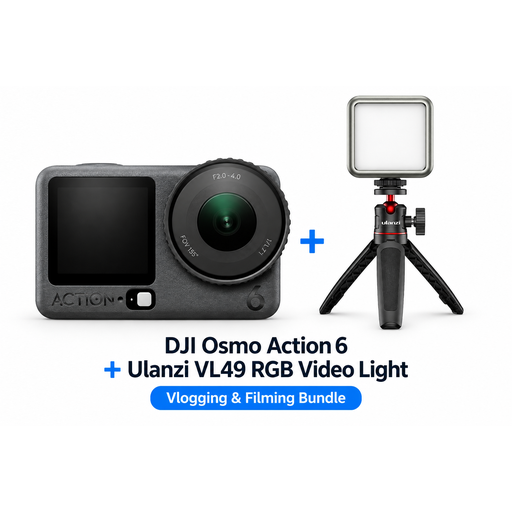
The product name specifies a DJI Osmo Action 6 Adventure Combo and a Ulanzi VL49 RGB LED video light.
 No image available
This bundle includes an extra light; check that the included accessories suit your lighting setup and the distance from the coin.
The product name specifies a DJI Osmo Pocket 4 Standard Combo and a rechargeable Ulanzi VL81 LED video light.
 No image available
The product name describes a vlogging camera; before choosing, check that the filming distance suits the details you want to show on your coins.
The product name specifies the Standard Bundle version and the colour Cosmic Black.
Not on its own. Lens magnification and your setup both affect how large the coin appears in the frame. Review a test recording at the size you intend to watch it. Sony lists 1:1 magnification for the SEL30M35, while Canon specifies up to 1:2 for the RF macro lens mentioned here.
First, record a test using the lights you plan to use and review the footage. If your camera supports it, try adjusting the video shutter speed or a video-specific anti-flicker setting. Sony describes this feature for the ZV-E10 II; check the settings and conditions for the exact model.
Check whether your chosen kit includes the lens you need; a zoom lens isn’t automatically a separate macro lens. ACM ConsuWijzer states that online purchases from a retailer generally come with a statutory 14-day cooling-off period after delivery. In the Netherlands, you’re also entitled to a product that lasts as long as you could reasonably expect, so the statutory guarantee isn’t simply a fixed two-year period.
This depends, among other things, on whether people can be identified and how you share the video. The Dutch Data Protection Authority considers identifiable people to be personal data and says the exception for personal or household use doesn’t apply when footage is shared more widely, for example publicly. If in doubt, film only the coins or check the privacy requirements before publishing footage in which others can be identified.