
Listener looking for stereo sound
You want to position speakers to the left and right of where you listen, and are comparing an active pair with a setup of two separate wireless speakers.


First, choose a speaker setup that matches the connections on your computer or other source. Then decide whether you want to position two speakers separately, one on the left and one on the right. A compact active pair is designed for computer and desk use; larger active models offer different physical inputs, while the Sonos Era 100 provides Wi-Fi and Bluetooth playback. These are differences in connections and setup, not a measured ranking of sound quality.
You want to position speakers to the left and right of where you listen, and are comparing an active pair with a setup of two separate wireless speakers.
You mainly listen from a computer and want speakers that fit on your desk, without overlooking the connection you need.
You switch between sources such as a computer, phone and TV. The connections and any adapters determine which setup will work with those sources.
Start with the source you use most often, then check whether you have room for one speaker or two speakers that can be positioned separately.
| What to consider | What should you check? | Who should pay particular attention? |
|---|---|---|
| Left-right positioning | Check whether you can position two speakers and whether the deal includes one speaker or a pair. | If you want to hear film soundtracks to the left and right of your workspace, the number of speakers in the set matters. Around 33% of consumers prioritise separate left-right positioning. |
| Desk space | Compare the dimensions of the exact model and leave room for cables. | If your desk has limited space, you’ll want to know how much room both speakers take up. Around 25% of consumers prioritise having enough desk space. |
| Connection to your source | Check that the speaker’s connections match the outputs or playback options on your computer, phone or TV. | If you switch between several sources, you don’t want to rely on a connection your device doesn’t support. Around 25% of consumers prioritise source compatibility. |
| Bass and expandability | Check for a subwoofer output if you want to connect a separate subwoofer later; where possible, also assess the sound where you’ll be listening. | If bass is important to you when listening to film soundtracks, the option to expand the system may be relevant. However, an output doesn’t predict how the system will sound in your room. Around 17% of consumers prioritise expandable bass. |
The Era 100 is sold as a single speaker. Sonos describes combining two Era 100 speakers to create a wider soundstage.
Check how many speakers are included in the deal and decide whether you want to position two units separately.
You’ll need a second speaker for the two-speaker setup described by Sonos.
Audioengine describes USB-C audio for the A2+ Gen 3. For the Era 100, Sonos describes a line input via a separate adapter, so the connector’s shape alone doesn’t tell you what it can do.
Compare the stated function of the port on the exact model with the outputs on your computer.
Sonos states that a separate, separately available adapter is required for an analogue line input on the Era 100.
A published specification is no substitute for comparing speakers by listening. The Consumentenbond includes balance, distortion and dynamics among its test criteria, and notes that bass can sometimes be less audible on smaller speakers.
Use specifications to narrow down the features you need, and where possible assess the sound at the volume you plan to listen at.
These models from different brands illustrate a range of connections and setups. The features apply to the product lines named here, not automatically to every product from each brand.
The A2+ Gen 3 is a compact active pair designed for computer and desk use.
The R1280DBs is an active bookshelf speaker pair with several listed physical inputs.
The Era 100 offers Wi-Fi and Bluetooth playback for wireless listening.
The Fives is an active stereo pair that can also be used with a TV via HDMI-ARC.
This selection includes compact stereo speakers for computers and desks, as well as wireless speakers and a monitor soundbar. Check that each model’s connection and setup suit your source.
 No image available
A compact stereo set for anyone looking to use speakers on a computer desk.
 No image available
A compact desktop set for music or films at your workspace.
 No image available
A wireless speaker for anyone who wants to switch between Wi-Fi and Bluetooth playback.
The product name lists 60 W, AirPlay 2, LDAC, USB and AUX.
 No image available
A set of computer speakers for anyone who wants to play film soundtracks from a computer.
The product name lists USB, Bluetooth 5.3 and a 3.5 mm AUX input.
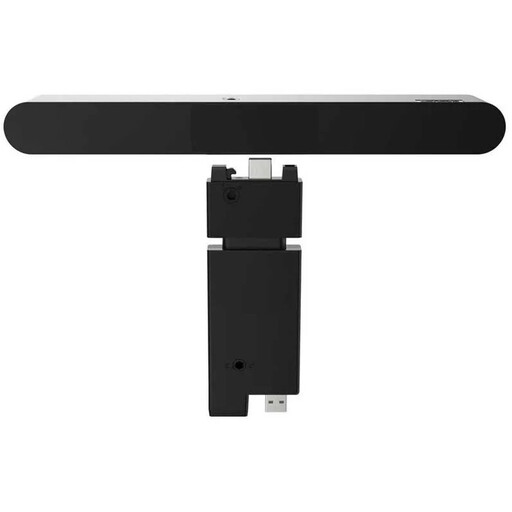 No image available
A monitor soundbar for audio with a monitor or desktop computer.
This is a wired model.
No. Start by listening to the speakers where you plan to use them. If you feel the bass is lacking, some of the Audioengine, Edifier and Klipsch models mentioned have an output for a separate subwoofer; having this output doesn’t mean you need to expand the system.
Don’t assume you can: Sonos describes the USB-C port as supporting line-in or Ethernet via separate adapters, not as a standard USB audio input or power port. Check which playback option and any adapter will work with your computer.
Follow the instructions for the exact model. For the R1280DBs, Edifier recommends leaving at least 5 cm of clearance for ventilation; this recommendation applies to this model.
For eligible distance purchases, the Government of the Netherlands says you’ll often have a 14-day cooling-off period, subject to exceptions. You’re also entitled to a product that meets legal standards under the statutory guarantee; the Netherlands does not have a fixed statutory guarantee period. The cooling-off period and your rights if a product has a problem are separate matters.
The Dutch Authority for Digital Infrastructure states that radio equipment must meet the applicable RED and EMC requirements and carry a CE marking. Since 1 August 2025, additional RED cybersecurity requirements have applied to certain categories of radio equipment; the requirements depend on the type of device. A model name on this page does not, by itself, confirm that a specific version complies.