
Listeners who want a stereo pair
You want to listen to film music through two speakers positioned separately. Decide whether you want amplification built into the speakers or would rather use a suitable amplifier of your own.


If you want two speakers you can position separately, without a separate amplifier, an active stereo pair is a practical option. With a suitable amplifier, you can also choose passive speakers. Network speakers are a better fit if app control and streaming are your priorities, but they may require initial setup, two units or an adapter. A subwoofer output gives you the option to expand your system, but it doesn’t mean a subwoofer is included or that the bass will suit your room.
You want to listen to film music through two speakers positioned separately. Decide whether you want amplification built into the speakers or would rather use a suitable amplifier of your own.
You might switch between a computer, an audio player and streaming, for example. Check that the connections and controls on the exact model work with your devices.
You want to tailor your setup and volume to your hobby room while being considerate of your neighbours. The Dutch Government advises people experiencing problems with neighbours to try agreeing arrangements together first.
Start with your setup and music source. Then check that the connections, space and any potential upgrades suit the way you plan to use the system.
| What to consider | What to look for when buying | Who is this important for? |
|---|---|---|
| Stereo placement | Check whether the set contains one speaker or a pair, measure the space for both cabinets, and see how they connect to each other and to the source. | If I want to listen to film music through a left and right speaker, I need to know whether the set is complete and will fit in my room. Around 33% of consumers prioritise stereo placement and a complete setup. |
| Connecting your source | Make a note of the outputs on your devices and check whether the exact model supports connections such as analogue audio, optical, USB audio, Bluetooth or Wi-Fi playback. ELAC lists USB audio for the DCB41; according to Sonos, the Era 100 requires a separate adapter for an analogue line input. | If I want to use my own computer, player or phone, the connection or playback method needs to work with it. Around 27% of consumers prioritise a connection to their existing music source. |
| Bass and expandability | Check whether the exact model has a subwoofer output and whether a subwoofer is actually included. Edifier lists a subwoofer output for the R1280DBs; Klipsch does the same for The Fives. | If I want to decide how much emphasis to put on low frequencies or expand my system later, I need to know what’s included with the set. Around 20% of consumers put their bass requirements and expandability first. |
| Space and neighbours | Measure the space for the speakers and allow for cables and connections. If you live in a shared building, it can help to agree on volume levels and times. | If my hobby room is short on space or I want to be considerate of my neighbours, the setup needs to work practically in those conditions. Around 20% of consumers prioritise space and their shared living environment. |
An output simply means you can expand the system; it doesn’t mean a subwoofer is part of the set.
Check what’s in the box and first decide whether you want to use an additional subwoofer in your room.
You’ll need a separate subwoofer for this upgrade and may also need a connection cable.
Passive speakers need a suitable amplifier. Active alternatives have amplification built into the speakers.
Compare complete setups and check that your amplifier is suitable for the speakers.
If you don’t already have a suitable amplifier, remember to factor in the extra equipment and cables you’ll need.
The shape of a port alone doesn’t tell you which audio functions a device supports. ELAC lists USB audio for the DCB41; Sonos specifies a separate adapter for an analogue line input on the Era 100.
Check what the port does and what output your source has before choosing a cable or adapter.
An analogue line input on the Era 100 requires a separate adapter and a suitable audio cable.
The active R1280DBs is an example of a stereo pair with Bluetooth and analogue and digital inputs, with no separate amplifier needed.
The active Debut ConneX DCB41 and passive Debut 3.0 DB53 offer different options: the DB53 needs a suitable amplifier.
The Era 100 is an option if you want to control music over Wi-Fi using an app and use two compatible speakers together.
The LSX II LT is an active stereo system worth comparing if you’re also looking for connections for a computer or television.
The Fives is an active stereo pair worth comparing if you also want to connect a television or add a subwoofer later.
This selection ranges from compact desktop stereo sets to passive bookshelf speakers and soundbars for multi-channel setups. A soundbar isn’t the same as two separate stereo speakers, so check which setup suits your hobby room and music source.
 No image available
A compact desktop stereo set with connections for different music sources.
2.0 stereo; USB audio, 3.5mm AUX and Bluetooth 5.3. The product name specifies RGB lighting.
 No image available
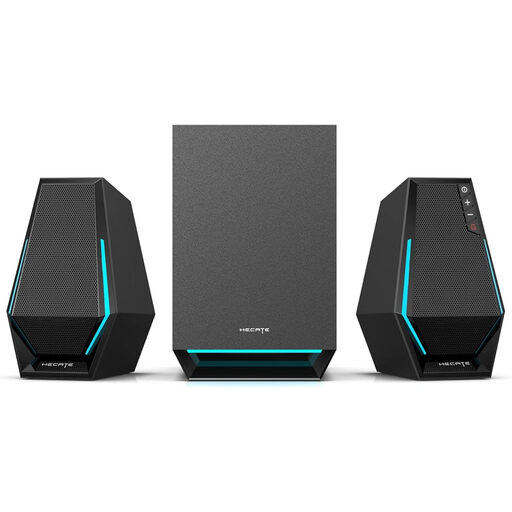
A desktop set for anyone who wants to switch between listening modes as well as enjoy music.
2.1 system; USB, 3.5mm AUX and Bluetooth. The product description lists game, film and music modes, as well as RGB lighting.
 No image available
A pair for anyone who wants to position two speakers separately and already has a suitable amplifier or wants to choose one separately.
The product description lists a 6.5-inch woofer and a 28 mm soft-dome tweeter. A separate amplifier is required to use them.
 No image available
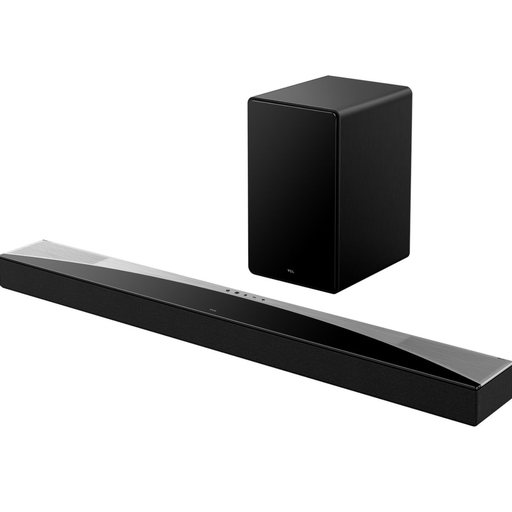
A soundbar setup for anyone who wants to play television and film audio through one system as well as listen to music.
The product description lists Bluetooth, AirPlay, HDMI eARC and a wireless subwoofer. This is a soundbar, not a stereo pair of two separate bookshelf speakers.
 No image available
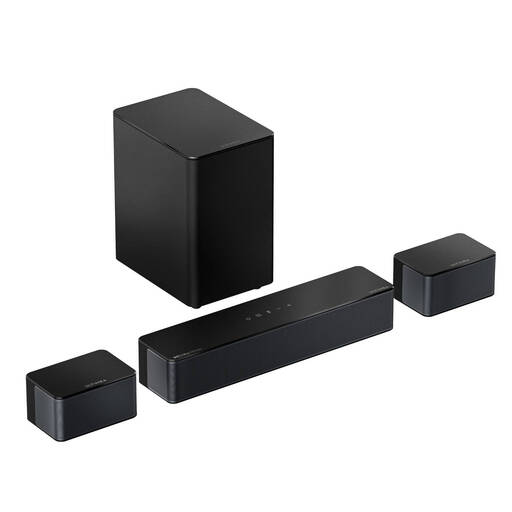
A soundbar with two surround speakers for anyone considering a multi-channel setup and with space for the cables.
The product description lists a 5.25-inch subwoofer, Bluetooth 5.4, HDMI eARC, an optical connection, AUX and USB. The two surround speakers are wired; the description specifies 20-foot extension cables.
Not if you’re only playing music from another source. If you also want to connect the speakers to a television, check that the television’s output matches the input on your chosen model. ELAC, KEF and Klipsch list HDMI ARC for the active systems discussed here.
No. According to Sonos, you must first set up the Era 100 on a Wi-Fi network using the Sonos app. You can then use Bluetooth. A separate adapter is also needed for an analogue line input.
Use an amplifier that matches the specifications of your chosen model. For the DB53, ELAC specifies a nominal impedance of 6 Ω and a recommended amplifier power of 20–120 W. For the Debut 3.0 series, ELAC recommends switching off your equipment while connecting it and connecting the positive and negative terminals correctly.
Adjust the volume and times to suit your living environment. The Dutch Government advises people experiencing problems with neighbours to agree arrangements together first, such as what time music should be played. This doesn’t establish a general permitted volume or time for every home.
Follow the instructions for the exact model. For the Debut 3.0 series, ELAC recommends dusting and advises against using abrasive or solvent-based cleaners. This guidance applies to that series and isn’t a general cleaning recommendation for all brands.