Choosing between a fightstick with a joystick and a leverless controller comes down mainly to the inputs you want to practise your combos with: familiar joystick movements or separate directional buttons. Then check that the exact model works with your game and both your practice platform and the platform you plan to use at tournaments. In a bright room, don’t assume a display or indicator light will be easy to read. Test it for yourself, and check settings using the physical controls if needed.
Who is this for?
Combo practice for console tournaments
You practise at home and want to use the controller on the platform you plan to play on at tournaments. So compare the game, platform and exact model. PlayStation distinguishes between PS5 games and supported PS4 games when it comes to specialist peripherals.
Players considering a different input layout
You’re weighing up familiar joystick movements against separate directional buttons and want to know what a different input layout means for practising combos. The available SOCD settings may also matter with leverless models.
Practising in a bright room
You want to check your settings while practising without relying entirely on a visual indicator. Test how easy it is to read in your practice space, and see if you can also check the mode using the physical controls.
What should you look for?
Fightstick with joystick
A good fit if: you practise combos using joystick movements or want to stick with that type of input. HORI and Qanba list support for PS5, PS4 and PC on specific models.
Bear in mind: the lever and casing take up space. Check the exact model and the requirements of your game and event.
Leverless controller with directional buttons
A good fit if: you want to use separate directional buttons and are happy to practise with this input style. Razer lists PS5 and PC support for the Kitsune; 8BitDo lists Switch and Windows support for the Arcade Controller.
Bear in mind: check the platform mode and SOCD settings for the exact model. According to MAYFLASH, the F700 FLAT Elite is intended for fighting games on PS5; check your event’s rules too.
| What to consider |
What should you check? |
Who is this important for? |
| Compatibility |
Check the full model, game and platform. PS4 support alone doesn’t confirm that a controller will work with the PS5 game you want to play. |
I want to use the same controller at home and on the platform I plan to play on. Around 31% of consumers prioritise compatibility. |
| Combo inputs |
Choose whether you want to practise with a joystick or separate directional buttons. With leverless models, also check the SOCD mode and any macro functions. |
When I’m repeating combos, I want to choose deliberately which input layout I train with. Around 31% of consumers prioritise inputs for practising combos. |
| Checking settings |
Test how visible the indicators are in your own room, and check whether you can also identify the mode using the physical controls. |
In a bright room, I want to be able to recognise my chosen mode while practising. Around 25% of consumers value visible settings. |
| Setup and maintenance |
Measure the space available and check the feet, casing and access to components on the exact model. |
I want the controller to fit in my gaming space and its components to be accessible if it needs maintenance. Around 13% of consumers prioritise setup and maintenance. |
Things to consider when buying and using
-
Choosing a platform version that isn’t right for you
A controller range may include different versions. Support for a platform or game doesn’t automatically confirm that another version or a specific PS5 game will work.
Before buying, compare the full model name with your home platform, the game and the platform you plan to play on. PlayStation lists support for specialist peripherals with PS5 games and supported PS4 games.
-
Assuming a configurable mode is allowed at a tournament
A manufacturer may offer SOCD settings or macro functions, but that doesn’t determine which settings a particular event allows.
Check the current rules for your game and event. If the controller has macro functions, also check that they’re disabled when you want to practise entering combos manually.
-
Assuming an indicator will be easy to see in bright light
8BitDo describes a dynamic indicator for the Arcade Controller’s button layout, but that alone doesn’t tell you how easy it will be to read in your room.
Try the controller in your own practice space and check whether you can also identify the mode using the physical controls.
Brands to consider
HORI
The Fighting Stick α for PlayStation is a joystick option available in specific PS5, PS4 and Windows versions.
- HORI lists a HAYABUSA lever and buttons. The casing opens to give you access to components for maintenance.
- Don’t confuse the PlayStation version with one made for another platform.
Qanba
Qanba lists the Drone 2 as a joystick option for PS5, PS4 and PC.
- The manufacturer lists a platform switch and touchpad.
- These features don’t confirm that other Qanba models or every tournament setup will be suitable.
Razer
Razer describes the Kitsune as a leverless controller for PS5 and PC.
- Razer lists four directional buttons and optical switches.
- The listed platform support doesn’t include Xbox or Switch.
MAYFLASH
The F700 FLAT Elite is a leverless controller with multiple connection options and platform modes.
- MAYFLASH lists Sanwa buttons and configurable SOCD modes.
- According to MAYFLASH, this version is intended for fighting games on PS5. Check macros and SOCD settings against your event’s rules.
8BitDo
8BitDo describes the Arcade Controller as compatible with Switch and Windows.
- The manufacturer lists a dynamic mode indicator, adjustable feet, swappable switches and configurable SOCD modes.
- Test how visible the indicator is in your own room; the listed features don’t confirm PS5 support.
Joybuy product selection
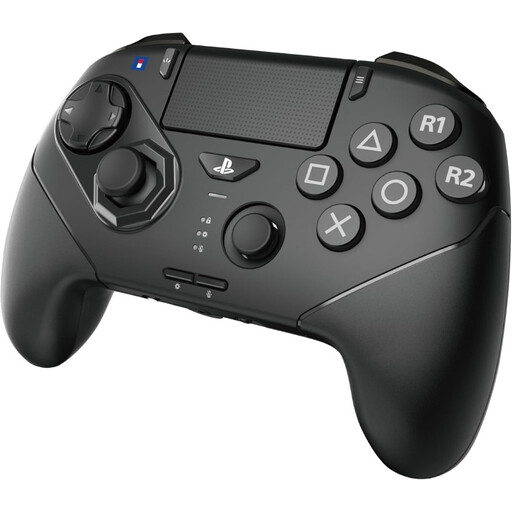
This Joybuy selection focuses on a fight pad for practising combos in fighting games.
 No image available
HORI Wireless Controller Fighting Commander Octa Pro for PS5/PC - Black
This fight pad is designed for fighting games and may suit you if you want to practise combos with a six-button face layout.
The product title lists wireless use and PS5/PC; the product description also mentions PS4.
The product description lists three interchangeable D-pads, an analogue stick with an 8-gate layout and programmable rear buttons.
View at Joybuy
Frequently asked questions
Will every PS4 fightstick work with a PS5 fighting game?
No. Don’t assume it will work with a specific PS5 game based on the PS4 label alone. PlayStation describes support for officially licensed specialist peripherals with PS5 games and supported PS4 games. You should also check the exact controller version and the game.
How can I avoid practising with the wrong settings?
Before a practice session, check the platform mode, button layout and, if your model offers it, the SOCD mode. If your model has macro functions, check that they’re disabled when you want to practise entering combos manually.
What are my rights when I buy online in the Netherlands?
For online consumer purchases in the Netherlands, ACM ConsuWijzer says you generally have a statutory cooling-off period of up to 14 days after delivery, subject to legal exceptions. Your statutory guarantee is separate from any manufacturer’s warranty: if a product doesn’t do what you could reasonably expect under normal use, the seller is responsible for providing an appropriate solution.


