
Players seated to the side
You want a reliable connection to the console from your seat, so you need to consider the cable route and the space available for your controller.


Start with the control scheme you already know, then check that the exact controller version works with the tournament console and complies with the event rules. Measure the cable route from your seat: a 3 m cable may be long enough, but it won’t necessarily suit every setup, and wireless play isn’t allowed at every tournament.
You want a reliable connection to the console from your seat, so you need to consider the cable route and the space available for your controller.
You check whether the exact controller version works with the console being used and whether the event allows its connection type and features.
You compare a fightpad, arcade stick and leverless layout with the hand movements you already know, without assuming that a different layout will improve your performance.
A good fit if: you use your thumb for directional inputs and want to hold the controller in your hands. HORI lists six action buttons and an adjustable D-pad for the Fighting Commander OCTA.
Bear in mind: the wired OCTA and wireless OCTA Pro are different models. Check the connection type and rules for the exact version you’re choosing.
A good fit if: a physical joystick suits the movements you’ve practised and you have enough room to support it. HORI describes the Fighting Stick α as a model that opens up for maintenance.
Bear in mind: a stick needs more space than a handheld pad. Measure the cable route and check the cable length for the exact version.
A good fit if: you want separate directional buttons and are willing to practise using that layout. Turtle Beach lists a 3 m cable with a cable lock for the PlayStation version of the Victrix Pro KO.
Bear in mind: check the platform version and how simultaneous directional inputs are handled against your game and event rules. Customisable settings don’t automatically mean a controller is approved.
| What to consider | What should you check? | Who should pay particular attention? |
|---|---|---|
| Cable route and connection | Measure the route from your seat and compare it with the cable length and connection type of the exact version. | If I’m sitting at an angle to the console, I want to be able to route the cable safely without it being stretched tight. Around 36% of consumers say reach from their seat is their main priority. |
| Console and tournament rules | Check the console version and the rules on connections, macros and simultaneous directional inputs. | I want my controller to work with the tournament console and be allowed under the event rules. Around 29% of consumers prioritise compatibility and approval. |
| Control layout | Compare the directional and attack buttons with the layout you already know. | If I’m choosing between a D-pad, joystick or separate directional buttons, I want to know which movements suit the controls I’m familiar with. Around 21% of consumers say input layout is the most important factor in their choice. |
| Space and portability | Check how much room you have for your arms and controller, and consider how you’ll carry the model. | I want enough space at the table or on my lap, and to be able to carry the controller without awkward extras. Around 14% of consumers give space and portability the highest priority. |
The cable has to follow the route around your playing area. The straight-line distance between your chair and the console doesn’t tell you how much cable you’ll need.
Measure the safe route and check the stated length and connection type for the exact version you want to buy.
If the route doesn’t work, you may need to change your setup or find a suitable cable.
An organiser may set conditions for connections and controller features. Under Evo’s rules, wireless controllers aren’t allowed unless the rules for the specific game explicitly permit them. These aren’t automatically the rules for another event.
Check the rules for your game and event, including those covering connections, macros and any SOCD setting.
A product range may include versions for different consoles, so the model name alone isn’t enough to confirm compatibility.
Check the full model name and the supported console for the version you’re buying.
The wrong console version may not work with the console used at the event.
Offers fightpads and fightsticks for players comparing thumb controls with a physical joystick.
The Victrix Pro KO is a leverless option for players looking to assess separate buttons and the cable route.
The Kitsune is a leverless option for players comparing a slim casing with a detachable cable.
The FlexStrike is a fightstick for players comparing wired and wireless connection options.
The picks below include a fightpad for PS5 and PC, and a wired HORI controller for Switch versions. First, check that the console used at your event is compatible.
 No image available
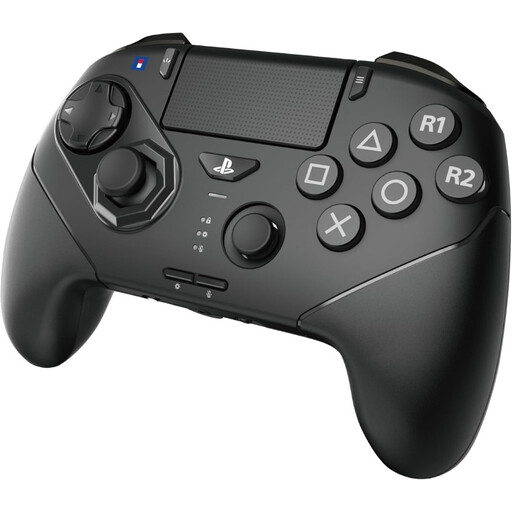
A fightpad for players who use their thumb for directional inputs; the product title lists PS5 and PC.
The product description lists wireless and wired USB-C connections, as well as a lockable cable. HORI lists a supplied 3 m USB cable for playing and charging with the OCTA Pro. Measure your route and check the event rules before relying on either the wired or wireless connection.
 No image available
This wired controller is only suitable if the console used at the event is compatible with the supported Switch version. Check before buying.
The product information lists a USB connection, analogue joysticks, programmable rear buttons and a turbo function. Switch, Switch 2 and Switch OLED are listed as supported platforms.
It depends on the game and the specific event. Under Evo’s rules, wireless controllers aren’t allowed unless the game rules explicitly permit them; those rules don’t automatically apply to a local tournament. Check the current regulations or measure the cable route for your wired setup.
Check the console, game and event rules in advance. Measure the cable route from where you expect to sit, test the correct platform mode and follow the product instructions for any cable or tournament lock. If you’re using a leverless controller, also check that its setting for handling simultaneous directional inputs is allowed at the event.
Follow the instructions for the exact model. HORI describes the Fighting Stick α as a model with a casing that opens up for maintenance; this won’t necessarily apply to other controllers. If a product is faulty, the seller is your point of contact for the statutory guarantee in the Netherlands, according to the Dutch government.
When buying from a business at a distance, you’ll often have a 14-day cooling-off period, although exceptions apply. A product must also meet the expectations you’re entitled to have of it; the Dutch government says to contact the seller if there’s a problem. Check the terms that apply to your specific purchase.