Take the controller style you can use confidently under pressure, then check that the exact version works with the tournament console and complies with your event’s rules. A fightpad suits players who use a D-pad, an arcade stick suits those who prefer joystick input, and a leverless controller is for players who want separate direction buttons. Lighting can make buttons easier to identify, but it doesn’t prove better tournament performance.
Which controller is right for you?
Tournament player with a familiar control style
You want to keep using your familiar D-pad, joystick or direction buttons, and check that the exact version works with the tournament console and complies with the event rules. Manufacturers’ compatibility information and Evo’s rules show why it’s important to check both separately.
Player who needs to find buttons in the dark
You want to find the button layout without mistakes. Lighting is one option, alongside a layout you know by feel. Turtle Beach and Razer list lighting on specific models, but that doesn’t demonstrate a performance advantage.
Tournament player who travels frequently
You’re looking for portability, a secure cable connection and access for maintenance, without assuming that a compact model will work with your tournament platform. Product information from Turtle Beach, Razer and Nacon lists cable and casing features, among others, for specific versions.
What should you look for when choosing?
Fightpad
Choose this if: you already play with a D-pad and handheld controller, and want a compact layout. 8BitDo lists six front-facing buttons and compatibility with Xbox Series X|S, Xbox One and Windows for the M30.
Bear in mind: an Xbox version won’t automatically work with PlayStation. Check the tournament platform and the exact version.
Arcade stick
Choose this if: you’re used to joystick movements and larger arcade buttons. Nacon lists compatibility with PS5, PS4 and PC, as well as a 3 m cable and button lock, for the PlayStation version of the Daija.
Bear in mind: the casing takes up more room to carry and use. Check the console version, as product ranges may include versions for different platforms.
Leverless controller
Choose this if: you want to use separate direction buttons or are already comfortable with this input style. Turtle Beach lists illuminated buttons on the PlayStation version of the Pro KO; Razer lists features including RGB lighting and adjustable SOCD modes on the Kitsune.
Bear in mind: a different layout may take practice. Check that the settings for handling simultaneous opposite directions and button mapping are allowed at your event. Lighting doesn’t guarantee better visibility or performance.
| Buying priority |
What to look for |
Who is this important to? |
| Platform and tournament rules |
Check the full version, tournament console and rules on connections and inputs. |
I want to know before buying whether my controller works with the tournament platform and is allowed. Around 36% of consumers put platform and rules first. |
| Familiar directional input |
Compare a D-pad, joystick and separate direction buttons with the way you currently play. |
I want to use an input style I’m familiar with or can practise deliberately. Around 29% of consumers prioritise input style. |
| Finding buttons in the dark |
Check the layout in similar lighting and see whether any lighting can be adjusted. |
I want to identify the buttons quickly in my playing space, with or without lighting. Around 21% of consumers prioritise being able to find buttons in the dark. |
| Transport and maintenance |
Check the dimensions, cable and cable connection, included parts and access for maintenance. |
I want to take my controller with me regularly and be able to connect or maintain it easily. Around 14% of consumers put transport and maintenance first. |
Buying pitfalls
-
Assuming official licensing means a controller is tournament-approved
Platform compatibility and rules on connections, button functions and inputs are separate matters. A controller that works with a console isn’t automatically allowed at every event.
Compare the full product version and configuration with the rules for your game and tournament.
-
Assuming RGB lighting improves input performance
Manufacturers list lighting on certain controllers, but this doesn’t show that it improves tournament performance in a dark room.
First choose a layout you recognise and have practised with; think of lighting as a potential aid to visibility.
-
Mixing up versions for different consoles
A product range may have different platform options. For example, 8BitDo’s M30 is described as being for Xbox and Windows; this doesn’t confirm compatibility with PS5.
Before buying, check the full product name and platform specification of the version you’re choosing.
Brands to consider
Nacon
The PlayStation version of the Daija is an arcade stick for players looking for joystick input and customisable parts.
- For the PlayStation version, Nacon lists a SANWA joystick and action buttons, compatibility with PS5, PS4 and PC, a button lock and a detachable 3 m cable.
- These features don’t automatically apply to an Xbox version. Customisable buttons don’t exempt a controller from tournament rules.
Victrix
The PlayStation version of the Pro KO is a leverless option with an adjustable button layout and lighting around the buttons.
- Turtle Beach lists 16 movable, assignable buttons, interchangeable switches, RGB light rings, a tournament lock and a 3 m cable.
- The Pro KO also has an Xbox platform option, so check the version before buying. Lighting doesn’t demonstrate a performance advantage.
Razer
The Kitsune is a slim leverless controller for PS5 and PC, with separate direction buttons.
- Razer lists optical switches, a detachable USB-C cable, a cable clamp, a tournament lock, RGB lighting and adjustable SOCD modes.
- Razer’s claims about precision are manufacturer claims, not an independently established advantage. Check whether the SOCD mode you choose complies with your event’s rules.
Qanba
The Drone 2, model N3, is a joystick option for PS5, PS4 and PC.
- Qanba lists an official PlayStation licence, a platform switch, a touchpad, proprietary buttons and a joystick.
- The listed specifications don’t show that this controller has illuminated action buttons, so don’t choose it solely to make the buttons easier to see in the dark.
8BitDo
The wired M30 for Xbox is a compact fightpad option for Xbox Series X|S, Xbox One and Windows.
- 8BitDo lists six front-facing buttons, a D-pad and a changeable button layout.
- The product information doesn’t list PS5 compatibility, so don’t consider this version a PlayStation alternative without separate confirmation.
HORI
The PlayStation Fighting Stick α is an arcade stick option for players looking for joystick input and access for customisation.
- For this version, the official PlayStation product information lists compatibility with PS5, PS4 and Windows, a HAYABUSA joystick and a tournament lock.
- The version listed is based on US product information; check the exact regional version and specifications.
Game controllers at Joybuy
The Joybuy selection below includes game controllers for Switch, Android, Xbox and PC. For a tournament, always check that the specific game, console and controller features comply with the event rules.
 No image available
NAXSIR Wireless Gamepad for Switch, 7-Color LED, 10m Range
A good fit for a Switch setup if you’re looking for a wireless gamepad with lighting; check whether your event allows this controller and its features.
The product name lists Bluetooth, 7-colour LED lighting and a 10 m range. Check the tournament rules for controller features such as turbo.
View at Joybuy
 No image available
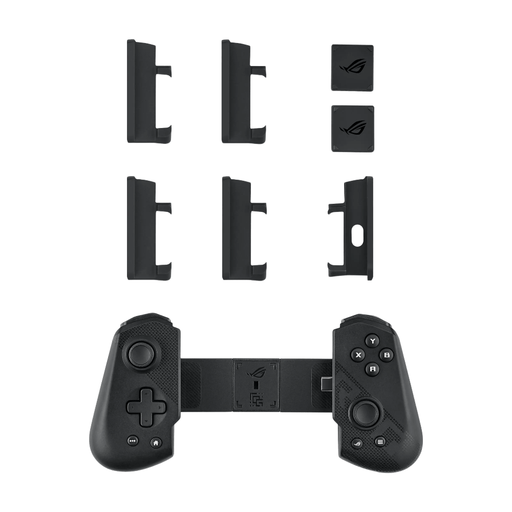
ASUS ROG Tessen Black/Grey USB 3.2 Gen 1
An option to consider for Android gaming; check that the specific game and tournament setup support this platform.
The product name lists Android and USB 3.2 Gen 1.
View at Joybuy
 No image available
Hyperkin DuchesS Wired Controller for Xbox, Black
A good fit for a wired setup on a supported Xbox or Windows platform; check your event’s rules in advance.
The product name lists Xbox Series X|S, Xbox One and Windows 11|10. Check whether programmable buttons are allowed at the tournament.
View at Joybuy
 No image available
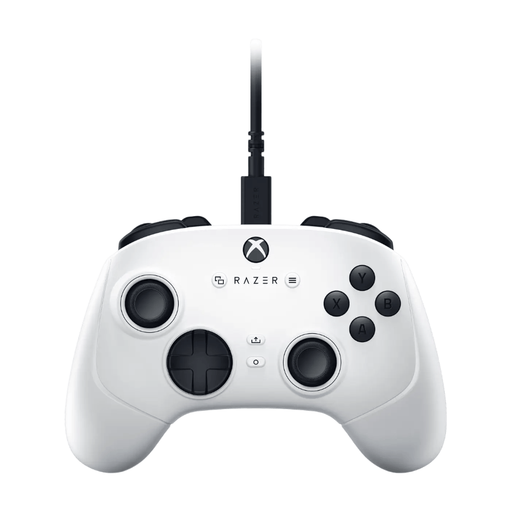
Razer Wolverine V3 Tournament Edition, White
A wired gamepad option for PC or Xbox; check that the tournament platform matches this version.
The product name lists PC and Xbox Series S|X. Check with the event whether the assignable buttons listed are allowed.
View at Joybuy
Frequently asked questions
Are wireless controllers allowed at my tournament?
You can only find out by checking your event’s rules. The Evo rules consulted generally assume a wired connection and mention game-specific exceptions; those rules don’t automatically apply to a tournament in the Netherlands.
How do I set up a leverless controller for a match?
Before the match, check the platform switch, button mapping and how simultaneous opposite directions are handled. Razer lists several SOCD modes for the Kitsune; which setting is allowed depends on the game and event rules. Don’t assume hardware macros are allowed.
How can I avoid pausing by mistake or a loose cable?
Before the match, check that the cable is securely connected and enable a tournament lock if your model has one and the rules allow it. Razer lists a cable clamp and lock for the Kitsune; the Evo rules consulted specify consequences for pausing unintentionally.
What cooling-off period and guarantee apply to an online purchase in the Netherlands?
For a qualifying online consumer purchase, you generally have a 14-day cooling-off period. The Dutch government lists exceptions and distinguishes these purchases from buying from a private seller. You’re also entitled to a legal guarantee from the retailer if a product is faulty. According to the ACM, this depends on what you could reasonably expect from the product, rather than one fixed guarantee period for the Netherlands.


